




Charlie686
Members
-
Joined
Everything posted by Charlie686
-
So it only crashes with the mods folder enabled?
-
Have you edited/installed any xml files?
-
No problem!
-
Not in your log. You possibly didn't save it. It is set to 10,000 😕
-
Epic: https://www.epicgames.com/help/en-US/technical-support-c90/general-support-c91/how-do-i-verify-game-files-in-the-epic-games-launcher-a3638#:~:text=To verify the installation of,in the drop-down navigation. Steam: https://support.steampowered.com/kb_article.php?ref=2037-QEUH-3335#:~:text=From a game's library page,process may take several minutes. Retail: https://support.rockstargames.com/articles/360036000713/How-to-verify-game-files-in-the-Rockstar-Games-Launcher
-
It is almost like this is covered in the FAQ's......
-
Attach your RagePluginHook log - a text document found in your main directory
-
-
Update GTAV by verifying the game files 🙂
-
For both these vehicles, did you install them into Patchday 24 or as addons through dlcpacks?
-
Nice to hear! Have fun 🙂
-
Disables your mods folder entirely. To get them back all we do is rename it back.
-
Just temporarily disables it 🙂
-
That is a good question. Is it still happening or was it random?
-
Rename your mods folder to _mods and try again.
-
Nice to hear! Have fun 😜
-
By the sounds of it you haven't installed ScriptHookV - a requirement not included in the install. You can find it here: http://www.dev-c.com/gtav/scripthookv/ Hope this helps 🙂
-
Great! Well just turn on notifications for that thread I link so you can see what is happenening. To all those seeing this, wouldn't it be a good idea to do that 😂 Plz don't report me for advertising :((
-
Did you install the requirements?
-
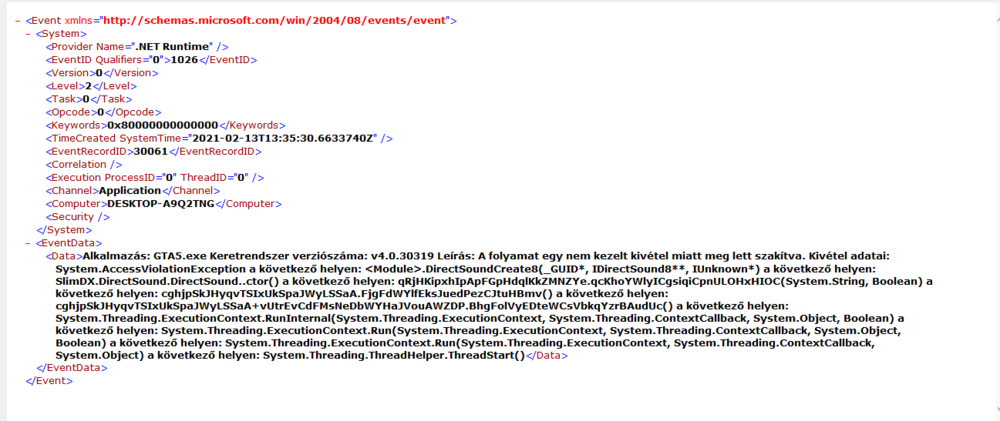
@Cyan This is from someone who has a clean directory apart from a reshade. Other than that nothing. If this wasn't the thing you were looking for let me know so I can get the appropriate file 🙂 FYI: It is partly in Hungarian.
-
Thanks. I'll let Cyan know about this. If it isn't the right log I'll let you know! In the meantime, sit tight!
-
Is that from the Event Viewer? Link to it: https://www.howtogeek.com/123646/htg-explains-what-the-windows-event-viewer-is-and-how-you-can-use-it/
-
I'll redirect you to this page: There is a possible bug I'm aware of and I've been trying to report it and it would be great if you could assist in that process. Could you do what Cyan has said in the thread and any questions pop them in there 🙂
-
That is actually helpful. So you have a fully clean GTAV folder?
-
Verify your game files and keep your mods folder renamed to _mods



