




KN1IGHT
-
Joined
Everything posted by KN1IGHT
-
![[View 1] Drunk Driver Ends up in Ocean Just Past Francis Intl. Airport Runway](//s3-gallery.int-cdn.lcpdfrusercontent.com/gallery/album_1463/sml_gallery_43345_1463_51168.jpg)
From the album: LCPDFR Scenarios
At approximately 6 PM, Officer Knight pulled over a White F-150, who was swerving all over the road and had struck multiple objects. The suspect pulled over, but as soon as Knight approached the window the suspect sped off down the Broker Dukes Expressway and turned onto the Airport turn off. Knight pursued the suspect until just before the airport, he turned into an Airport Vehicles only area, and sped down the run way. Speeding down the runway he realized the end of the runway was getting closer, and swerved to avoid crashing, and ended up jumping into the lake just beside the runway. Knight arrived on scene, but had to remain on level ground as his Ford Taurus wouldn't handle the dirt ground and the side of the hill. Knight called in this situation and Liberty City Ambulance and Sheriff were dispatched to the scene, but both had to remain on level ground, due to their vehicles. Being unable to maneuver down the hill to get closer to the F-150, two Metro Police Units were dispatched, and being Jeeps were able to safely maneuver on the side of the hill without ending up in the water. Paramedics gently carried the suspect out of the water, who was unconscious by then. They performed CPR on him and revived him, but his vitals were very unstable. The ambulance transported him to Schottler Medical Center where he is listed in critical condition. Needing the F-150 out of the water, LCPD Tow Truck was dispatched and winched the truck out of the water. While there was no body damage, the damage done to the F-150 was approx. $4,000, as the suspect had installed many electronic accessories, such as a GPS Unit, Radio, iPod Charger, and an Alarm System. The F-150 was towed to the LCPD Impound Yard, where it currently remains as it has been seized by the LCPD for 30 days. The suspect's license was also suspended. He is charged with: - Driving Under the Influence - And Reckless Driving -
According to Rockstar Games' article (http://support.rockstargames.com/entries/479435-PC-System-Requirements-for-GTA-IV) your video card is the recommended one in terms of dedicated memory. But I have a 1GB Radeon 3750 HD Graphics Card and my GTA IV does run a bit slow depending all on what I'm doing. So in terms of recommended cards, yours is exactly what is recommended for memory. In terms of game play..... well, how does GTA IV run? Any lag? Best, KRI
-
Yes I tried with an unlocked Tahoe, and it didn't give me any warning in the Import window saying I can't import locked files. Best, KRI - Posted using iPhone
-
Lol Well, his key he gave me, doesn't give me a warning when importing. When I tried importing before, the window that lets you select files to import didn't close, after clicking "Import". It closed when I tried it after using the key, and didn't give me any warning stating only registered version can import files. Best, KRI - Posted using iPhone
-
![[View 7] Suspicious Vehicle and Gunshots](//s3-gallery.int-cdn.lcpdfrusercontent.com/gallery/album_1463/sml_gallery_43345_1463_75236.jpg)
From the album: LCPDFR Scenarios
All police units present at the scene At approximately 7:30 PM, a citizen called 911 reporting she had seen a Blue 1973 Ford Mustang Mach I drive in a house's driveway, crash into the Landstalker parked into the driveway, and then heard gunshots from the back of the house. An undercover officer was patrolling the area, and was dispatched to the scene. He was just out of his district so Liberty City Sheriff was dispatched to the scene to take command. Not to much later RCMP were dispatched for more backup. A SWAT Unit was requested, but unfortunately all SWAT Units were occupied at an earlier Bank Robbery. Two EPS Traffic Control Units were dispatched to the scene, to block off the driveway and direct traffic around the scene. Officer Knight knocked on the door and yelled "Police! Open up!", and got no response, and then more gunshots. 3 Officers having SWAT Gear in their cars, then suited up and approached the house from all sides they could. Each officer went in through a separate door. One went through the front door, another went through the side door, and the last one went through the back door. Officer Knight remained out front to keep people front entering the yard and potentially being shot. When they entered the house, they found one suicidal person, who was armed with a handgun, and the driver of the Mustang, armed with an MP5 and holding a 16 year old family member hostage, as well as the suicidal person. He did not know the suicidal person was also armed. There were also 3 more members of the family, who had been forced into a closet at gunpoint. Officers did not attempt to free the people in the closet until they had disarmed the Mustang Driver, as well as the suicidal victim. This situation continued until approximately 9 PM, which the suicidal victim had surrendered, and the Mustang Driver surrendered peacefully. Officers then freed the people from the closet, thinking this situation had ended. They were wrong. Upon untying the victims who were in the closet, Dave (originally tied up in closet) pulled out to Micro Uzi's, fired a few shots, not hurting anyone, and then held everyone else at gunpoint. At this time only 2 Temp. SWAT Officers were present. Officer Wilson, who had left the house after everyone had surrendered, assumed this was over. He soon learned that it in fact was not over. He also learned of the location of Dave. Wilson, having received special training when he was in the Military, was seen by Knight, climbing up the side of the house, quietly going in the window of the room the hostages were in, tackled Dave to the ground, and held him at gunpoint. Dave, realizing he had no choice, then surrendered and was arrested. All suspects were searched for more weapons, and then escorted outside and taken into police custody. After close investigation, it was determined the Mustang had been stolen, while the real owner was at work. The owner of the Mustang could not be reached. The driver of the Mustang was charged with: - Reckless Driving - Possession of a weapon - Attempted Murder - And Grand Theft Auto Dave was charged with: - Possession of a Weapon - Intent to Harm - Intent to Harm with a Weapon The suicidal subject was taken to hospital, and is on a 48 hour hold, and is closely watched by hospital staff and security. The Mustang was towed away at the owner's expense, and damage was estimated to be at approx. $1,000. The Landstalker was towed away and damage repairs were estimated at approx. $1500. -
![[View 6] Suspicious Vehicle and Gunshots](//s3-gallery.int-cdn.lcpdfrusercontent.com/gallery/album_1463/sml_gallery_43345_1463_57705.jpg)
From the album: LCPDFR Scenarios
Mustang Mach I and Landstalker At approximately 7:30 PM, a citizen called 911 reporting she had seen a Blue 1973 Ford Mustang Mach I drive in a house's driveway, crash into the Landstalker parked into the driveway, and then heard gunshots from the back of the house. An undercover officer was patrolling the area, and was dispatched to the scene. He was just out of his district so Liberty City Sheriff was dispatched to the scene to take command. Not to much later RCMP were dispatched for more backup. A SWAT Unit was requested, but unfortunately all SWAT Units were occupied at an earlier Bank Robbery. Two EPS Traffic Control Units were dispatched to the scene, to block off the driveway and direct traffic around the scene. Officer Knight knocked on the door and yelled "Police! Open up!", and got no response, and then more gunshots. 3 Officers having SWAT Gear in their cars, then suited up and approached the house from all sides they could. Each officer went in through a separate door. One went through the front door, another went through the side door, and the last one went through the back door. Officer Knight remained out front to keep people front entering the yard and potentially being shot. When they entered the house, they found one suicidal person, who was armed with a handgun, and the driver of the Mustang, armed with an MP5 and holding a 16 year old family member hostage, as well as the suicidal person. He did not know the suicidal person was also armed. There were also 3 more members of the family, who had been forced into a closet at gunpoint. Officers did not attempt to free the people in the closet until they had disarmed the Mustang Driver, as well as the suicidal victim. This situation continued until approximately 9 PM, which the suicidal victim had surrendered, and the Mustang Driver surrendered peacefully. Officers then freed the people from the closet, thinking this situation had ended. They were wrong. Upon untying the victims who were in the closet, Dave (originally tied up in closet) pulled out to Micro Uzi's, fired a few shots, not hurting anyone, and then held everyone else at gunpoint. At this time only 2 Temp. SWAT Officers were present. Officer Wilson, who had left the house after everyone had surrendered, assumed this was over. He soon learned that it in fact was not over. He also learned of the location of Dave. Wilson, having received special training when he was in the Military, was seen by Knight, climbing up the side of the house, quietly going in the window of the room the hostages were in, tackled Dave to the ground, and held him at gunpoint. Dave, realizing he had no choice, then surrendered and was arrested. All suspects were searched for more weapons, and then escorted outside and taken into police custody. After close investigation, it was determined the Mustang had been stolen, while the real owner was at work. The owner of the Mustang could not be reached. The driver of the Mustang was charged with: - Reckless Driving - Possession of a weapon - Attempted Murder - And Grand Theft Auto Dave was charged with: - Possession of a Weapon - Intent to Harm - Intent to Harm with a Weapon The suicidal subject was taken to hospital, and is on a 48 hour hold, and is closely watched by hospital staff and security. The Mustang was towed away at the owner's expense, and damage was estimated to be at approx. $1,000. The Landstalker was towed away and damage repairs were estimated at approx. $1500. -
![[View 5] Suspicious Vehicle and Gunshots](//s3-gallery.int-cdn.lcpdfrusercontent.com/gallery/album_1463/sml_gallery_43345_1463_99160.jpg)
From the album: LCPDFR Scenarios
Officer Wilson's vehicle At approximately 7:30 PM, a citizen called 911 reporting she had seen a Blue 1973 Ford Mustang Mach I drive in a house's driveway, crash into the Landstalker parked into the driveway, and then heard gunshots from the back of the house. An undercover officer was patrolling the area, and was dispatched to the scene. He was just out of his district so Liberty City Sheriff was dispatched to the scene to take command. Not to much later RCMP were dispatched for more backup. A SWAT Unit was requested, but unfortunately all SWAT Units were occupied at an earlier Bank Robbery. Two EPS Traffic Control Units were dispatched to the scene, to block off the driveway and direct traffic around the scene. Officer Knight knocked on the door and yelled "Police! Open up!", and got no response, and then more gunshots. 3 Officers having SWAT Gear in their cars, then suited up and approached the house from all sides they could. Each officer went in through a separate door. One went through the front door, another went through the side door, and the last one went through the back door. Officer Knight remained out front to keep people front entering the yard and potentially being shot. When they entered the house, they found one suicidal person, who was armed with a handgun, and the driver of the Mustang, armed with an MP5 and holding a 16 year old family member hostage, as well as the suicidal person. He did not know the suicidal person was also armed. There were also 3 more members of the family, who had been forced into a closet at gunpoint. Officers did not attempt to free the people in the closet until they had disarmed the Mustang Driver, as well as the suicidal victim. This situation continued until approximately 9 PM, which the suicidal victim had surrendered, and the Mustang Driver surrendered peacefully. Officers then freed the people from the closet, thinking this situation had ended. They were wrong. Upon untying the victims who were in the closet, Dave (originally tied up in closet) pulled out to Micro Uzi's, fired a few shots, not hurting anyone, and then held everyone else at gunpoint. At this time only 2 Temp. SWAT Officers were present. Officer Wilson, who had left the house after everyone had surrendered, assumed this was over. He soon learned that it in fact was not over. He also learned of the location of Dave. Wilson, having received special training when he was in the Military, was seen by Knight, climbing up the side of the house, quietly going in the window of the room the hostages were in, tackled Dave to the ground, and held him at gunpoint. Dave, realizing he had no choice, then surrendered and was arrested. All suspects were searched for more weapons, and then escorted outside and taken into police custody. After close investigation, it was determined the Mustang had been stolen, while the real owner was at work. The owner of the Mustang could not be reached. The driver of the Mustang was charged with: - Reckless Driving - Possession of a weapon - Attempted Murder - And Grand Theft Auto Dave was charged with: - Possession of a Weapon - Intent to Harm - Intent to Harm with a Weapon The suicidal subject was taken to hospital, and is on a 48 hour hold, and is closely watched by hospital staff and security. The Mustang was towed away at the owner's expense, and damage was estimated to be at approx. $1,000. The Landstalker was towed away and damage repairs were estimated at approx. $1500. -
![[View 4] Suspicious Vehicle and Gunshots](//s3-gallery.int-cdn.lcpdfrusercontent.com/gallery/album_1463/sml_gallery_43345_1463_48350.jpg)
From the album: LCPDFR Scenarios
Officer Knight's vehicle At approximately 7:30 PM, a citizen called 911 reporting she had seen a Blue 1973 Ford Mustang Mach I drive in a house's driveway, crash into the Landstalker parked into the driveway, and then heard gunshots from the back of the house. An undercover officer was patrolling the area, and was dispatched to the scene. He was just out of his district so Liberty City Sheriff was dispatched to the scene to take command. Not to much later RCMP were dispatched for more backup. A SWAT Unit was requested, but unfortunately all SWAT Units were occupied at an earlier Bank Robbery. Two EPS Traffic Control Units were dispatched to the scene, to block off the driveway and direct traffic around the scene. Officer Knight knocked on the door and yelled "Police! Open up!", and got no response, and then more gunshots. 3 Officers having SWAT Gear in their cars, then suited up and approached the house from all sides they could. Each officer went in through a separate door. One went through the front door, another went through the side door, and the last one went through the back door. Officer Knight remained out front to keep people front entering the yard and potentially being shot. When they entered the house, they found one suicidal person, who was armed with a handgun, and the driver of the Mustang, armed with an MP5 and holding a 16 year old family member hostage, as well as the suicidal person. He did not know the suicidal person was also armed. There were also 3 more members of the family, who had been forced into a closet at gunpoint. Officers did not attempt to free the people in the closet until they had disarmed the Mustang Driver, as well as the suicidal victim. This situation continued until approximately 9 PM, which the suicidal victim had surrendered, and the Mustang Driver surrendered peacefully. Officers then freed the people from the closet, thinking this situation had ended. They were wrong. Upon untying the victims who were in the closet, Dave (originally tied up in closet) pulled out to Micro Uzi's, fired a few shots, not hurting anyone, and then held everyone else at gunpoint. At this time only 2 Temp. SWAT Officers were present. Officer Wilson, who had left the house after everyone had surrendered, assumed this was over. He soon learned that it in fact was not over. He also learned of the location of Dave. Wilson, having received special training when he was in the Military, was seen by Knight, climbing up the side of the house, quietly going in the window of the room the hostages were in, tackled Dave to the ground, and held him at gunpoint. Dave, realizing he had no choice, then surrendered and was arrested. All suspects were searched for more weapons, and then escorted outside and taken into police custody. After close investigation, it was determined the Mustang had been stolen, while the real owner was at work. The owner of the Mustang could not be reached. The driver of the Mustang was charged with: - Reckless Driving - Possession of a weapon - Attempted Murder - And Grand Theft Auto Dave was charged with: - Possession of a Weapon - Intent to Harm - Intent to Harm with a Weapon The suicidal subject was taken to hospital, and is on a 48 hour hold, and is closely watched by hospital staff and security. The Mustang was towed away at the owner's expense, and damage was estimated to be at approx. $1,000. The Landstalker was towed away and damage repairs were estimated at approx. $1500. -
![[View 3] Suspicious Vehicle and Gunshots](//s3-gallery.int-cdn.lcpdfrusercontent.com/gallery/album_1463/sml_gallery_43345_1463_87666.jpg)
From the album: LCPDFR Scenarios
Liberty City Sheriff's vehicle. At approximately 7:30 PM, a citizen called 911 reporting she had seen a Blue 1973 Ford Mustang Mach I drive in a house's driveway, crash into the Landstalker parked into the driveway, and then heard gunshots from the back of the house. An undercover officer was patrolling the area, and was dispatched to the scene. He was just out of his district so Liberty City Sheriff was dispatched to the scene to take command. Not to much later RCMP were dispatched for more backup. A SWAT Unit was requested, but unfortunately all SWAT Units were occupied at an earlier Bank Robbery. Two EPS Traffic Control Units were dispatched to the scene, to block off the driveway and direct traffic around the scene. Officer Knight knocked on the door and yelled "Police! Open up!", and got no response, and then more gunshots. 3 Officers having SWAT Gear in their cars, then suited up and approached the house from all sides they could. Each officer went in through a separate door. One went through the front door, another went through the side door, and the last one went through the back door. Officer Knight remained out front to keep people front entering the yard and potentially being shot. When they entered the house, they found one suicidal person, who was armed with a handgun, and the driver of the Mustang, armed with an MP5 and holding a 16 year old family member hostage, as well as the suicidal person. He did not know the suicidal person was also armed. There were also 3 more members of the family, who had been forced into a closet at gunpoint. Officers did not attempt to free the people in the closet until they had disarmed the Mustang Driver, as well as the suicidal victim. This situation continued until approximately 9 PM, which the suicidal victim had surrendered, and the Mustang Driver surrendered peacefully. Officers then freed the people from the closet, thinking this situation had ended. They were wrong. Upon untying the victims who were in the closet, Dave (originally tied up in closet) pulled out to Micro Uzi's, fired a few shots, not hurting anyone, and then held everyone else at gunpoint. At this time only 2 Temp. SWAT Officers were present. Officer Wilson, who had left the house after everyone had surrendered, assumed this was over. He soon learned that it in fact was not over. He also learned of the location of Dave. Wilson, having received special training when he was in the Military, was seen by Knight, climbing up the side of the house, quietly going in the window of the room the hostages were in, tackled Dave to the ground, and held him at gunpoint. Dave, realizing he had no choice, then surrendered and was arrested. All suspects were searched for more weapons, and then escorted outside and taken into police custody. After close investigation, it was determined the Mustang had been stolen, while the real owner was at work. The owner of the Mustang could not be reached. The driver of the Mustang was charged with: - Reckless Driving - Possession of a weapon - Attempted Murder - And Grand Theft Auto Dave was charged with: - Possession of a Weapon - Intent to Harm - Intent to Harm with a Weapon The suicidal subject was taken to hospital, and is on a 48 hour hold, and is closely watched by hospital staff and security. The Mustang was towed away at the owner's expense, and damage was estimated to be at approx. $1,000. The Landstalker was towed away and damage repairs were estimated at approx. $1500. -
![[View 2] Suspicious Vehicle and Gunshots](//s3-gallery.int-cdn.lcpdfrusercontent.com/gallery/album_1463/sml_gallery_43345_1463_3294.jpg)
From the album: LCPDFR Scenarios
Picture of all police vehicles At approximately 7:30 PM, a citizen called 911 reporting she had seen a Blue 1973 Ford Mustang Mach I drive in a house's driveway, crash into the Landstalker parked into the driveway, and then heard gunshots from the back of the house. An undercover officer was patrolling the area, and was dispatched to the scene. He was just out of his district so Liberty City Sheriff was dispatched to the scene to take command. Not to much later RCMP were dispatched for more backup. A SWAT Unit was requested, but unfortunately all SWAT Units were occupied at an earlier Bank Robbery. Two EPS Traffic Control Units were dispatched to the scene, to block off the driveway and direct traffic around the scene. Officer Knight knocked on the door and yelled "Police! Open up!", and got no response, and then more gunshots. 3 Officers having SWAT Gear in their cars, then suited up and approached the house from all sides they could. Each officer went in through a separate door. One went through the front door, another went through the side door, and the last one went through the back door. Officer Knight remained out front to keep people front entering the yard and potentially being shot. When they entered the house, they found one suicidal person, who was armed with a handgun, and the driver of the Mustang, armed with an MP5 and holding a 16 year old family member hostage, as well as the suicidal person. He did not know the suicidal person was also armed. There were also 3 more members of the family, who had been forced into a closet at gunpoint. Officers did not attempt to free the people in the closet until they had disarmed the Mustang Driver, as well as the suicidal victim. This situation continued until approximately 9 PM, which the suicidal victim had surrendered, and the Mustang Driver surrendered peacefully. Officers then freed the people from the closet, thinking this situation had ended. They were wrong. Upon untying the victims who were in the closet, Dave (originally tied up in closet) pulled out to Micro Uzi's, fired a few shots, not hurting anyone, and then held everyone else at gunpoint. At this time only 2 Temp. SWAT Officers were present. Officer Wilson, who had left the house after everyone had surrendered, assumed this was over. He soon learned that it in fact was not over. He also learned of the location of Dave. Wilson, having received special training when he was in the Military, was seen by Knight, climbing up the side of the house, quietly going in the window of the room the hostages were in, tackled Dave to the ground, and held him at gunpoint. Dave, realizing he had no choice, then surrendered and was arrested. All suspects were searched for more weapons, and then escorted outside and taken into police custody. After close investigation, it was determined the Mustang had been stolen, while the real owner was at work. The owner of the Mustang could not be reached. The driver of the Mustang was charged with: - Reckless Driving - Possession of a weapon - Attempted Murder - And Grand Theft Auto Dave was charged with: - Possession of a Weapon - Intent to Harm - Intent to Harm with a Weapon The suicidal subject was taken to hospital, and is on a 48 hour hold, and is closely watched by hospital staff and security. The Mustang was towed away at the owner's expense, and damage was estimated to be at approx. $1,000. The Landstalker was towed away and damage repairs were estimated at approx. $1500. -
![[View 1] Suspicious Vehicle and Gunshots](//s3-gallery.int-cdn.lcpdfrusercontent.com/gallery/album_1463/sml_gallery_43345_1463_56987.jpg)
From the album: LCPDFR Scenarios
At approximately 7:30 PM, a citizen called 911 reporting she had seen a Blue 1973 Ford Mustang Mach I drive in a house's driveway, crash into the Landstalker parked into the driveway, and then heard gunshots from the back of the house. An undercover officer was patrolling the area, and was dispatched to the scene. He was just out of his district so Liberty City Sheriff was dispatched to the scene to take command. Not to much later RCMP were dispatched for more backup. A SWAT Unit was requested, but unfortunately all SWAT Units were occupied at an earlier Bank Robbery. Two EPS Traffic Control Units were dispatched to the scene, to block off the driveway and direct traffic around the scene. Officer Knight knocked on the door and yelled "Police! Open up!", and got no response, and then more gunshots. 3 Officers having SWAT Gear in their cars, then suited up and approached the house from all sides they could. Each officer went in through a separate door. One went through the front door, another went through the side door, and the last one went through the back door. Officer Knight remained out front to keep people front entering the yard and potentially being shot. When they entered the house, they found one suicidal person, who was armed with a handgun, and the driver of the Mustang, armed with an MP5 and holding a 16 year old family member hostage, as well as the suicidal person. He did not know the suicidal person was also armed. There were also 3 more members of the family, who had been forced into a closet at gunpoint. Officers did not attempt to free the people in the closet until they had disarmed the Mustang Driver, as well as the suicidal victim. This situation continued until approximately 9 PM, which the suicidal victim had surrendered, and the Mustang Driver surrendered peacefully. Officers then freed the people from the closet, thinking this situation had ended. They were wrong. Upon untying the victims who were in the closet, Dave (originally tied up in closet) pulled out to Micro Uzi's, fired a few shots, not hurting anyone, and then held everyone else at gunpoint. At this time only 2 Temp. SWAT Officers were present. Officer Wilson, who had left the house after everyone had surrendered, assumed this was over. He soon learned that it in fact was not over. He also learned of the location of Dave. Wilson, having received special training when he was in the Military, was seen by Knight, climbing up the side of the house, quietly going in the window of the room the hostages were in, tackled Dave to the ground, and held him at gunpoint. Dave, realizing he had no choice, then surrendered and was arrested. All suspects were searched for more weapons, and then escorted outside and taken into police custody. After close investigation, it was determined the Mustang had been stolen, while the real owner was at work. The owner of the Mustang could not be reached. The driver of the Mustang was charged with: - Reckless Driving - Possession of a weapon - Attempted Murder - And Grand Theft Auto Dave was charged with: - Possession of a Weapon - Intent to Harm - Intent to Harm with a Weapon The suicidal subject was taken to hospital, and is on a 48 hour hold, and is closely watched by hospital staff and security. The Mustang was towed away at the owner's expense, and damage was estimated to be at approx. $1,000. The Landstalker was towed away and damage repairs were estimated at approx. $1500. -
If by activated you mean he used it to register zModeler. He didn't register zModeler. (What he told me. Never proved to me he didn't) He read up on how to do vehicle models on LCPDFR.com, and he wasn't willing to do all that for one model. So he emailed me the supposedly "good" key, and let me use it, cause he knew I was interested in trying to make vehicle models.
-
Can't be. My friend (who wishes to remain Anonymous) just bought it about 3-4 days ago. (Probably 4 days now) He read up on how to make vehicle models, and wasn't willing to go through everything for one vehicle model. He knew I was interested in zModeler, so he emailed me the key, and I entered it.
-
Hi guys, I recently got zModeler from a friend, who lives nearby. He got the registration key and everything, but didn't use it because he realized how much he would have to do, to make vehicle models with it and lost interest in it. So he sent it to me in an email. I entered the key, and it displays when I click F1. It imports textures fine for the vehicle model I'm trying to use. However, when I import a .wft file to start modelling, nothing shows up. I'm trying to use zModeler to start modelling and maybe release some of my own MODs, but with this problem I can't. Any thoughts?
-
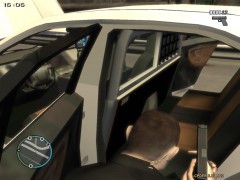
From the album: GTA IV/ LCPDFR Photos
Screenshot of my new Unmarked Taurus. -
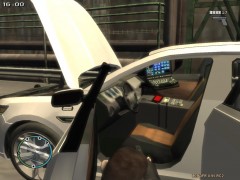
From the album: GTA IV/ LCPDFR Photos
Screenshot of my new Unmarked Taurus. -
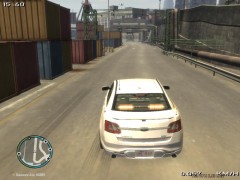
From the album: GTA IV/ LCPDFR Photos
Screenshot of my new Unmarked Taurus. -
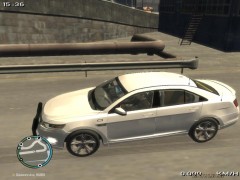
From the album: GTA IV/ LCPDFR Photos
Screenshot of my new Unmarked Taurus. -
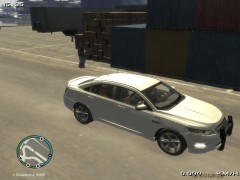
From the album: GTA IV/ LCPDFR Photos
Screenshot of my new Unmarked Taurus. -
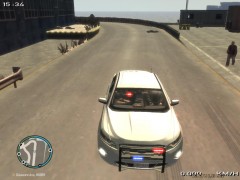
From the album: GTA IV/ LCPDFR Photos
Screenshot of my new Unmarked Taurus. -
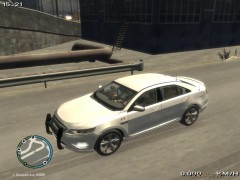
From the album: GTA IV/ LCPDFR Photos
Screenshot of my new Unmarked Taurus. -
![[View 10] Vehicle Explosion just off Broker Dukes Expressway](//s3-gallery.int-cdn.lcpdfrusercontent.com/gallery/album_1463/sml_gallery_43345_1463_67701.jpg)
From the album: LCPDFR Scenarios
Officer Knight has arrested the suspect and is waiting for units to arrive and transport him to LCPD. At approximately 7 PM a witness said, a suspicious looking Landstalker pulled into an empty driveway of a house that was recently sold. The witness (who wishes to remain anonymous) then said the driver got out, went to the back of the vehicle and placed some sort of device underneath the vehicle and then walked away. Not knowing what to do, the witness called Police. A White Unmarked Ford Taurus of the Edmonton Police Service then arrived on scene. In need of backup the officer then called in an RCMP Unit along with the Liberty County Sheriff. As the Liberty County Sheriff arrived the vehicle exploded, injuring two civilians. Liberty County Sheriff then had the Liberty City Fire Dept. and Liberty County Ambulance dispatched to the scene. The two injured civilians were taken to hospital, where they later died. Liberty City citizens wouldn't avoid the scene, therefore the undercover EPS Officer, called in the Edmonton Police Service's Traffic Control Unit, and placed a barricade in front of the TCU, to prevent people from driving in the driveway or approaching the scene. The driver of the Landstalker had fled the scene long before any units arrived, and is now wanted by the LCPD, EPS, and RCMP. However, a witness said she saw a person run from the Landstalker and give a small device with an antenna on it to another citizen. It was determined that this person detonated the bomb from a distance. The house and garage suffered minor damage, estimated at approx. $1500 total, for a new garage door, back door for house, windows, and cameras which were part of a security system the house owner had recently installed. The owner of the house this occurred at was on vacation and could not be contacted. The Landstalker was towed to Liberty City Junk Yard and what remained was recycled. The driver of the Landstalker faces charges of: - Possession of a weapon (Car Bomb) - Intent to Harm - Attempted Murder. The citizen suspected of detonating the car bomb, was arrested and faces charges of: - Accessory to Murder - Intent to Harm - Possession of a weapon (Handgun) -
![[View 9] Vehicle Explosion just off Broker Dukes Expressway](//s3-gallery.int-cdn.lcpdfrusercontent.com/gallery/album_1463/sml_gallery_43345_1463_12676.jpg)
From the album: LCPDFR Scenarios
Officer Knight ordered a suspect to stop, who then turned and opened fire on Knight. Knight then tasered the suspect, which then made him drop the handgun and surrender Knight can be seen arresting the citizen suspected of detonating the car bomb. At approximately 7 PM a witness said, a suspicious looking Landstalker pulled into an empty driveway of a house that was recently sold. The witness (who wishes to remain anonymous) then said the driver got out, went to the back of the vehicle and placed some sort of device underneath the vehicle and then walked away. Not knowing what to do, the witness called Police. A White Unmarked Ford Taurus of the Edmonton Police Service then arrived on scene. In need of backup the officer then called in an RCMP Unit along with the Liberty County Sheriff. As the Liberty County Sheriff arrived the vehicle exploded, injuring two civilians. Liberty County Sheriff then had the Liberty City Fire Dept. and Liberty County Ambulance dispatched to the scene. The two injured civilians were taken to hospital, where they later died. Liberty City citizens wouldn't avoid the scene, therefore the undercover EPS Officer, called in the Edmonton Police Service's Traffic Control Unit, and placed a barricade in front of the TCU, to prevent people from driving in the driveway or approaching the scene. The driver of the Landstalker had fled the scene long before any units arrived, and is now wanted by the LCPD, EPS, and RCMP. However, a witness said she saw a person run from the Landstalker and give a small device with an antenna on it to another citizen. It was determined that this person detonated the bomb from a distance. The house and garage suffered minor damage, estimated at approx. $1500 total, for a new garage door, back door for house, windows, and cameras which were part of a security system the house owner had recently installed. The owner of the house this occurred at was on vacation and could not be contacted. The Landstalker was towed to Liberty City Junk Yard and what remained was recycled. The driver of the Landstalker faces charges of: - Possession of a weapon (Car Bomb) - Intent to Harm - Attempted Murder. The citizen suspected of detonating the car bomb, was arrested and faces charges of: - Accessory to Murder - Intent to Harm - Possession of a weapon (Handgun) -
![[View 8] Vehicle Explosion just off Broker Dukes Expressway](//s3-gallery.int-cdn.lcpdfrusercontent.com/gallery/album_1463/sml_gallery_43345_1463_2524.jpg)
From the album: LCPDFR Scenarios
The house's owner forgot to remove the For Sale sign pictured here, after purchasing the house. At approximately 7 PM a witness said, a suspicious looking Landstalker pulled into an empty driveway of a house that was recently sold. The witness (who wishes to remain anonymous) then said the driver got out, went to the back of the vehicle and placed some sort of device underneath the vehicle and then walked away. Not knowing what to do, the witness called Police. A White Unmarked Ford Taurus of the Edmonton Police Service then arrived on scene. In need of backup the officer then called in an RCMP Unit along with the Liberty County Sheriff. As the Liberty County Sheriff arrived the vehicle exploded, injuring two civilians. Liberty County Sheriff then had the Liberty City Fire Dept. and Liberty County Ambulance dispatched to the scene. The two injured civilians were taken to hospital, where they later died. Liberty City citizens wouldn't avoid the scene, therefore the undercover EPS Officer, called in the Edmonton Police Service's Traffic Control Unit, and placed a barricade in front of the TCU, to prevent people from driving in the driveway or approaching the scene. The driver of the Landstalker had fled the scene long before any units arrived, and is now wanted by the LCPD, EPS, and RCMP. However, a witness said she saw a person run from the Landstalker and give a small device with an antenna on it to another citizen. It was determined that this person detonated the bomb from a distance. The house and garage suffered minor damage, estimated at approx. $1500 total, for a new garage door, back door for house, windows, and cameras which were part of a security system the house owner had recently installed. The owner of the house this occurred at was on vacation and could not be contacted. The Landstalker was towed to Liberty City Junk Yard and what remained was recycled. The driver of the Landstalker faces charges of: - Possession of a weapon (Car Bomb) - Intent to Harm - Attempted Murder. The citizen suspected of detonating the car bomb, was arrested and faces charges of: - Accessory to Murder - Intent to Harm - Possession of a weapon (Handgun) -
![[View 7] Vehicle Explosion just off Broker Dukes Expressway](//s3-gallery.int-cdn.lcpdfrusercontent.com/gallery/album_1463/sml_gallery_43345_1463_47003.jpg)
From the album: LCPDFR Scenarios
At approximately 7 PM a witness said, a suspicious looking Landstalker pulled into an empty driveway of a house that was recently sold. The witness (who wishes to remain anonymous) then said the driver got out, went to the back of the vehicle and placed some sort of device underneath the vehicle and then walked away. Not knowing what to do, the witness called Police. A White Unmarked Ford Taurus of the Edmonton Police Service then arrived on scene. In need of backup the officer then called in an RCMP Unit along with the Liberty County Sheriff. As the Liberty County Sheriff arrived the vehicle exploded, injuring two civilians. Liberty County Sheriff then had the Liberty City Fire Dept. and Liberty County Ambulance dispatched to the scene. The two injured civilians were taken to hospital, where they later died. Liberty City citizens wouldn't avoid the scene, therefore the undercover EPS Officer, called in the Edmonton Police Service's Traffic Control Unit, and placed a barricade in front of the TCU, to prevent people from driving in the driveway or approaching the scene. The driver of the Landstalker had fled the scene long before any units arrived, and is now wanted by the LCPD, EPS, and RCMP. However, a witness said she saw a person run from the Landstalker and give a small device with an antenna on it to another citizen. It was determined that this person detonated the bomb from a distance. The house and garage suffered minor damage, estimated at approx. $1500 total, for a new garage door, back door for house, windows, and cameras which were part of a security system the house owner had recently installed. The owner of the house this occurred at was on vacation and could not be contacted. The Landstalker was towed to Liberty City Junk Yard and what remained was recycled. The driver of the Landstalker faces charges of: - Possession of a weapon (Car Bomb) - Intent to Harm - Attempted Murder. The citizen suspected of detonating the car bomb, was arrested and faces charges of: - Accessory to Murder - Intent to Harm - Possession of a weapon (Handgun)

![[View 1] Drunk Driver Ends up in Ocean Just Past Francis Intl. Airport Runway](http://s3-gallery.int-cdn.lcpdfrusercontent.com/gallery/album_1463/sml_gallery_43345_1463_51168.jpg)
![[View 7] Suspicious Vehicle and Gunshots](http://s3-gallery.int-cdn.lcpdfrusercontent.com/gallery/album_1463/sml_gallery_43345_1463_75236.jpg)
![[View 6] Suspicious Vehicle and Gunshots](http://s3-gallery.int-cdn.lcpdfrusercontent.com/gallery/album_1463/sml_gallery_43345_1463_57705.jpg)
![[View 5] Suspicious Vehicle and Gunshots](http://s3-gallery.int-cdn.lcpdfrusercontent.com/gallery/album_1463/sml_gallery_43345_1463_99160.jpg)
![[View 4] Suspicious Vehicle and Gunshots](http://s3-gallery.int-cdn.lcpdfrusercontent.com/gallery/album_1463/sml_gallery_43345_1463_48350.jpg)
![[View 3] Suspicious Vehicle and Gunshots](http://s3-gallery.int-cdn.lcpdfrusercontent.com/gallery/album_1463/sml_gallery_43345_1463_87666.jpg)
![[View 2] Suspicious Vehicle and Gunshots](http://s3-gallery.int-cdn.lcpdfrusercontent.com/gallery/album_1463/sml_gallery_43345_1463_3294.jpg)
![[View 1] Suspicious Vehicle and Gunshots](http://s3-gallery.int-cdn.lcpdfrusercontent.com/gallery/album_1463/sml_gallery_43345_1463_56987.jpg)
![[View 10] Vehicle Explosion just off Broker Dukes Expressway](http://s3-gallery.int-cdn.lcpdfrusercontent.com/gallery/album_1463/sml_gallery_43345_1463_67701.jpg)
![[View 9] Vehicle Explosion just off Broker Dukes Expressway](http://s3-gallery.int-cdn.lcpdfrusercontent.com/gallery/album_1463/sml_gallery_43345_1463_12676.jpg)
![[View 8] Vehicle Explosion just off Broker Dukes Expressway](http://s3-gallery.int-cdn.lcpdfrusercontent.com/gallery/album_1463/sml_gallery_43345_1463_2524.jpg)
![[View 7] Vehicle Explosion just off Broker Dukes Expressway](http://s3-gallery.int-cdn.lcpdfrusercontent.com/gallery/album_1463/sml_gallery_43345_1463_47003.jpg)