




Keith.
Members
-
Joined
-
Last visited
Everything posted by Keith.
-
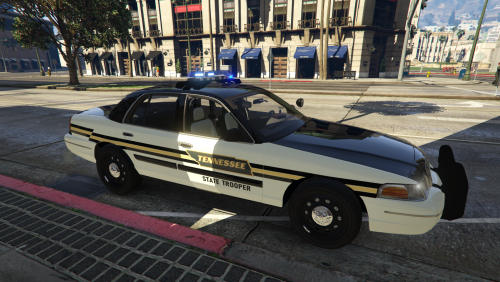 I've just reinstalled it into my game, and the lights don't work for me either. But I think I know what the problem is.
- 25 comments
- 1 review
-
I've no idea bud, this is the first I've heard that happening. ? Is the VCF file ok ?
- 25 comments
- 1 review
-
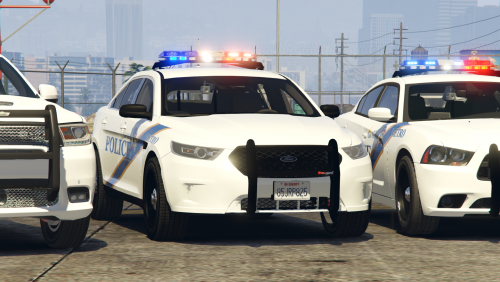 What police skin are you after bud. I've got WHP and Cheyenne Police textures floating around in a folder on my desktop.
- 24 comments
- 3 reviews
-
From the album: Officer Wades photos
-
From the album: Officer Wades photos
When it's the law! -
-
I live in England so all our police cars are s**t The skin is based on Louisville KY The sheriff skins are based on Laramie county WY
- 24 comments
- 3 reviews
-
-

- 1
-
-
Cheers bud. I might look into using a mods folder in the future. I was going to include highway patrol cars, but that's now going to be a separate pack.
- 24 comments
- 3 reviews
-
-
- 1
-
-
It wasn't the cars bud. I had to remove all the +hi.ytd files and just came out under the limit. I have messaged Cyan, but not heard anything. I'm assuming these models will go in the latest patchday ? 19 is it?
- 24 comments
- 3 reviews
-
I had to downsize the pack files bud. Too big to upload. I'll make a little edit now 😉
- 24 comments
- 3 reviews
-
Hurk bud, I forgot to add the template in the original, but it should be there now, I've edited the file
- 25 comments
- 1 review
-
I just happen to like the Vista for some reason. but I've only seen it for GTA IV. So I thought I'd give a go. And here it is after watching many tutorials on youtube 😉
- 25 comments
- 1 review
-
-
- 1
-
-
Please make a back up of your files. If you use a 'mods' folder then place these vehicles in you latest patchday ( 19 ) Here is my first pack to go with the CVPI I uploaded yesterday All the credits are in the download Hope you enjoy it. The only bug I've seen is the Taurus disappears at a short distance. I did try an Impala but it crashed the game. You can use the CVPI or the 2014 Charger in it's place if you wish.
- 24 comments
- 3 reviews
-
-
- 8
-
-
-
-
Ha, I did attach a whip but for some reason it ended up in the trunk, so I deleted it. It did the same when I put it on an Explorer too for some reason. I'm still working on the steady burns, no joy so far.
- 25 comments
- 1 review
-
PLEASE DO NOT UPLOAD TO ANY OTHER SITE You may paste a link to this page. Crown Vic number 2 Edited and remapped the lightbar for this one. All blue lights I reccomend BXBugs123 CVPI wheel pack for the aesthetically pleasing look Credits are in the download I don't use a mods folder, so I put it in GTA V > x64e > levels > gta5 > vehicles.rpf Use OPEN IV Enjoy
- 25 comments
- 1 review
-
-
- 1
-
-
-
 Yeah I will be, I tried a few times and it messed up my light_emis for some reason, but I think I've got it figured out now.
- 19 comments
- 4 reviews
-
-
I'll have a play around with it tomorrow and see bud, I think you have use 'extra_10' for a steady burn, but I'm not 100% sure
- 19 comments
- 4 reviews
-
-
-
-
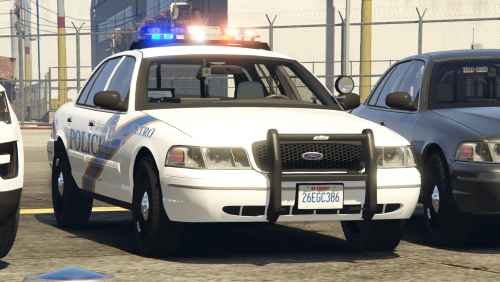
PLEASE DO NOT UPLOAD TO ANY OTHER SITE You may paste a link to this page. Here's my first police car model. This is part of the pack in the video. I reccomend BXBugs123 CVPI wheel pack for the aesthetically pleasing look Credits are in the download I don't use a mods folder, so I put it in GTA V > x64e > levels > gta5 > vehicles.rpf Use OPEN IV Enjoy
- 19 comments
- 4 reviews
-
-
- 4
-

