
dominikexe
Members
-
Joined
-
Last visited
Everything posted by dominikexe
-
Hey @Mud, thats right. Now we have to wait until @Sharakon has moved the files and start the game... I look forward to your response.
-
Hey @Jordanb1, Thanks for you fast answer. Can you send me please your `RagePluginHook.log` from your gta5 main directory? I look forward to your response.
-
Hey @PastKeenan360, have fun with LSPDFR! This issue has been resolved. For further questions you can look in the message above.

-
Hey @Sharakon, no. sorry, one "plugin" to mutch. -> GTA5\plugins\lspdfr\ I look forward to your response.
-
Hey @Sharakon, again...! You must move StopThePed in GTA5 -> PLUGINS and in PLUGINS in LSDPFR! Not the LSPDFR folder in die main directory, rather the LSDPFR subfolder in the PLUGINS folder I look forward to your response.
-
Hey @Sharakon, Then you didn't do exactly what I told you to do... pls send me two screens: 1) of yours GTA5\plugins\ - folder 2) of yours GTA5\plugins\lspdfr\ - folder Otherwise, I could just set it up for you via remote maintenance. I look forward to your response.
-
Hey @talonross43, Thanks for this fast answer. How to add an exception: After add the exception you could start your game new. I look forward to your response.
-
Hey @Sharakon, good luck. This was the "error", because i read from the Log, that StopThePed has no rights to execute the .dll! Please write when you have something new out. I look forward to your response.
-
Hey @SuperTriniGamer, how are you? Here you will find the newest version of ScriptHookV: ScriptHookV [v1.0.2060.1] http://www.dev-c.com/gtav/scripthookv/ If you need more help, you can write another message under this. This issue has been resolved. For further questions you can look in the message above.

-
Hey @Sharakon, you must move the StopThePed files in the subfolder "/lspdfr/" so that the final path to you StopThePed.dll is -> GTA 5\plugins\lspdfr\StopThePed.dll However, if you copy all of the files from StopThePed (also copy the associated folder). I look forward to your response.
-
Hey @DeadmanPlays, how are you? If you're uploading yours current visualsettings.dat file here, i can edit it for you. I look forward to your response.
-
Hey @Sharakon, where is your stoptheped.dll ? in wich folder-patch? Pls be sure, that you installed StopThePed in "GTA5\plugins\lspdfr\" I look forward to your response.
-
Hey @Sharakon, no problem, everyone started once. Can you pls check if you have a `RageNativeUI.dll` in your main directory? I look forward to your response.
-
Hey @talonross43, how are you? You can see all RageHook/LSPDFR events in the `RagePluginHook.log` file in your gta 5 main directory. I hope i could help you. I look forward to your response.
-
Hey @Sharakon, how are you? I would like to see your `RagePluginHook.log` - (you will find them in your gta 5 main directory) I look forward to your response.
-
Hey @Forbeq, Thanks for this fast answer! Can you send me an screen from the car files in the patchday22ng and patchday23ng folders? Thx. I look forward to your response.
-
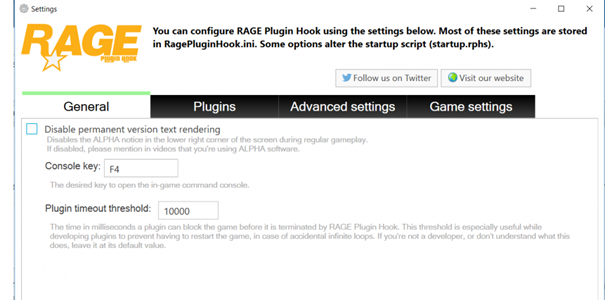
Hey @Jordanb1, how are you? Go in your Settings of RagePluginHook (start RPH -> click after start on the gear) then the settings will open: on the first page you finde the option "plugin timeout threshold" set this value on "30000" then click on "Save & Restart" I look forward to your response.
-
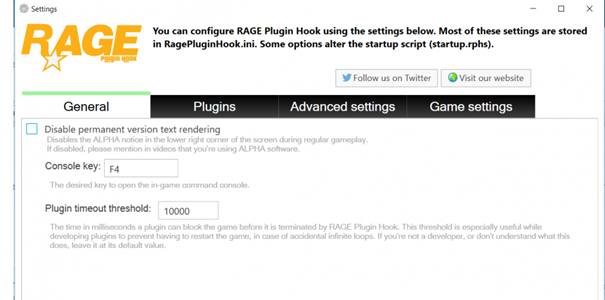
Hey @talonross43, how are you? You can try this: Go in your Settings of RagePluginHook (start RPH -> click after start on the gear) then the settings will open on the first page you finde the option "plugin timeout threshold" set this value on "30000" AND Add the GTA 5 folder as an exception in the antivirus program. (I think you're using the Microsoft Defender... when yes, i can send you an tutorial how you can add an exception.) I look forward to your response.
-
Hey @Forbeq, how are you? Sometimes you must put the replacement cars/mods in the patchday22 or the patchday23. (both working.) if you put an replace-car in patchday23 and it will not working, then you can put it in patchday22. Could I help you with that? ^^
-
Hey @TheDman131, Do you have the latest version of ScriptHookV and ScriptHookVDotNet? Otherwise you have to deactivate these mods if you want to play the story. It has always been the case that the story does not go well with mods! Is there anything else we can help you with? I look forward to your response.
-
Hey @TheDman131, sure. Save your old mods folder as backup. Then you can create/update the mods folder with OpenIV and use your backup to install your "old" plugins in the new mods folder. *EDIT: Just move them from your backup to your new mod folder and you should be set! If you know what i mean ^^ I look forward to your response.
-
Hey @Drewster327, always my pleasure! This issue has been resolved. For further questions you can look in the message above.

-
Hey @Donut8931, how are you? I'm not sure if you've noticed by now, but there's a new version of ScriptHookV available. ScriptHookV [v1.0.2060.1] http://www.dev-c.com/gtav/scripthookv/ If you have any further questions, please feel free to ask them further. This issue has been resolved. For further questions you can look in the message above.

-
Hey @Azffemt06, I'm happy if I could help. This issue has been resolved. For further questions you can look in the message above.

-
Hey @MarshMaui, its fine! As I said, this can happen when you use Shader and Better Radiance together... If something is still there, just let us know. LG Dominik This issue has been resolved. For further questions you can look in the message above.