
dominikexe
Members
-
Joined
-
Last visited
Everything posted by dominikexe
-
Hey @XxStormShadowxX, thank you for your request. Please make sure that you have RegularCallouts installed on the latest version. I see from the logs that you are using a slightly older version. Below you can find the download page of the plugin. It requires that you have RageNativeUI.dll installed, but you do have it. I hope I was able to help. If you have any further questions, please do not hesitate to contact me. I look forward to your feedback. With kind regards
-
Hey @DrJesus, thank you for your request. Please check if you have the following file: Grand Theft Auto V\LSPDFR\audio\scanner\RESIDENT\DISPATCH_INTRO_01.wav If the file exists, please check it. You can do this by simply opening it with a double click. It should play a sound. I appreciate your feedback. With kind regards
-
Hey @ChoddiPro, thank you for the quick feedback. Unfortunately, there is a defective or corrupt file here. Save the following file to your desktop and delete it from the folder. C:/Program Files (x86)/Steam/steamapps/common/Grand Theft Auto V/lspdfr/data/custom/stations_sahp.xml If you have saved the file to your desktop and deleted it from the folder, then run LSPDFR again. If it loads, please attach the above file in your next reply. I look forward to your feedback. With kind regards
-
Hey @grantg777, thank you for your request. In my opinion, there is no need to reconfigure the ELS file. If you still want to change something, your variant of the file notation is wrong. You write in your contribution "PA20A_WAIL".... Nevertheless the file is called "SIREN_PA20A_WAIL". If that doesn't help, I would just ask the other way around: If you replace the original sound files, does everything work? - I hope so... Then just pick another soundpack... What we recommend to our users is the Modern Siren Pack from GravelRoadCop. Is equipped with some sirens and also works... (so replaces the standard sound files) So, take a look at the 1st point, maybe this is where the error lies. I hope I was able to help. If you have any further questions, please do not hesitate to contact me. With kind regards
-
Hey @Hanary, thank you for your request. Unfortunately, it is difficult to make a general statement. Many factors play an important role here: How many... ... Vehicles you have installed ... changed textures you have installed ... scripts, addons and plugins you have installed ... power your computer has You are welcome to have a look if you might have activated unnecessary plugins or scripts, which are not really needed to make your game run a bit smoother. You can provide me with a file where I can see which scripts are currently enabled when you are on duty. Go to your GTA 5 root directory and look for the file "RagePluginHook.log". Just attach this file to your next message. I hope I was able to help you. If you have any further questions, please do not hesitate to contact me. With kind regards
-
Hey @bkieley, In order that we may be able to locate the problem more quickly, please attach the following file in your reply. In your GTA 5 root directory you will find a file called "RagePluginHook.log". I look forward to your feedback. With kind regards
-
Hey @ChoddiPro, thank you for your request. In order that we may be able to locate the problem more quickly, please attach the following file in your reply. In your GTA 5 root directory you will find a file called "RagePluginHook.log". I look forward to your feedback. With kind regards
-
Hey @KillerCam, ? and... Can you please put the file "RagePluginHook.log" from your root directory again in your next message? With kind regards
-
Hey @Rummik, so it looks to me like it should not run RagePluginHook because no log file was created. This log file is created as soon as the RagePluginHook launcher is executed... But since the launcher is not running, the problem must be with Windows. The problem could well be caused by your anti-virus program. - LSPDFR and RagePluginHook do not contain viruses. So you can make an exception on the whole GTA 5 folder. With kind regards
-
Reason: The Arrest Manager plugin has overridden the functions of StopThePed. #TopicSolved - BlackADITUM.de - unofficial German LSPDFR Support

-
Hey @Rummik, thank you for your request. In general, please note that you are using the manual installation of LSPDFR. The automatic installation (.exe) can lead to errors under certain circumstances. The process of RagePluginHookLauncher is blocked by your anti-virus program and thus cancels the startup. Here it is recommended to add an exception in your antivirus program. The exception should preferably include your entire GTA 5 folder. If you use Windows Defender, here is a short guide. Should you use another anti-virus program google helps you there certainly further ;D A configuration extension is required to allow LSPDFR to load. To do this, open the "RagePluginHook.ini" file located in your GTA 5 root directory and edit it with any text editor. Change the value 10000 behind the parameter "PluginTimeoutThreshold" to 30000 and save the file. Among other things, it would be interesting to know if there is a "RagePluginHook.log" file in your GTA 5 root directory. If so, please attach it to a next message. I hope I could help you so far. If you have any further questions, please do not hesitate to contact me. With kind regards
-
Hey @nickdelahaye, unfortunately I could not find any direct error messages about StopThePed. - So I would like to have a look at that in a remote maintenance. But what we can also do right now is to uninstall all plugins from Albo1125, because they cause error messages and can also lead to game crashes. For a remote maintenance please send me your AnyDesk-ID. You can find the corresponding program at https://anydesk.com/de With kind regards
-
Hey @KillerCam, i just do not know how familiar you are with the whole modding and personalization story in gta 5. The mentioned error may occur due to the following things: The process of RagePluginHookLauncher is blocked by your anti-virus program and thus cancels the startup Here it is recommended to add an exception in your antivirus program. The exception should preferably include your entire GTA 5 folder. If you use Windows Defender, here is a short guide. Should you use another anti-virus program google helps you there certainly further ;D A configuration extension is required to allow LSPDFR to load. To do this, open the "RagePluginHook.ini" file located in your GTA 5 root directory and edit it with any text editor. Change the value 10000 behind the parameter "PluginTimeoutThreshold" to 30000 and save the file. There is an error in the "mods" folder. Rename your mods folder to "_mods". This will disable the modifications and GTA 5 should start without problems. If GTA 5 starts without problems, the error is in the modifications. I hope I could help you so far. If you have any further questions, please do not hesitate to contact me. With kind regards Hey @KillerCam, sorry, my first reply was a bit late ^^ Do you have the latest RageNativeUI in your GTA 5 root directory? With kind regards
-
Hey @nickdelahaye, thank you for the quick feedback. Where did you install StopThePed? Otherwise I would offer you to have a look at the whole thing remotely... If it's okay for you... Can you please also provide me with the following file? You can find a file called "RagePluginHook.log" in your GTA 5 root directory. You can simply attach it to your next message. I hope I could help you so far. If you have any further questions, please do not hesitate to contact me. With kind regards
-
Hey @Goober42, to help me find the error faster, please send me a specific file: You will find a file called "RagePluginHook.log" in your GTA5 root directory. You can easily attach this to your next message. I appreciate your feedback. With kind regards
-
Hey @HaudraufHD, ich habe dir auf Discord eine Nachricht geschrieben. Weitere Unterhaltungen werden dort fortgeführt. Das Resultat des Supportfalls werden wir hier wieder posten. - Für die Nachwelt...
-
Hey @nickdelahaye, unfortunately, I couldn't quite figure out what exactly wasn't working. StopThePed or ELS? If ELS does not work, please note that you need to install "ScriptHookV". (And that also correctly...) Here you can download ScriptHookV: http://www.dev-c.com/files/ScriptHookV_1.0.2245.0.zip And here I have a "little" tutorial for you: download ScriptHookV. (link above) unpack the directory into a folder. Drag the contents of the "bin" directory into your Grand Theft Auto V root directory. Here are the default keybinds: StopThePed: E = Ped Interact (on TrafficControll or on Foot) G = Controll Menu and so on... ELS: CTRL + P = Open Control-Panel J = Turn On Light (lvl 1-3) 1, 2, 3 = Sirens L = Speciallights on Lightbar (Inidicators) and so on... I hope I could help you so far. If you have any further questions, please do not hesitate to contact me. With kind regards
-
Hey @WHI, Your LSPDFR crashed when a TrafficCallouts deployment was created. By the fact that the plugin is also only in beta, I would also like to point out that such errors in the development and initial release of a "fresh" script may well occur. The reported error indicates either a vehicle model that was not installed correctly or is corrupt or the plugin is faulty. - In my opinion, the error has nothing to do with LSPDFR itself. The easiest way is of course to uninstall the plugin... Or you report the "incident" to the developer of TrafficCallouts. I think for the later development of the plugin the hint will certainly not be bad. But this decision is up to you. I hope I was able to help you. With kind regards
-
Hey @Lucky2595, vielen Dank für deine Anfage. Ein Screenshot währe das nächste Mal als Gedankenstütze hilfreich. - Aber alles gut! Tritt der oben genannte "Fehler" bzw. der Fehlverlauf auch beim Starten des "normalen" GTA 5 auf? Ansonsten würde ich dir folgendes Empfehlen mal zu probieren: Starte GTA 5 ganz normal über deinen Launcher (Steam, RockstarGames, EpicGames, usw.) Wenn der Ladebildschirm von GTA 5 beginnt (nach dem RockstarGames Intro) "tabbst" aus dem Spielefenster raus. Führe in deinem GTA 5 Hauptverzeichnis die "RagePluginHook.exe" aus. - Somit startest du LSPDFR während dein GTA 5 schon läuft und SocialClub schon verbunden ist. Nun lädt RagePluginHook und LSPDFR "in" GTA5 rein. - Somit sollte die Mod dann auch richtig funktionieren. Was machen, wenn GTA5 auch normal nicht mit der Anmeldung am SocialClub startet? Naja, hier gibt es zwei Möglichkeiten: Besuche den RockstarGames Support und fordere Hilfe über die Erstellung eines Tickets an. (Hier geht's zum Rockstar Support) Wir helfen dir auf unserem Discord weiter. Das heißt, wir lösen das Problem und setzen uns für dich mit Technikern von RockstarGames in Verbindung. Ich freue mich über deine Rückmeldung. Bei weiteren Fragen stehe ich dir gerne zur Verfügung. Mit freundlichen Grüßen
-
Hey @HaudraufHD, beachte bitte das nächste mal, dass du deinen CrashLog als Datei und nicht als Link in deinem Beitrag einbindest... - gibt manchmal "fishing-links". 😄 Generell fehlen mir leider ein paar Informationen zu deinem aktuellen Stand deines GTA 5 Ordners. Hast du dir Uniformen installiert? Hast du dir Fahrzeuge (Replace oder Addon) installiert? Damit wir uns einen besseren Überblick machen können lade ich dich rechtherzlich auf unseren Discord ein. Hier können wir dir per Fernwartung / Bildschirmübertragung besseren Support bieten. Gerne freue ich mich über deine Rückmeldung und die Beantwortung der oben stehenden Fragen. Mit freundlichen Grüßen
-
Hey @LeonGaming01, scheint mir, dass in deinem "mods"-Ordner ein Fehler vorliegt. Hast du jemals Fahrzeuge, Skins oder Visuelle-Mods installiert / abgeändert? Stürzt GTA 5 bei dir reinzufällig oder bei einer "unbewussten" aber immer bei der gleichen Situation ab? Folgendes Vorgehen kann dir beim identifizieren des Problems weiterhelfen: Benenne deinen "mods"-Ordner um in "_mods". Somit werden die Modifikationen deaktiviert. - Nicht erschrecken... diese sind nicht gelöscht, nur "deaktiviert". Sollte dein GTA 5 bzw. LSPDFR nicht mehr abstürzen, haben wir dann festgestellt, dass es an deinem "mods"-Ordner lag und eine bestimmte installierte Modifikation in diesem korrupt ist oder nicht richtig installiert wurde. Gerne unterstütze ich dich bei den oben genannten Schritten und der Fehlersuche. Dazu stehe ich dir auf unserem Discord zur Verfügung. Ich freue mich über eine Rückmeldung. Mit freundlichen Grüßen,
-
Hey @Mr Dog, ich verweise auf dein letzten Post. Dieses Thema kann also geschlossen werden...
-
Hey @Mr Dog, damit ich dir weiterhelfen kann, benötige ich eine genauere Beschreibung deines Problems. Folgendes kann bei unserer Fehlersuche noch helfen: In deinem GTA 5 Hauptverzeichnis befindet sich eine Datei mit dem Namen "RagePluginHook.log". Diese Datei hängst du bitte bei deiner nächsten Nachricht an. - Dann kann ich da mal rein schauen. Ich freue mich über deine Rückmeldung. Bei weiteren Fragen stehe ich dir gerne zur Verfügung oder besuche unseren Discord.
-
 Hey ^^ Wir sind wieder aktiver auf dem Discord unterwegs. Jedoch, damit wir jemanden weiterhelfen, müsste er auch ein Ticket aufmachen ;D Du kannst auch auf unseren Discord über die offizielle Website joinen: https://blackaditum.de/discord Ich werde mich bemühen, dass wir wieder ein Update für die aktuelle Version von StopThePed hochladen. Eine komplette Übersetztung des ganzen Plugins ist in der Regel einfach, jedoch müsste ich dazu den SourceCode von Benjio haben... (Bekomm ich aber leider nicht...)
- 18 comments
- 1 review
-
-

- 1
-
-
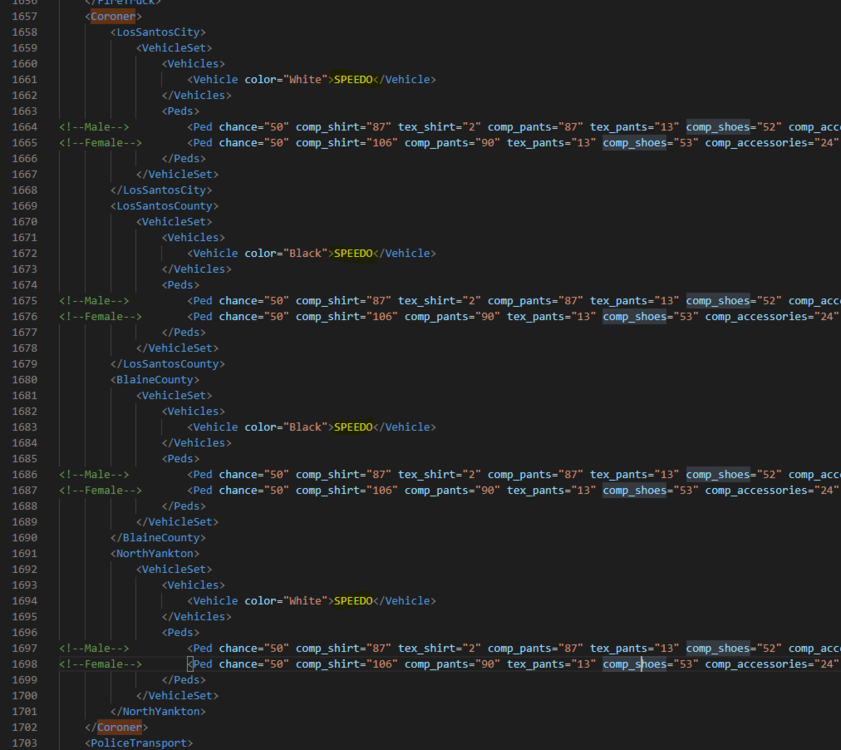
Hey @SanchezzzRUS, how are you? Go in "GTA 5 \ plugins \ LSPDFR \ UltimateBackup \ DefaultRegions.xml" and open the File with an Editor. Search after "SPEEDO" and Replace all SPEEDO with "POLSPEEDO" The Coroner Unit is between line 1657 and 1702. I hope I could help you. I look forward to your response!