



dominikexe
Members
-
Joined
-
Last visited
Everything posted by dominikexe
-
Hey @Kurkkis, always my pleasure! Have fun! This issue has been resolved. For further questions you can look in the message above.

-
Hey @DeadmanPlays, You can find your visualsettings.dat at "Grand Theft Auto V\mods\update\update.rpf\common\data\visualsettings.dat" Just upload it here or under https://workupload.com/ and poste the link. I look forward to your response.
-
Hey @gman124, Thank you for the fast answer. Have fun. This issue has been resolved. For further questions you can look in the message above.

-
Hey @Officer Cheese Doodle, Thanks for your quick responde! Have fun. This issue has been resolved. For further questions you can look in the message above.

-
Hey @talonross43, how are you? Have you ever installed POLICEB as a replace? Or have you never modded / replaced a vehicle? I look forward to your response.
-
Hey @Officer Cheese Doodle, Thanks for your quick feedback! Here i have a tutorial for you. Write if you need help on this. https://winaero.com/blog/exclusions-windows-defender-windows-10/ I look forward to your response.
-
Hey @tcaplette, always my pleasure! If you need more help, feel free to start a new topic. Best regards Dominik This issue has been resolved. For further questions you can look in the message above.

-
Hey @Jordanb1, how are you? The error comes from the TrafficPolicer plugin. Its an error in an callout names "DriverUnderTheInfluence". You can remove the plugin... OR you go in this file: `Grand Theft Auto V\Plugins\LSPDFR\Traffic Policer.ini` and search for the following entry: DriverUnderTheInfluenceEnabled=true replace `true` with `false`. If done, you can restart your game. I look forward to your response.
-
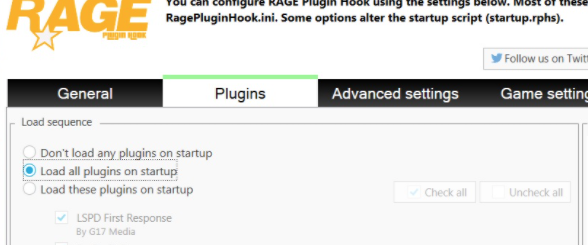
Hey @Kurkkis, how are you? 1) Did you include the RageNativeUI.dll in your GTA 5 main directory? 2) Did you include the EUPMenu.dll in the right folder? ~ "Grand Theft Auto V\plugins\" 3) Did you enabled the EUPMenu in the RagePluginHook-Launcher (Settings) *You should have specified there that either all plugins have a checkmark or select the option that all plugins should be loaded. I look forward to your response.
-
Hey @Tyd, always my pleasure! If you have any further questions, feel free to start a new topic. This issue has been resolved. For further questions you can look in the message above.

-
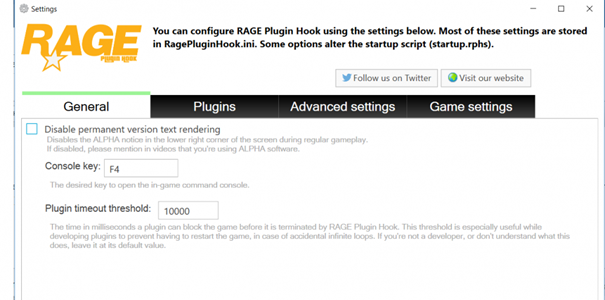
Hey @Officer Cheese Doodle, how are you? Please be sure that you do two things: 1) - Changes Settings in RagePluginHook Go in your Settings of RagePluginHook (start RPH -> click after start on the gear) then the settings will open on the first page you finde the option "plugin timeout threshold" set this value on "30000" then click on "Save & Restart" 2) - AntiVirus I would recommend that you add your GTA 5 folder as an exception in the antivirus. If you need help with this, you can tell me which antivirus you are using. Then I can pick out a little guide for you. I look forward to your response.
-
Hey @tcaplette, Thanks for the fast respond! So the main problem is that he doesn't want to find LSPDFR or he can't start it. Is the file write/read-protected on your computer? AND Is everything up to date? Are you're have the newest LSPDFR Version? ... I would say, that you "reinstall" LSPDFR: -> use the manual installation and overwrite all files with the latest/you downloaded. If you need help, you can write. I look forward to your response.
-
Hey @Tyd, okay! I look forward to your response.
-
Hey @tcaplette, Thanks for the fast respond! Okay. Looks right. Please be sure you're have the newest `RageNativeUI.dll` in your main directory of GTA5. You can find the newest version here: https://github.com/alexguirre/RAGENativeUI/releases/download/1.7/RAGENativeUI.zip AND I would recommend that you add the GTA 5 main folder as an exception in the antivirus program. If you tell me which antivirus you are using, I can help you with that. I look forward to your response.
-
Hey @h3llst4ff, how are you? Did you also install the configurations for lspdfr? *I recommend that you make a backup of the `GTA 5\lspdfr\data` folder beforehand. I look forward to your response.
-
Hey @LenMagBen, danke für deine schnelle Rückmeldung! Immer wieder gerne. Wie gesagt, immer erst schauen, ob du auf dem neusten Stand der Dinge bist. 😉 Gerne kann ich dir anbieten auf unserem Discord vorbei zu schauen: https://blackaditum.de/discord Hier bekommst du jederzeit in unserer LSPDFR Abteilung, Support für LSPDFR / GTA 5. -> schneller als hier im Forum... Bei weiteren Fragen kannst du gerne einfach ein neuen Thema aufmachen. LG Dominik This issue has been resolved. For further questions you can look in the message above.

-
Hey @tcaplette, how are you? Could you send me pls an screenshot of following folder: -> D:\Steam\steamapps\common\Grand Theft Auto V\Plugins\ AND I would recommend that you add the main gta 5 folder as an exception in the antivirus.# I look forward to your response.
-
Hey @rajveersmann, I would recommend checking your game files for errors. You can do this in your launcher where you bought GTA5. I look forward to your response.
-
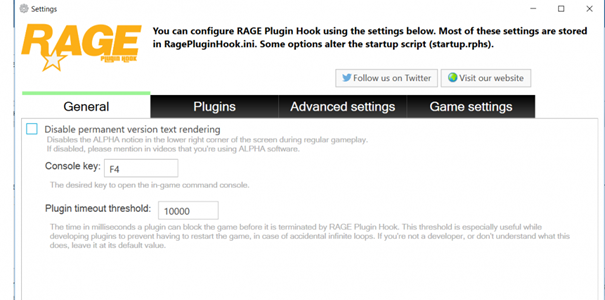
Hey @rajveersmann, Thanks for the fast respond. Okay. Go in your Settings of RagePluginHook (start RPH -> click after start on the gear) then the settings will open on the first page you finde the option "plugin timeout threshold" set this value on "30000" then click on "Save & Restart" I look forward to your response.
-
Hey @beemy62, it was still an honor for me! If you have further questions or problems, you can always just write. Best regards Dominik This issue has been resolved. For further questions you can look in the message above.

-
Hey @Forbeq, Thanks for this fast answer! the screens look right. I'm just wondering why you only have part of the updates folder in your mods folder. And does this problem only occur with the two vehicles? Have you ever put these vehicles in a different slot? Maybe it's because of the vehicle models themselves... I look forward to your response.
-
Hey @Jordanb1, Thanks for you fast answer. Do you have the latest version of scripthook installed? Here you can find the latest version: I look forward to your response.
-
Hey @Sharakon, fine! I hope I could help you. I wish you a lot of fun playing. if you have another question, you can simply write another message. LG Dominik This issue has been resolved. For further questions you can look in the message above.

-
Hey @Sharakon, sounds good. I look forward to your response.
-
Hey @rajveersmann, how are you? Are you using the latest version of ScriptHookV? You can find the latest version here: I look forward to your response.


