



dominikexe
Members
-
Joined
-
Last visited
Everything posted by dominikexe
-
Hey @TheDman131, Okay. Then. A new try 😉 I look forward to your response.
-
Hey @AE14, always my pleasure! This issue has been resolved. For further questions you can look in the message above.

-
Hey @TheDman131, Do you have Open All Interiors installed? Because there are some garages in the description... I look forward to your response.
-
Hey @MarshMaui, did you using my file version? Some lines do not even exist in your file... I look forward to your response.
-
Hey @TheDman131, let me know when what's new... I look forward to your response.

-
Hey @AE14, Thank you for the fast answer. *thats not a thing for the technical support... 😉 But i love StopThePed and UlimateBackup to manage the peds, call backup and call my buddys. Here two links: StopThePed UltimateBackup If nothing else is ...
-
Hey @Migg, Thank you for the fast answer. pls try to start your lspdfr without yours mods folder.. -> rename your mods folder to "_mods" (underscore + mods) That means, that we disable the mods folder and check, if the mods folder do issues... I look forward to your response.
-
Hey @MarshMaui, firstperson in car or firstperson on foot or firstperson in both? I look forward to your response.
-
Hey @AE14, Thank you for the fast answer. Now you can rename the mods-folder back in "mods"and delete the "wrong mods".. OR (my favorite) delete the old mods folder and create an new / clean one. I look forward to your response. Could i help you?
-
Hey @TheDman131, Thank you for the fast answer. I've found this in an old topic: *This Method you can try if you would like to "skip" the mission: I just found that you should restart or reinstall your game. I look forward to your response.
-
Hey @AE14, Thank you for the fast answer. pls try to start your lspdfr without yours mods folder.. -> rename your mods folder to "_mods" (underscore + mods) That means, that we disable the mods folder and check, if the mods folder do issues... I look forward to your response.
-
Hey @TheDman131, Thank you for the fast answer. ╚ I mean, does it work when you restart your game? I look forward to your response.
-
Hey @MarshMaui, i have here for you an edit version... note: the normal ligts are not so bright... (this is the default file from gta5) only test... I look forward to your response.
-
Hey @TheDman131, how are you? Does this problem also occur after a restart? Is this problem only at this one garage? I look forward to your response.
-
Hey @MarshMaui, no problem! This can happen when you use Shader and Better Radiance together... Can you send me pls this file. I will edit it for you. -> Grand Theft Auto V\mods\update\update.rpf\common\data\visualsettings.dat I look forward to your response.
-
Hey @MarshMaui, how are you? Do they have no lights (i.e. dark) or are all the traffic lights just gone on the map? I look forward to your response
-
Hey @AE14, how are you? Are you using the latest version of ScriptHookV? AND Do you have any mods installed? I look forward to your response
-
Hey @Drewster327, Thank you for the fast answer. pls try to start your lspdfr without yours mods folder.. -> rename your mods folder to "_mods" (underscore + mods) If it working, than is your mods folder broken.... I look forward to your response
-
Hey @beemy62, always my pleasure! I'm here. Just write under this message. I look forward to your response! Have a nice day!
-
Hey @eeeeeeeeee, how are you? Are you using the newest Version of ScriptHookV? http://www.dev-c.com/gtav/scripthookv/ I look forward to your response
-
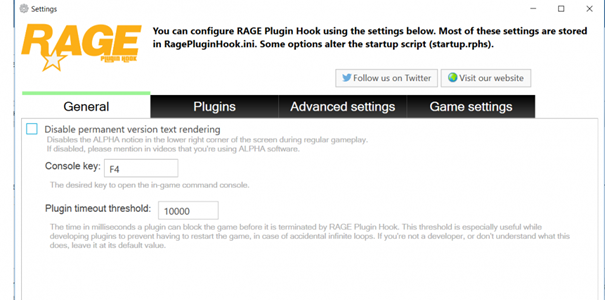
Hey @beemy62, Thank you for the fast answer. The Shader is installed in your GTA 5... and you don't know anything about it? I would say that you should check your gamefiles (about your launcher) If you tell me what launcher youre using i can help you better. AND you can try this: Go in your Settings of RagePluginHook (start RPH -> click after start on the gear) then the settings will open on the first page you finde the option "plugin timeout threshold" set this value on "30000" then click "Save & Restart" I look forward to your response
-
Hey @Jimmayy87, Always my pleasure! This issue has been resolved. For further questions you can look in the message above.

-
Hey @Jimmayy87, Thank you for the fast answer. I thinks this issue is by the model self. I look forward to your response
-
Hey @beemy62, what is, if youre start GTA 5 without RagePluginHook? So normaly with the Rockstar Games Launcher... If your game will crash if youre start them with the RockstarGamesLauncher, your gamefiles are broken. I look forward to your response
-
Hey @Jimmayy87, Thank you for the fast answer. If you installed all your "moddedcars" in there... Yes I look forward to your response

