



dominikexe
Members
-
Joined
-
Last visited
Everything posted by dominikexe
-
Hey @LuisK, ich weis leider gerade nicht genau was du mit "gamefolder" meinst. Und welches Fenster kommen soll, auf dem du "Ja" drückst. Gerne bieten wir dir an, dass wir uns das einmal gemeinsam anschauen, damit wir dir so schnell wie möglich weiterhelfen können. Dazu kannst du uns in unserem LiveChat https://blackaditum.de/ besuchen oder auf unseren Discord joinen und ein Ticket eröffnen. https://blackaditum.de/discord Ich freue mich über eine Rückmeldung und wünsche dir noch ein schönes Wochenende.
-
Hey @Tom Lasky, das kann mehrere Gründe haben: Entweder, dein aktuelles EUP Pack (welches nicht standardmäßig ist) hat eine andere Konfiguration der Texturen oder Models. ODER Du hast bei der Installation des standard EUP vergessen die LSPDFR Konfiguration zu Installieren. Bei weiteren Fragen stehen wir dir gerne zur Verfügung. Du kannst ins unserem LiveChat https://blackaditum.de/ vorbei schauen, oder ein Ticket auf unserem Discord https://blackaditum.de/discord öffnen.
-
Hey @jan300, gerne helfe ich dir weiter. Sei dir sicher, dass dein Mods-Ordner seit dem letzten GTA 5 Update auf dem neusten Stand ist. Überprüfe ob du einen patchday23ng in den dlcpacks hast. Beachte auch, dass nicht alle Fahrzeugmodelle seit dem neuen Patch im patchday23ng funktionieren! Daher rate ich dir, versuche die Fahrzeuge in patchday19ng bis patchday22ng zu installieren. Bei weiteren Fragen oder Hilfe bei der Installation stehen wir dir gerne zur Verfügung. Besuche uns im LiveChat https://blackaditum.de/ oder auf unserem Discord per Ticket https://blackaditum.de/discord. Für weitere Fragen stehe ich dir gerne zur Verfügung.
-
Hey @Lucro12, die standard Loudouts kann man mit einem Plugin hinterlegen. Wir bieten dir gerne unsere Hilfe zum Installieren und Einrichten des Plugins an. Dazu kannst du einfach unseren LiveChat auf https://blackaditum.de/ vorbeischauen und uns anschreiben, oder unseren Discord unter https://blackaditum.de/discord besuchen. Unsere Supporter helfen dir gerne weiter. Bei weiteren Fragen stehe ich dir gerne zur Verfügung.
-
Hey @Blitz49, Please send me a screen of your exception. Have you ever restarted your PC? If that doesn't help, please deactivate your Windows Defender monitoring. I look forward to your response!
-
Hey @EuroPlays, Please check if you have the "CUFFS_TIGHTEN_01.wav" file in "GTA5 \ lspdfr \ audio \ sfx \" I look forward to your response!
-
Hey @EuroPlays, Can you please send me the link from your soundpack? I look forward to your response!
-
Hey @EuroPlays, Did you also uninstall ArrestManager? Have you ever changed the handcuff sound? So replaced with another file? I look forward to your response!
-
Hey @HeyMaxYT, wie geht es dir? Leider kann LSPDFR laufende Missionen nicht unterbrechen. Ich denke mal, dass du die Anfangsmission meinst. Diese muss meistens durchgespielt werden. Bei weiteren Fragen, freue ich mich gerne auf eine Rückmeldung!
-
Hey @mitchelldasilva40, how are you? Is that all clear? I am longingly waiting for an answer. ^^ I look forward to your response!
-
Hey @Matt Cameron and @Eclipse The solution is above. I look forward to your response!
-
*More settings / configurations can be found here: This issue has been resolved. For further questions you can look in the message above.

-
Hey @Eclipse, how are you? Go to the following file: " GTA5\plugins\lspdfr\DeadlyWeapons.ini " Then set the parameter "EnablePanic" to "false" from to *Save the file and restart LSPDFR I look forward to your response!


-
Hey @JDRG, always my pleasure! I wish you a lot of fun and always stay "up to date"! 😉 Best regards Dominik. This issue has been resolved. For further questions you can look in the message above.

-
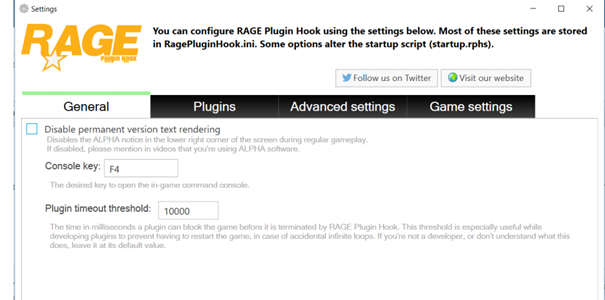
Hey @EuroPlays, how are you? Please uninstall Albo1125's Arrest Manager. You can also find all functions of ArrestManager in StopThePed. (ArrestManager is out of date!) In general you can do this here as well: Go in your Settings of RagePluginHook (start RPH -> click after start on the gear) then the settings will open on the first page you finde the option "plugin timeout threshold" set this value on "30000" then click on "Save & Restart" I look forward to your response
-
Hey @gameur97414, how are you? Veuillez ouvrir un sujet dans le forum des langues pour vous. ~ Please open a topic in the language forum for you. Link: https://www.lcpdfr.com/forums/forum/65-forum-franã§ais/
-
Hey @Blitz49, how are you? Please add your GTA 5 main folder as an exception in your antivirus program. I guess you are using Windows Defender. If you are using a different antivirus program, I can find another guide for you. https://wiki.nus.edu.sg/display/DA/Add+folder+exclusion+-+Windows+Defender+Security+Center I look forward to your response!
-
Hey @OneLincolnEighteen, how are you? I can offer you remote maintenance. Please just reply to this message. I look forward to your response!
-
Hey @JDRG, how are you? Please make sure you have the latest version of StopThePed installed. In the latest version of StopThePed you will find a parameter "TaserLaserBeamLength = 40" in the "Ultimatebackup.ini". Set this to 0. Here a screen of the .ini: Here you can download StopThePed: https://www.bejoijo.com/post/ultimate-backup If you have any further questions, you can simply answer them. Have fun!

-
Hey @Officer _m, how are you? Please make sure that LML has been installed correctly. Please try, among other things, to deactivate / uninstall LML and then start it. Have you already added the GTA 5 main folder as an exception to your antivirus? Otherwise I would advise you to start RagePluginHook without mods. I look forward to your response!
-
Hey @Tom Lasky, wie geht es dir? Das ist ganz normal. EUP ist "standardmäßig" nur für die eigene Person/Spieler gedacht. (Also mit den Voreinstellungen) Jedoch bieten wir dir auf unserem Discord an, auch deine KI mit Uniformen auszustatten. Dazu kannst du gerne mal unserem Discord beitreten, oder einfach auf diese Nachricht hier antworten. Ich freue mich über eine Rückmeldung von dir. Bis dahin, viel Spaß 😉 Discord: https://blackaditum.de/discord
-
Hey @mitchelldasilva40, how are you? for Chill Callouts you need "Traffic Policer, Version=6.16.0.0". You can click here to Download Traffic Policer > BUT Traffic Policer is out of date and is very buggy.. so I would recommend you to uninstall Chill Callouts ^^ Have fun
-
Hey @joetrev, how are you? Have you already renamed your mods folder? Please try renaming your mods folder to "_mods". And then restart your game. I look forward to your response!
-
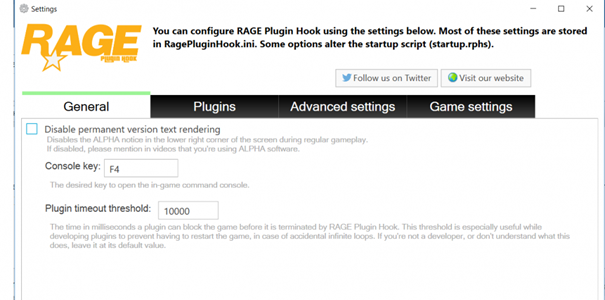
Hey @DeviLee, how are you? 1) Did you rename the mods folder to "_mods"? 2) I would also recommend that you start your game without LSPDFR and only when you are inside, start your LSPDFR via the F4 console. (You do that with "LoadPlugin LSPD First Respond.dll") 3) And you can try this: Go in your Settings of RagePluginHook (start RPH -> click after start on the gear) then the settings will open on the first page you finde the option "plugin timeout threshold" set this value on "30000" then click on "Save & Restart" I look forward to your response!
-
Hey @KM964, how are you? Can you please send your addon pack in here? I would like to take a look at the files. I have the assumption that there are differences between the vehicle spawn name and the naming of the add-on. I look forward to your response!


