



dominikexe
Members
-
Joined
-
Last visited
Everything posted by dominikexe
-
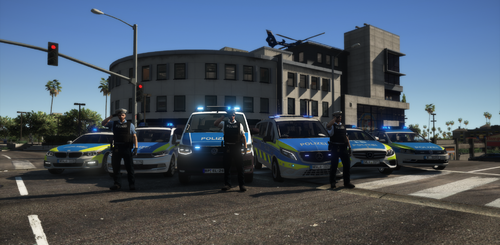 Hey ^^ auf Grund einiger Projekte habe ich es leider nicht ganz rechtzeitig geschafft, diese Übersetzung anzubieten. Ich habe nun erst einmal auf Grund deines Wunsches dieses Plugin fertiggestellt. - Die anderen Übersetzungen folgenden: Viel Spaß ^^
- 18 comments
- 1 review
-
-

- 1
-
-
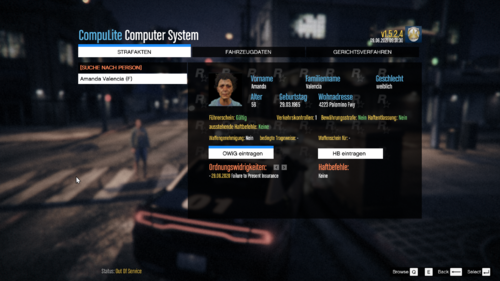 Willkommen zur inoffiziellen deutschen Version der CompuLite UI »» v1.0 Um nun auch in der deutschen Community vielen Verständnisfragen aus dem Weg zu gehen und die Bedienung des wohl bekanntesten Polizeirechners zu vereinfachen, haben wir diese Übersetzung geschrieben. Was ist die Besonderheit an unserer? - Viele Begriffe sind im "Beamtendeutsch" geschrieben, um eine möglichst realistische Erfahrung zu bieten. Kostenlosen und kompetenten Support erhält du auf unserem Discord » https://blackaditum.de/discord **ACHTUNG Dieses Datei-Addon benötig die original Version von CompuLite. Beachte, dass CompuLite installiert sein muss, bevor dieses Addon installiert werden kann! ERWEITERUNGEN - Empfehlungen: (Diese können beliebig hinzugefügt werden! Addons, welche hier aufgelistet werden, MÜSSEN NICHT hinzugefügt werden!) UltimateBackup - by Bejoijo https://www.bejoijo.com/post/ultimate-backup StopThePed - by Bejoijo https://www.bejoijo.com/post/stop-the-ped --------------------------------------------------------------------------- FEATURES: die deutsche Übersetzung der Anzeigeschriften / Benutzeroberfläche (UI) von CompuLite angepasste Position der Schriften / Anzeigen inklusive erstklassigem Support bei gewünschten Anpassungen auf unserem Discord Installation: Installiere das originale CompuLite** Entpacke die DE_CompuLiteUI_v1.0.rar Datei Kopiere den Inhalt des "Grand Theft Auto V" Ordner in dein GTA5 Hauptverzeichnis Bestätige die Anfrage des "Dateien ersetzen" mit JA/OK. Starte nun LSPDFR und betrachte die Benutzeroberfläche deines Polizeirechners. [Installationsvideo demnächst verfügbar!] Trete unserem Discord bei, um keine Updates (auf für andere Plugins) zu verpassen, Support zu erlangen und dich mit andern LSPDFR-Spielern zu treffen. Jetzt auf unseren Clan-Discord beitreten: https://discord.gg/vV9Zgrm Vielen Dank auch für euer Feedback!
 -
Hey @Mr Dog, den letzten Fehler finden wir jetzt auch noch. ;D Bitte merke dir, wenn du schreibst, dass es wieder einen Crash gab, dass du den Log mit schickst. - Wir können leider keine Gedanken lesen ^^ -> Hänge deinen RagePluginHook.log bitte an. Ich freue mich über deine Rückmeldung. Mit freundlichen Grüßen
-
Hey @LeonGaming01, wie soeben in der Fernwartung besprochen, war das Problem vermutlich das Plugin "Tacco Highway Callouts" Es unterstützt nicht mehr die neuste LSPDFR Version und führt zu Fehlern z.B. bei der Event-Generierung oder Beendigung eines Callouts. # Ergebnis => Tacco Highway Callouts wurde deinstalliert. Bei weiteren Fragen stehen ich gerne zur Verfügung. Mit freundlichen Grüßen
-
Hey @KillerCam, I use StopThePed, UltimateBackup, CompuLite and GrammarPolice as a "base" for handling with the AI. With kind regards
-
Hey @LeonGaming01, ich habe gesehen, dass du dich auf unserem Discord befindest. Eröffne gerne einfach mal ein Ticket, dann können wir das in einem Gespräch und per Fernwartung schneller und gezielter erledigen. Ansonsten kann du mir gerne auf Discord anschreiben !dominikexe#1000. Sobald wir das Problem gelöst haben, wird die Lösung / Ursache hier im Nachhinein gepostet. Mit freundlichen Grüßen
-
Hey @Nelly222, i am sorry that I misunderstood you. Then please be sure that you have installed the vehicles in the latest patchday (in our case "patchday24ng"). However, it could also be the vehicles themselves. With kind regards
-
Hey @Nelly222, thank you very much for the quick feedback. It is normal that Non-Els vehicles do not work with ELS. These are not designed for this purpose. As soon as ELS is installed, you should also use ELS vehicles, otherwise you will not be able to control them with ELS. If you have any further questions, please do not hesitate to contact me. With kind regards
-
Hey @JorM, thank you for your request. Please go through the following steps: The process of RagePluginHookLauncher is blocked by your anti-virus program and thus cancels the startup or some features Here it is recommended to add an exception in your antivirus program. The exception should preferably include your entire GTA 5 folder. If you use Windows Defender, here is a short guide. Should you use another anti-virus program google helps you there certainly further ;D A configuration extension is required to allow LSPDFR to load. To do this, open the "RagePluginHook.ini" file located in your GTA 5 root directory and edit it with any text editor. Change the value 10000 behind the parameter "PluginTimeoutThreshold" to 60000 and save the file. If you have any further questions, please do not hesitate to contact me. With kind regards
-
Hey @Mr Dog, vielen Dank für die schnelle Rückmeldung. Dann wissen wir jetzt woran es lag. 😉 Somit ist eine Modifikation im "mods"-Ordner falsch bzw. korrupt. Entweder du weist jetzt, welche Modifikationen du im "mods"-Ordner installiert hast oder (der einfache und sicherste Weg) du setzt den "mods"-Ordner komplett neu auf. Das ist dir jetzt überlassen... Bei weiteren Fragen stehe ich dir gerne auf unserem Discord oder hier im Forum zur Verfügung. Mit freundlichen Grüßen
-
Hey @Nelly222, thank you for your feedback. In general, if you want to use ELS vehicles, you must first install the .xml file that comes with ELS (plugin is attached below) and the file must have the same name as the vehicle file. I have a short tutorial here: Note: Always install your vehicles in the latest patchday. In our current case this would be the "patchday24ng". With kind regards
-
Hey @Mr Dog, vielen Dank für die schnelle Rückmeldung. Das die Mods aus dem "mods"-Ordner nicht funktionieren ist logisch, da die Modifikationen so zu sagen deaktiviert werden. Hat LSPDFR, als du den "mods"-Ordner in "_mods" umbenannte hattest (und die Modifikationen deaktiviert waren) geladen? - Dann können wir hier weiter machen... Gerne würde ich mir das ganze mir dir zusammen anschauen. Dazu lade ich dich auf unseren Discord ein. Ich freue mich über deine Rückmeldung. Bei weiteren Fragen stehe ich dir gerne zur Verfügung. Mit freundlichen Grüßen
-
Hey @BIGDAD30, thank you for your request. The mentioned error may occur due to the following things: The process of RagePluginHookLauncher is blocked by your antivirus program and therefore aborts the launch. Here it is recommended to add an exception in your antivirus program. The exception should include your entire GTA 5 folder if possible. If you use Windows Defender, you can find a short guide here. If you use another antivirus program, google will surely help you there ;D To load LSPDFR, a configuration extension is needed. Open the file "RagePluginHook.ini", which is located in your GTA 5 root directory and edit it with any text editor. Change the value 10000 behind the parameter "PluginTimeoutThreshold" to 30000 and save the file. There is an error in the "mods" folder. Rename your mods folder to "_mods". This will disable the mods and GTA 5 should start without problems. If GTA 5 starts without problems, the error is in the mods. I hope I could help you so far. If you have any further questions, please feel free to contact me. With kind regards
-
Hey @Nelly222, thank you for your request. Can you please put the link from your carpack in your next message? - Thx Basically, this looks more like a FiveM ready vehicle resource to me. You could rename the .yft and .ytd so that you replace a normal police car. This would require renaming the files to: cadillacbb.yft -> police.yft cadillacbb.ytd -> police.ytd I appreciate your feedback. If you have any further questions, please do not hesitate to contact me. With kind regards
-
Hey @LockHeed, no problem. Then I wish you much fun 😄 If you have any further questions, please do not hesitate to contact me. With kind regards
-
Hey @Mr Dog, vielen Dank für deine Rückmeldung. Ich habe verschiedene Vermutungen: 1. Eine Modifikation in deinem "mods"-Ordner wurde nicht korrekt installiert oder ist korrupt. Wie folgt kannst du hier vorgehen, damit wir feststellen können ob es an deinem mods-Ordner lag oder nicht: 1. Gehe in dein GTA V - Hauptverzeichnis. 2. Benenne deinen "mods"-Ordner in "_mods" um. 2. Füge eine Ausnahme zu einem Anti-Viren Programm hinzu. Wie folgt kannst du hier vorgehen, solltest du den Windows Defender nutzten: Hier eine kurze Anleitung für den Windows Defender: https://support.microsoft.com/de-de/windows/hinzufügen-eines-ausschlusses-zu-windows-sicherheit-811816c0-4dfd-af4a-47e4-c301afe13b26 Solltest du ein anderes Antiviren Programm haben, kannst du dies gerne einmal mir schreiben und ich suche dir eine passende Anleitung raus. 3. Dein mods-Ordner ist nicht auf dem neusten Stand. Damit wir feststellen können, ob du auch die neuste Version von GTA5 in deinem mods-Ordner verwendest, öffne mit OpenIV folgenden Pfad in deinem GTA 5 Hauptverzeichnis. Gehe mit OpenIV in: Grand Theft Auto V\mods\update\x64\dlcpacks Schau ob ein Ordner "patchday24ng" vorhanden ist. - Wenn ja, währe der 3te Punkt schon mal erledigt. Ich freue mich über deine Rückmeldung. Bei weiteren Fragen stehe ich dir gerne zur Verfügung. Mit freundlichen Grüßen
-
Hey @LockHeed, So the errors occur because of "code red callouts". -> Uninstall the callout pack "Code Red Callouts". - because it is no longer up to date Please delete the following files and folders: Grand Theft Auto V \ lspdfr \ Police Scanner \ Code Red Callouts Audio Grand Theft Auto V \ plugins \ lspdfr \ CodeRedCallouts.dll Then try again. I appreciate your feedback. If you have any further questions, please do not hesitate to contact me. With kind regards
-
[German] Hey @jan12097, vielen Dank für deine Anfrage. Hast du einen "Loadout-Manager" mal installiert? - Es könnte sein, dass automatisch eine falsche Konfiguration geladen wird. Bitte schicke ebenfalls deinen RagePluginHook.log (aus deinem Hauptverzeichnis) mit an deine nächste Antwort. Somit kann ich mir einen besseren Überblick von Script-Aktionen und aktiven Plugins in LSPDFR verschaffen. Gerne biete ich dir auch an, dass wir uns das generell per Fernwartung auf unserem offiziellen Discord anschauen. Somit können wir dir gezielt und noch schneller weiterhelfen. Ich freue mich über deine Rückmeldung. Mit freundlicehn Grüßen [English] Have you ever installed a "loadout manager"? - It could be that a wrong configuration is loaded automatically. Please also send your RagePluginHook.log (from your root directory) to your next answer. So I can get a better overview of script actions and active plugins in LSPDFR. I appreciate your feedback. With kind regards
-
Hey @LockHeed, you can upload the file here (https://workupload.com) and just send the link in here. I appreciate your feedback. If you have any further questions, please do not hesitate to contact me. With kind regards
-
Hey @LockHeed, then I await your reply to my message above. I appreciate your feedback. If you have any further questions, please do not hesitate to contact me. With kind regards
-
Hey @LockHeed, what does this "no" belong to now? ^^ Please refer to one of our statements in your answers. It is best to always create a quote in your answers. I appreciate your feedback. If you have any further questions, please do not hesitate to contact me. With kind regards
-
Hey @LockHeed, please send the whole RagePluginHook.log from your GTA 5 root directory. -> Uninstall the callout pack "Code Red Callouts". It causes the displayed errors and crashes as well. https://www.lcpdfr.com/downloads/gta5mods/scripts/10947-code-red-callouts-297-stolen-tanker-vicious-dog-more/ I appreciate your feedback. If you have any further questions, please do not hesitate to contact me. With kind regards
-
Hey @XxStormShadowxX, in your GTA 5 root directory there is a file called "RagePluginHook.ini". Open it with any text editor and change the value 10000 behind "PluginTimeoutThreshold=" to 30000 or 60000. I look forward to your feedback. With kind regards
-
Hey @DrJesus, You should have a look at your configuration of LSPDFR in a remote maintenance. - So the whole thing could be solved faster. - But you don't have to! What I would recommend you anyway, UltimateBackup for the supports and any backups to use and not the normal menu of LSPDFR. I appreciate your feedback. With kind regards
-
Hey @DrJesus, thank you for the quick feedback. Have you ever replaced the vehicle AMBULANCE? Any vehicle mod? I appreciate your feedback. With kind regards Hey @DrJesus, we can add the following. Open the file "RagePluginHook.ini" in your GTA 5 root directory with your favorite text editor and change the value 10000 from the parameter "PluginTimeoutThreshold" to 60000. Then just try to call an ambulance as backup. (But note my message still from above...) I appreciate your feedback. With kind regards

