



LostBoyLazarus
Friends of LSPDFR
-
Joined
-
Last visited
Everything posted by LostBoyLazarus
-
Very, but such is the nature of technology. Happy gaming \m/
-
Either of these?

-
Do you have a text file called "RagePluginHook" in your main GTAV directory?
-
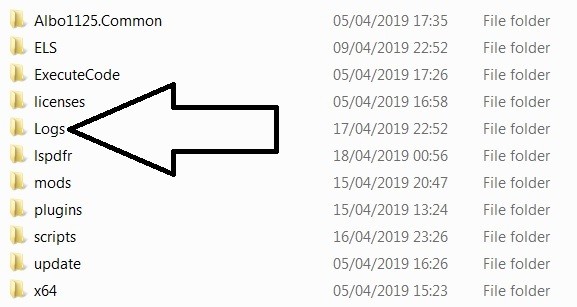
Locate Grand Theft Auto V\Logs (for me its: C:\Program Files\Rockstar Games\Grand Theft Auto V\Logs) and post the most recent log. Just open it, copy/paste here and it will automatically put it into a spoiler. No need to screenshot.
-
Looks good on paper... Okay, throw up your RagePluginHook log please.
-
Have you tried what TreadRed suggested above? If so, post your RageHookPlugin log and I'll take a look.
-
Okay, silly question, but I have to ask: Where are you installing your gameconfig.xml to? I assume you're using OpenIV as well?
-
Okay, so does it crash when you load LSPDFR+ or does it crash before that?
-
I use F7YO's gameconfig.xml and have no issues (I also use both Heap Limit Adjuster and Packfile Limit Adjuster.) Which setting did you install?

-
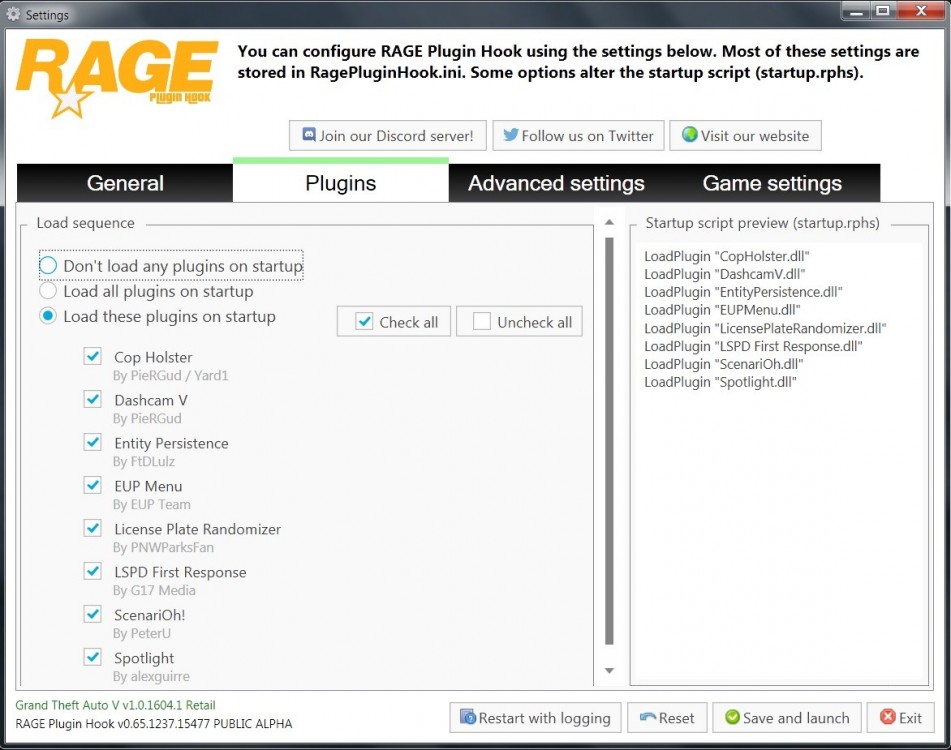
LSPDFR+ requires: Assuming you have everything installed as mentioned above, and because you don't have "LSPD First Response" set to load on startup, you will need to untick "LSPDFR+" and instead start it via the console in-game AFTER you have loaded "LSPD First Response" in the same way. Does that make sense? It's 4am here and I've been awake for the best part of two days lol
-
Is LSPDFR+ ticked?
-
Is "LSPD First Response" the only plugin on your list?
-
Can you open your RAGEPluginHook.exe like normal but hold left shift to open the setting menu. Navigate to the Plugins tab and tell me/show me what's there. For example:
-
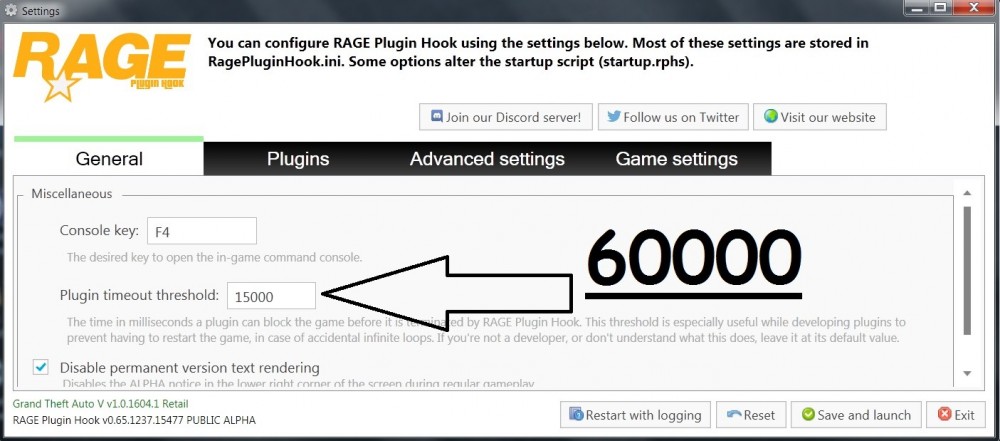
Please open "RAGEPluginHook.exe" and hold "left shift". You will see the settings menu. Please change the number to 60000 and see if that helps.
-
Can you post your "RagePluginHook log" please? 1. Go to "Grand Theft Auto V\Logs" (example: C:\Program Files\Rockstar Games\Grand Theft Auto V\Logs) 2. Paste the most recent log here. Thanks.
-
"Exception type: System.AccessViolationException LSPD First Response: Exception message: Attempted to read or write protected memory. This is often an indication that other memory is corrupt."
-
Are you using: LSPDFR 0.3, LSPDFR 0.4 or LSPDFR 0.4.1?
-
The red writing probably says: ELS Lock. Try pressing "Scroll Lock" / "ScrLk" on your keyboard while in-game and try again. Let me know the results 👍 As for the current build info on-screen, you can disable that under the General tab of your Rage Plugin Hook. It's the only option with a checkbox.
-
LSPDFR = GTAV LCPDFR = GTAIV What mods/scripts/plugins are you using?
-
What exactly are you typing into the console? "ForceDuty" or "goto pd"?
-
Can you post your mod/script/plugin list please?
-
I think you're misunderstanding the help being offered here. Assuming you're using a legit copy of GTAV, remove all traces of it from your system and install a fresh copy of GTAV. Can you play the vanilla game?
-
Have a look here, see if this helps. If not let me know and I'll have a proper look: https://www.lcpdfr.com/forums/topic/88418-skipping-api-ms-win-crt-math-l1-1-0/
-
Which gameconfig.xml are you using?
-
Heh, I came across this the other day too. I was just clearing up a pursuit when I noticed shouting in the background. I had a look and BOOM! There was this group of people standing in the middle of the road. There were also a few people lying down. I decided to RP things a bit and "discovered" that the group was peacefully protesting against the development of the complex on the north side of the street. I literally dismissed everyone one at a time - the people on the ground were just stuck until the people standing moved off them. I assume they were stopping traffic 😉 Only one person failed to leave the area so he was arrested and dealt with accordingly. I came past Spanish Ave again yesterday and noticed they were back. Definitely added by a callout pack but no idea which. Not complaining mind you. Aside from a bit of an FPS drop, I consider this to be a special "ambient event" that can be dealt with however you wish.


