
LostBoyLazarus
Friends of LSPDFR
-
Joined
-
Last visited
Everything posted by LostBoyLazarus
-
 @HazyTube, I've been using 0.3.1.0 for weeks without any issues at all. Is it worth updating? This is one my essential mods and would hate to break it 😉 BTW, is it possible to add a flash light to the handgun? I can add one to all weapons, or a selection of individual weapons, but not to just the handgun. Not the end of the world (I add it in-game via trainer) but would be a welcome addition.
- 68 comments
- 12 reviews
-
 @PeterU, today while playing, I received the notification that I didn't have "Newtonsoft.Json.dll" installed - which is correct. The notification told me your callout pack was not installed correctly and to refer to the guide to correct it. I understand this warning was added via the latest update, however I'm unsure how to fix it. There is no Newtonsoft.Json.dll included in the update, not in the original folder that I downloaded. The readme didn't help either.
- 546 comments
- 103 reviews
-
 60+ mods all with all necessary keys binded to a controller. I'm dangerously close to conflicts lol. Having the ability to use this via PSR is a godsend!
- 117 comments
- 19 reviews
-
-

- 1
-
-
[New] Added Police SmartRadio integration, you can now let dispatch know if you are available or not available via the radio, and also force a callout via the radio. Thank you. I can now use this mod 🙂
- 117 comments
- 19 reviews
-
-
- 1
-
-
 A lot of people have experienced this. AFAIK, it remains unfixed. No longer using Computet+ however there hasn't been an update since so would imagine the issue remains.
- 1,743 comments
- 172 reviews
-
-
- 1
-
-
@l1nk.evg What do you want support with? We've tried to help and you don't seem to want it. I can appreciate that LSPDFR can be difficult sometimes, however it does work contrary to what you've stated. If you still require assistance, can I recommend again that you completely remove all traces of GTAV from you system, including all registry entries, folders, .ini files, save games etc. Then, do a fresh install of GTAV without any extras. Test the game and complete the intro and first mission up to and including where you take control of Franklin and are instructed to get a hair cut. If you can do all that without issue, let us know and we can help you install LSPDFR correctly and get you ready to install mods, plugins, scripts etc.
-
-
This is way beyond me (my brother is the expert in everything coding related lol), however I recall that ERR_CERT_COMMON_NAME_INVALID is a Chrome related issue that is caused by the SSL certificate and/or HTTPS errors. In this example, it would appear that lcpdfr.com site owner would need to update the SSL configuration to correct the issue. @Brotix can also try the usual cache wipe, check any problem plugins etc however if it is a site issue, it can only be resolved by the webmasters.
-
So far so good. Thanks very much 🙂
-
I know in my modified setup, the transport does drive to and drop off any suspects at the nearest police station. I can't say I've ever followed the transport in vanilla LSPDFR.
-
Yeah, by default it is: [CalmPed] // If set to yes then all gang member peds will not be affected (yes/no) ExcludeGangMembers=yes
-
 @Phaxol, just a passing thought: Is there any chance of limiting the help dialogue "to open the computer press 'this button'" that appears in-game? I know Computer+ limited it to once per session. Not game breaking but you know how I'm always suggesting things for Interaction+ 😉
- 1,005 comments
- 68 reviews
-
I really like the look of these. The detail is very sharp! If you were asking for advice, I'd suggest trying the buttons in a silver-ish colour just to break up the black slightly. Either or I really look forward to seeing these in-game soon 🙂
-
Have you looked into using a trainer? I know some of them offer options for invincibility etc.
-
Ah, I see 🙂
-
I can see where you're coming from but who's to say it's unrealistic? I'm sure IRL police operate differently in a known gang-active area as opposed to how they would on a generic downtown traffic stop. If you want to play things safe, when stopping a vehicle, call for backup first. Having extra bodies in the event of a shootout is rarely a bad thing. I personally will call for gang task-force backup if I'm operating somewhere such as Grove St. I've only been killed once in this scenario. The rest of the time, it's quite good fun. Just keep your head down and remember to call for backup. Some plugins have this built in already though not all of them affect gang members. I'd advise reading the mod's description prior to downloading to ensure it will affect gang members if you choose to go down this route.
-
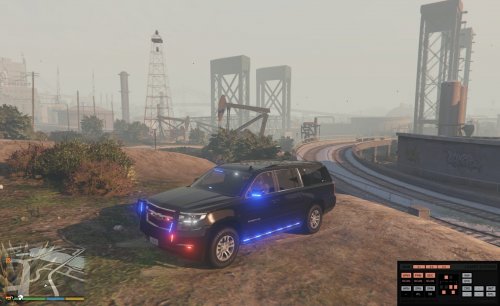 I wanted an ELS replacement for the FBI2 vehicle and after shopping around, I discovered this. After a few weeks of having it in my game, I must say, I'm very impressed. The lighting is amazing and the overall feel of the vehicle is believable. My only dislike is the interior. It's impossible to see in any direction apart from forward due to the tint and even that is obscured by overhead blinds blocking your forward view. The steering wheel is also static. If you don't play in first person, or can otherwise see past these issues, then this is the vehicle for you!
- 87 comments
- 22 reviews
-
I've been using this for a few weeks now (all blue) and am loving it. I hate the interior though! The windows aren't tinted - they're solid black so you can't see for s**t. The overhead blinds obscure most of the forward view and the steering wheel doesn't move. The sheer quality of the lighting and overall feel of the vehicle in any other view surpasses expectations however. For your first model, this is a fantastic vehicle. Thank you for creating it. (If you ever get around to updating the interior, this would be my favorite in-game vehicle.)
- 87 comments
- 22 reviews
-
-
I'll have to check in-game, however the LSPDFR.ini is set to: "Main.PreloadAllModels = true" ?
-
I'm posting here because this issue happens after about an hour of play and regardless of which mods are used. The only constant is LSPDFR. Please move if required. I've heard of this happening but have only recently started experiencing it myself and can't fix it. Has anyone got any ideas please? The first images shows the issue, while the second appears to fix it simply by looking in a different direction.
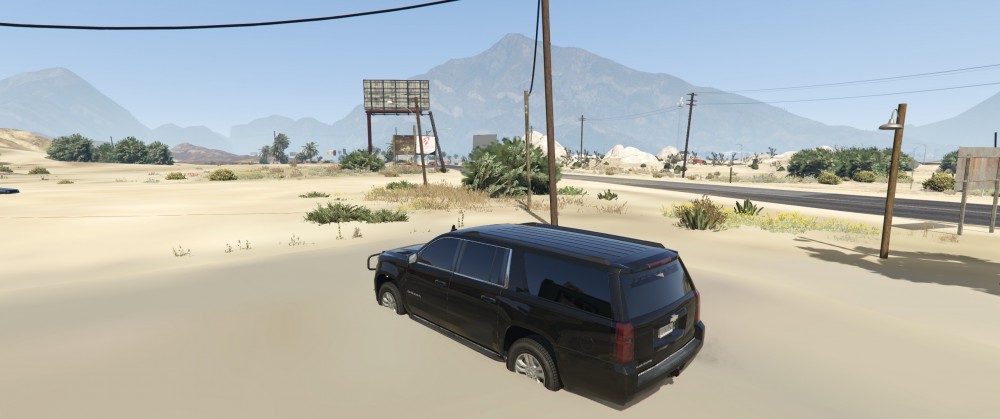
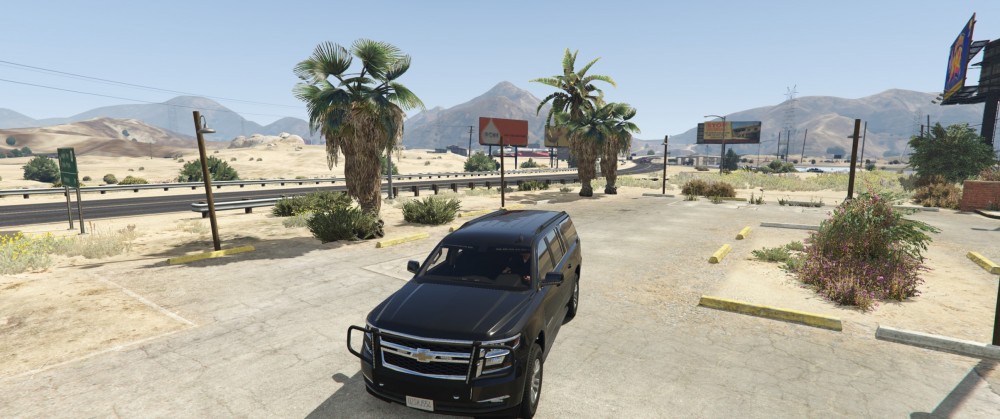
-
The "CommunityEngagementEvent" doesn't seem to work properly for me. Fuel consumption on the helicopter drops to zero within seconds of taking off, the K9 doesn't catch me until I let it and then it kills me when attacking (every time) and the patrol vehicle demo always fails on noise even if I'm simply turning my lights on with no sound. The "UnauthorizedCamping" event usually ends with at least one suspect fleeing the scene at point or another. After catching and detaining the ped, going through the motions etc, their blip doesn't vanish after police transport arrives. It remains until I reset the game. I'm getting crashes on "BurglarySilentAlarm" 9 times outta 10 (usually in the downtown area) and every time on "HeliLocateSuspect". I've never had a "BarricadeHostageSituation". I believe DamageToProperty" is the spray paint callout? If so, I can't always pickup the evidence, even when marked on my map with a green blip. Otherwise a fun, unique pack 🙂
- 546 comments
- 103 reviews
-
 Does anyone know if the keybinds "Ctrl, Alt + L" can be changed, and if so, how? I couldn't find anything in the .ini and can't ask the author given they haven't been active for quite sometime. I'd like to match them to my "hide minimap" keybind so I can hide both at the same time. *EDIT* Anyone?
- 220 comments
- 55 reviews
-
 Seen (and downloaded the update.) I'll check it out after I put my son to bed 👍
- 51 comments
- 7 reviews
-
-
- 1
-
-
Glad to hear the STP issue might still happen. Best of luck with your finals!
- 1,005 comments
- 68 reviews
-
-
- 1
-