


dumbrellas
Members
-
Joined
-
Last visited
-
-
-
-
 You'll ideally want to create the arrest report before you call for prisoner transport or drop them at the station.
- 1,005 comments
- 68 reviews
-
-
Start with this and see if it helps. If no dice, I'll help you out on discord. If you really want to achieve this, you could edit the vehicles.meta for the vehicle you want to use thats not a police car and add the FLAG_LAW_ENFORCEMENT and FLAG_EMERGENCY_SERVICE flags. That should work in theory.
-
Glad to hear it. Fingers crossed for an LSPDFR+ update sometime soon 😄
-
I've had good experience on 0.4.1 with (All of these run simultaneously mind you) PeterUCallouts, Tacco Highway Callouts, and More Robberies for callouts. I also use ELS, Interaction+, Ultimate Backup, StopThePed, Computer+, Traffic Policer, Police SmartRadio, and VocalDispatch. So far it's fairly stable. The occasional crash when too much gets thrown at it. I just recently added Computer+ into the mix. If you try all of these and something is acting up, Computer+ is probably the prime suspect.
-
Maybe. Go one at a time, play for a little bit and add more callouts as you go. It could just be one of them causing issues.
-
Hopefully this is the right forum for this. Currently using NVR + Radiance V. I am wondering how to tone down the blue streak glow around headlights as seen in this image. I am familiar with how to edit visualsettings.dat, etc, but have no idea what controls this.
-
-
 What Avibaba said is correct. This is not an LSPDFR plugin or an ELS plugin for the game. This is for the Elgato StreamDeck hardware device. Simply put, the StreamDeck allows you to press a key on the pad to simulate a keyboard press. This is a profile for the StreamDeck which includes icons to resemble a siren controller inside of a police unit. If you have the StreamDeck and are looking for some more immersion, this will be a perfect match. A quick example of how it works is once you install the profile, if you press the LGST+ key for example, that's the equivalent of pressing the "J" key on your keyboard. Nothing more, nothing less. So instead of pressing the keyboard to handle ELS lights, you would use the StreamDeck, or both. Just a little more immersion. I'll try and get a video together this weekend.
- 12 comments
- 1 review
-
-

- 1
-
-
-
Make sure ragehook is the latest. Then make sure ragehook is set to -Windowed mode in the options. GTA5 must also be in DX11. Start there and let me know.
-
**These are now fixed in v1.1** Realized a couple of things off the bat: - My nightlight keybind is incorrect in StreamDeck. Will be fixed next upload but is easily fixed on your end - The wail, yelp, piercer, and hi/lo probably don't need an "on" state light as you'll be flipping between them often. If they're on, you'll need to turn them off before switching every time and that honestly sounds like a giant headache. I'll fix this for the next upload as well. You can fix this yourself by turning each key from a toggle into a regular hotkey, setting the keybind and using the "off" state icon. Best
- 12 comments
- 1 review
-
Elgato StreamDeck ELS profile & icon set. More to be added and updated. Expand the spoiler for install info and FAQ:
- 12 comments
- 1 review
-
-
- 2
-
-
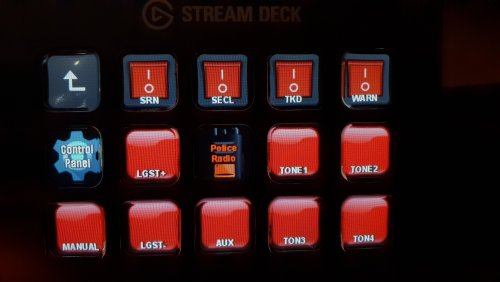 Works great right out of the box. I think I might have a go at creating some custom icons. Great use of the stream deck!
- 13 comments
- 3 reviews
-
X4vBond reacted to a comment on a file:
Interaction+ | Lite Computer System | Field Sobriety Test | Field Test Kits
-
Yes. You need to create an arrest report on the computer in the vehicle if they've been arrested. If it's just a citation/summon, create it in the computer and give it to the ped before you end the call/dismiss them.
- 1,005 comments
- 68 reviews
-
-
- 1
-
-
Do you personally use Computer+ at all? Just trying to decide if it's even worth it at this point and just use the one in this mod. So many keybinds to make sure are all free/compatible.
- 1,005 comments
- 68 reviews
-
Not sure, right now I'm making sure I'm being very procedural during a traffic stop to rule out user error. I was just able to perform a horizontal vision test with no issue and then subsequently trigger StopThePed on the driver to perform a pat down and the arrest itself and that seems to work. So far maybe it was just a fluke but I'll keep at it and trying different scenarios. I thought also it might have been some overlapping keys so I ensured I disabled all the LSPDFR 0.4 default traffic interaction keys so I would solely be using Interaction+ and StopThePed. I also use Computer+ and I'm not sure if there is compatibility as far as peds and their offenses. One lady in Computer+ was showing a suspended license but when I interacted with her through Interaction+, it came back valid. Again, might have been a one-off. Thanks for all the hard work on this though, its such essential functionality and when its all working smooth it's perfect.
- 1,005 comments
- 68 reviews

