Yard1
Friends of LSPDFR
-
Joined
-
Last visited
Everything posted by Yard1
-
 Just use OpenIV and get the model names from the RPFs. The low end gameconfig has the same amount of traffic as vanilla.
- 1,524 comments
- 85 reviews
-
Yep, noticed it yesterday, I'll upload a fixed version.
-
Yeah, I'll try to add some extra equipment to the cars. And thanks :)
-
-
Did some more things: Also, the standalone gresley will be released (finally!) when I make the lightbar look better. And maybe I'll get the slicktops out. Maybe.
-
They should show up if you've installed RDE and then this addon.
-
Why won't you people read the readme?! It says there that you must install your vehicles to rde/dlc.rpf I need some sort of a counter saying how many times I've said that already.
-
Install them to rde/dlc.rpf. I have said that 5 times already and it's also in the readme. Try putting this in update.rpf/common/data/ai and see if it fixes the aggressive peds. http://www.mediafire.com/view/4qhk4yql6g4vfwi/combatbehaviour.meta
- 1,524 comments
- 85 reviews
-
-

- 1
-
-
Looks scary! Did you put all the model files to the dlc.RPF (ydd and YTD)? I have answered this question 2 times in the last comments, countless times on gta5-mods and the answer is also in the readme nobody seems to read.
- 1,524 comments
- 85 reviews
-
https://www.gta5-mods.com/misc/rde-vehicle-spawner Grand Theft Auto V\mods\update\x64\dlcpacks\rde
- 1,524 comments
- 85 reviews
-
Yea, popcycle.dat. Read about it in the net. However, you must also make sure all the values for an area equal 100, otherwise it will bug out (add 1 to one popgroup, remove 1 from the other).
-
0.2% chance of spawning, so that means it's 2 in 1000 :)
-
The possibility of a patrol spawning in the county is very low, you might have just been unlucky.
-
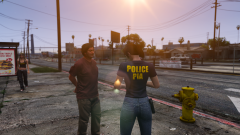 Patriotism and immigration Authority, which is GTA's counterpart of US Immigration and Customs Enforcement (with some Customs and Border Protection thrown in). PIA appeared in GTA IV.
 -
Do you have the BCSO add-on? Because it overwrites the textures for sheriff vehicles. Try putting the models in BCSO/dlc.rpf
- 1,524 comments
- 85 reviews
-
https://www.gta5-mods.com/misc/rde-vehicle-spawner Never heard of that happening. Try installing RDE without any other mods, it might be a conflict.
- 1,524 comments
- 85 reviews
-
 Yeah, I'd actually have to force myself to make something, so this is the main problem :P
 -
Drop the files you have modified to the respective locations in rde/dlc.rpf.
- 1,524 comments
- 85 reviews
-
-
- 1
-
-
It'd be the best to do a clean install, but you should be fine with installing RDE over the old versions.
- 1,524 comments
- 85 reviews
-
My guess is you haven't removed all the references to the vehicles you have removed. Check popgroups.ymt and vehiclemodelsets.meta. Does it crash when you don't make any edits? They will be overwritten, however you can just install your models and textures to the rde/dlc.RPF so they will overwrite RDE's files, as stated in the readme (please read it next time :) ). Alternatively you can remove models and textures from rde/dlc.rpf, provided they are not vehicles added by rde (such as police5).
- 1,524 comments
- 85 reviews
-
 My new "major" updates tend to have a lot of bugs, so bear with me :P It should all be fixed now, though.
- 19 comments
- 5 reviews
-
-
It's in Realism Dispatch Enhanced - I should really release it standalone at some point.
-
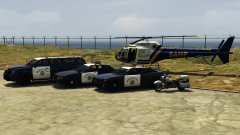 No Gresley? :(
 -