


Yard1
Friends of LSPDFR
-
Joined
-
Last visited
Everything posted by Yard1
-
woop woop 20% more tacticool
-
3
-
 @JacobKazmierczak Well, it should work. Make sure you are replacing the gameconfig.xml file in the correct folders (mods). Aside from that, I am stumped.
- 1,523 comments
- 85 reviews
-
@JacobKazmierczak, do you have any other mods installed? @PantherP71, as above - do you have any other mods? Have you installed the file under "IMPORTANT" part of the description?
- 1,523 comments
- 85 reviews
-
Took me long enough:
-
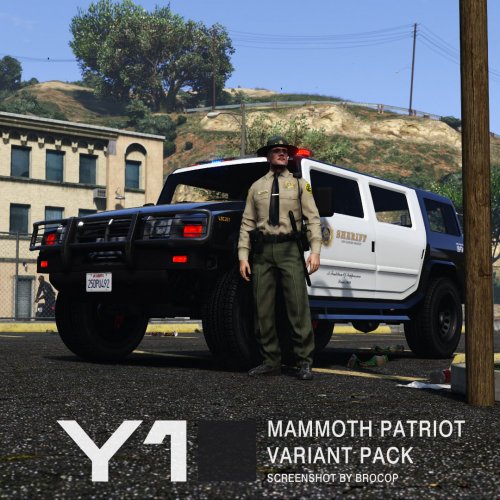 This is a Mammoth Patriot (patriot) mapped to support liveries. Included are two variants with different lightbars - one with default GTA V one, and the NOOSE one with a custom made LED lightbar (made out of default parts) inspired by Whelen Liberty (as used on my other SAHP and NOOSE cars). Included in the archive are 4 High Quality (4096x4096) and 4 Standard Quality (2048x2048) skins and PSD files with editable unit number layers (LSSD only) for both High Quality (4096x4096) and Standard Quality (2048x2048) allowing you to make additional unit numbers, should you wish to do so. -------------------------------------- Installation: IT'S VERY IMPORTANT THAT YOU FOLLOW THE INSTRUCTIONS CAREFULLY. MAKE BACKUPS! Install with OpenIV. For NOOSE variant, use sirensetting 13. -------------------------------------- This download is exclusive to LCPDFR.com and GTA5-mods. Feel free to edit the file, just make sure to credit me. However, don't re-upload if you have not changed anything. Model by Rockstar Games, NOOSE skins by AlexVonShep (using Abraxas's source materials), UV-Map, template, assembly and LSSD skins by Yard1.
- 3 comments
- 2 reviews
-
-

- 9
-
-
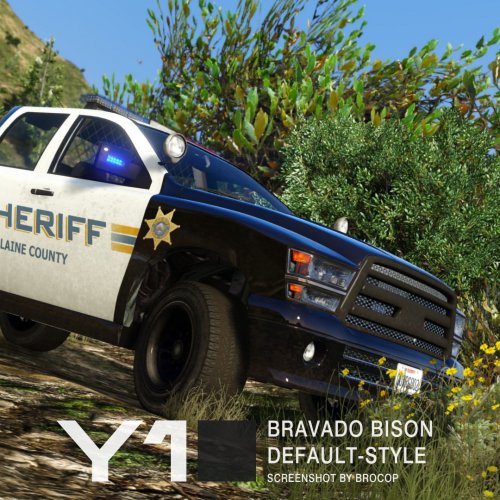 This is a Bravado Bison (bison) mapped to support liveries and a lighting setup as on the default Sheriff Granger (sheriff2). Included in the archive are 2 Standard Quality (2048x2048) Blaine Country Sheriff's Department skins by AlexVonShep. -------------------------------------- Installation: IT'S VERY IMPORTANT THAT YOU FOLLOW THE INSTRUCTIONS CAREFULLY. MAKE BACKUPS! Install with OpenIV. -------------------------------------- This download is exclusive to LCPDFR.com and GTA5-mods. Feel free to edit the file, just make sure to credit me. However, don't re-upload if you have not changed anything. Model by Rockstar Games, skins by AlexVonShep, UV-Map, template, assembly and by Yard1.
- 11 comments
- 4 reviews
-
-
- 11
-
-
It does, those kinds of light bars are still used by CHP today, although they are being replaced by the new ones.
- 1,523 comments
- 85 reviews
-
-
Waiting for brocop to get the screens :)
-
To be honest, I was hoping for BF2143, as 2142 was my favorite Battlefield, but oh well. I don't think I'll buy this one.
-
Have you used the gameconfig.xml linked to in description (under IMPORTANT)?
- 1,523 comments
- 85 reviews
-
GIMS EVO is a plugin for a modelling program 3ds Max that when updated, will allow for modifying the component models. Right now the very models of components can't be modified. I presume you mean swapping ped components in peds, right?
-
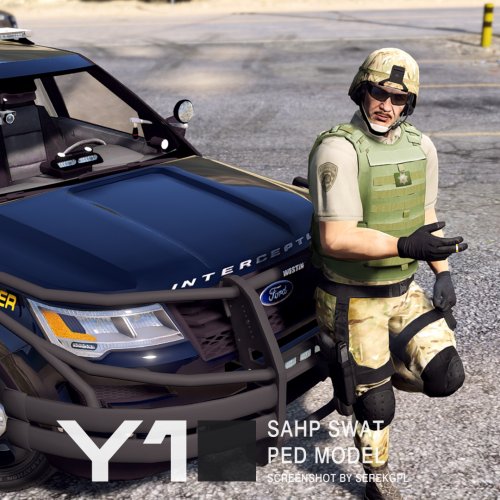 Just change the "sahpswat" in file names to "swat" (so it's s_m_y_swat_01) and place them in either RDE dlc.rpf or the latest patchday
- 8 comments
- 2 reviews
-
Also, Bison and Patriot will be released the week hopefully.
-
 http://www.lcpdfr.com/files/file/11253-sahp-swat-ped-model/
 -
This mod is a model and texture replacement for Realism Dispatch Enhanced's SAHP SWAT (s_m_y_sahpswat_01) ped. Using Zmodeler 3, this is a custom ped made from existing parts edited to fit together in order to provide a semi-accurate representation of the real life CHP SWAT officers. This model can be used without RDE, just rename the files to the name of the ped you wish to replace and put them in the correct locations. This ped model will be inculded in RDE 3.0 and beyond. -------------------------------------- MAKE BACKUPS OF ALL CHANGED FILES! Installation: Install with OpenIV: Files from "Model and textures" folder (assuming Realism Dispatch Enhanced or GTA Realism is installed): - "rde_componentpeds" folder to update\x64\dlcpacks\rde\dlc.rpf\x64\models\cdimages\rde_componentpeds.rpf - "rde_componentpeds_p" folder to update\x64\dlcpacks\rde\dlc.rpf\x64\models\cdimages\rde_componentpeds_p.rpf Cop Holster plugin config: [Ped:S_M_Y_SAHPSWAT_01] FuncHolster=True FuncIntim=True FuncIntimMesh=8:0,8:1 8:0=8:1 -------------------------------------- This download is exclusive to LCPDFR.com and GTA5-mods. Feel free to edit the files, just make sure to credit me. However, don't re-upload if you have not changed anything. Made by Rockstar Games, Edits and textures by Yard1, Headset model by DICE, ripped by gianlucagp at facepunch.com, Multicam Camouflage pattern by AlexVestin @ forums.bistudio.com Special thanks to Lundy and c13. Screenshots by SerekgPL.
- 8 comments
- 2 reviews
-
-
- 9
-
-
Exactly.
-
When GIMS gets updated, it will be possible :)
-
Thanks to OpenIV 2.8, we can swap ped components around, just like in GTA IV :D RDE 3.0 will take advantage of this. Expect more! Based on:
-
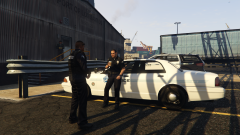 RESPECT MAH AUTORITAH Skin and peds by Dying, to be included in RDE 3.0.
 -
Ask @AlexVonShep!
-
No, the version I am talking about has not yet been released anywhere.
-
It appears to be fixed in the beta version we are using. I'll see if Dila can make such a gameconfig. We do not plan to add any of the vehicles mentioned, but we will add an USCG Swift helicopter.
-
Every second week, thank you very much :)

