


Yard1
Friends of LSPDFR
-
Joined
-
Last visited
Everything posted by Yard1
-
When I feel like it :) IDK, I don't really feel like modding GTA V now, and I won't have much time in the coming weeks.
-
At this point it wouldn't really be worth the effort. Besides, they look nearly identical.
-
Maybe use an external site to upload images, like imgur?
-
yeah, it's almost done
-
I have the vanilla ambo mapped, maybe it will be out at some point. As for new ambos, I am not sure. Maybe later?
-
-
-
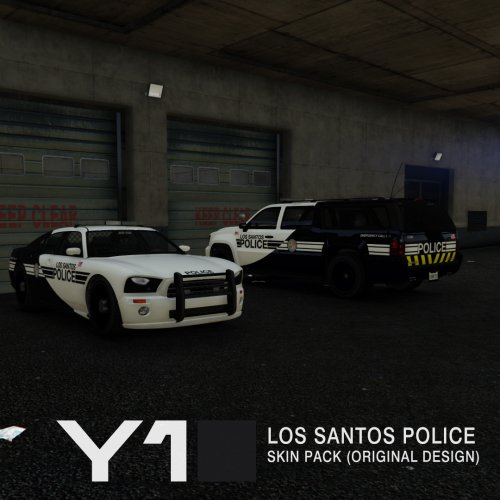 Why the hell not. If people like this, I can make skins for more vehicles. Watch and see what MLP has forced me to do!
- 13 comments
- 2 reviews
This is a Los Santos Police skin pack featuring my original design (not based on any real life department). Following vehicles are covered: Bravado Buffalo Declasse Granger Vapid Interceptor Vapid Stanier (Cruiser) There are 4 High Quality (4096x4096) skins per vehicle, and PSD files with editable unit number layers allowing you to make additional unit numbers, should you wish to do so. -------------------------------------- Installation: IT'S VERY IMPORTANT THAT YOU FOLLOW THE INSTRUCTIONS CAREFULLY. MAKE BACKUPS! Install with OpenIV - replace the textures in the relevant vehicle's ytd files. -------------------------------------- This download is exclusive to LCPDFR.com and GTA5-mods. Feel free to edit the file, just make sure to credit me. However, don't re-upload if you have not changed anything. Made by Yard1.- 13 comments
- 2 reviews
-
-

- 2
-
I am pretty sure that unlike GTA IV, extra textures won't appear on the model, as they are controlled by some other file (probably those ymt files that are alongside peds - they are currently uneditable).The Patriot and the Bison have been delayed since AlexVonShep kept finding issues xD Anyway, I'll up them soon (I hope). So I wanted to make some My Little Pony themed skins for April Fools, but I didn't finish them in time. As I've put quite some work and attention to detail into them, it would be a shame to let them sit on my drive. Would anybody be interested? I'd also make LSPD versions. The designs are 100% original and not based on any real-life department.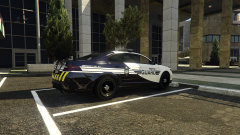 This is too much fun :D Should I release? The design is once again original. https://imgur.com/a/le036 Also - LS version here: https://imgur.com/a/apX2Z
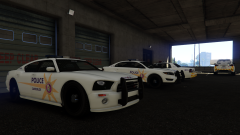 The model, right? RDE or here -
Says the guy who made this: And not even for April Fools :D
Dedicated to @Lundy. Wanted to upload this as an April Fools joke, but I didn't finish it in time. Still, the design is 100% original - maybe an LSPD version wouldn't look so bad? Should I go for it? https://imgur.com/a/5SLhYUh, not really. But since it only took a minute, here: http://puu.sh/o2w0U/6e4d08ea01.7z Only halogen lightbar (not as an extra).Some cars have lightbars as separate extras, and if they had FLAG_EXTRAS_ALL , they would spawn with both lightbars on. Then again, it's dependent on individual car models.Not sure I'll have the time in the coming weeks :(
The model, right? RDE or here -
Says the guy who made this: And not even for April Fools :D
Dedicated to @Lundy. Wanted to upload this as an April Fools joke, but I didn't finish it in time. Still, the design is 100% original - maybe an LSPD version wouldn't look so bad? Should I go for it? https://imgur.com/a/5SLhYUh, not really. But since it only took a minute, here: http://puu.sh/o2w0U/6e4d08ea01.7z Only halogen lightbar (not as an extra).Some cars have lightbars as separate extras, and if they had FLAG_EXTRAS_ALL , they would spawn with both lightbars on. Then again, it's dependent on individual car models.Not sure I'll have the time in the coming weeks :( It's a mistake that will be fixed in the next patch, sorry for inconvenience.
- 1,524 comments
- 85 reviews
i imagine adding more livery items to the vehicle's entry carvariations.meta could work, as all police cars have 8 by default. Then again, that could very well be the hardcoded limit.Yeah, I moved it back a bit.i just checked the wheels, it works fine in game. I suppose that's a R* editor bug or something.Haha, that too I suppose xDIt's very strange, because i only replaced the wheel model (taking great care to make sure it was the same size as the previous wheel), leaving dummies and collisions unchanged. I'll try to redo it.

