


trewq34
Members
-
Joined
-
Last visited
Everything posted by trewq34
-
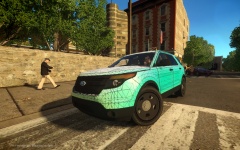 Good job on the improvements! All you're missing is a more realistic texture for the front indicators - I suggest KevinDV's texture
 -
![LCPD Highway Patrol - Chevrolet Caprice PPV [FINAL]](//s3-gallery.int-cdn.lcpdfrusercontent.com/gallery/album_3549/sml_gallery_29300_3549_2437437.png) Look sweet! Can't wait for the release. Keep up the work ;)
Look sweet! Can't wait for the release. Keep up the work ;) -
That model isn't unlocked. The fact that it's "Open" simply means the author is still working on it.
-
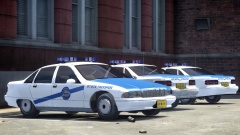 Good job, Ringo! Will definitely be downloading as soon as it's available
 -
Notch, the creator of Minecraft, has left Mojang. He posted on his website - notch.net - around 5 minutes ago. But his website is now down. He then tweeted a link to a pastebin, here it is: http://pastebin.com/n1qTeikM
-
^^ Not necessarily. You can just edit the visualsettings.dat by yourself. (Using this tutorial). Also, make sure to replicate that in the TBoGT folder too!
-
Not as if the NYPD is some dept that nobody has heard of...
-
It is indeed an issue with the model. You'd have to contact whoever made the model and ask them to lower their seat dummies - let me elaborate... In a car model, there are dummies (the little blue/green boxes). These dictate certain aspects of the car. For the seat positions it would be seat_dside_f, seat_dside_r, seat_pside_f and seat_pside_r. To put those into normal words, seat_dside_f, for example, is the location of the driver's seat - ie. where the player model goes (doesn't have to be on the front seat, but it'll look damn weird if it's not). Furthermore, seat_pdside_f would be the front passenger seat. Now, you asked if you could do it... you can't, unless you have access to the unlocked model, in which case, just select the dummies and move them accordingly.
-
The part that you want to light up would be mapped to any texture (doesn't matter which, as long as it has the colour that you want) - denoted by "xyz". The material would be called xyz lightsemissive and the part would be attached to something like chassis or bodyshell, etc. So to recap, map the part to a lightsemissive material and attach it to chassis etc.
-
It's no longer available. You could try and ask KevinDV for a copy, since I believe he made the model.
-
Sam provided a PedVariations replacement, have you tried that? In case you haven't, here it is: // --------------------------------------------------- // EXAMPLE PEDVARIATIONS.DAT REPLACEMENT // --------------------------------------------------- #model no. of variations we are setting values for M_Y_COP, 10 #slot geometry BULK JOB SUNNY WET MAT1 RES1A RES1B RES2A RES2B AUDIO ID feet, 0, 0, 1, 0, 0, 0, -1, -1, -1, -1, 1 head, 2, 0, 1, 0, 0, 0, -1, -1, -1, -1, 10 head, 0, 0, 1, 0, 0, 0, -1, -1, -1, -1, 6 head, 1, 0, 1, 0, 0, 0, -1, -1, -1, -1, 6 uppr, 1, 0, 1, 0, 0, 0, 2, 1, 100, 1, 3 uppr, 0, 0, 1, 0, 0, 0, 2, 1, 100, 1, 1 lowr, 0, 0, 1, 0, 0, 0, -1, -1, -1, -1, 1 suse, 0, 0, 1, 0, 0, 0, -1, -1, -1, -1, 1 p_head, 0, 1, 1, 1, 0, 0, -1, -1, -1, -1, 0 p_head, 1, 1, 1, 0, 1, 0, -1, -1, -1, -1, 0 end EDIT: These were in Sam's readme file.
-
Photoshop, Paint .NET, GIMP, etc. Copy and paste the design, then flip it so it's the same. (You will need to copy and paste the text separately.)
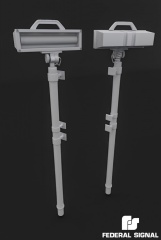 It's just over 4700 trianglesIt would be best asking on Prepar3D's forums. The link can be found on their website under the "Community" tab.It could be the pack contains high poly cars, which your system can't handle - ie. it's running out of memory and thus it begins to 'de-load' the textures.Do you have any vehicle mods installed?What are your specs and in game settings?I had a similar problem when changing my ENB a couple of days ago. I managed to solve it by deleting my savegame. Have you tried that? If not, look below, if you have, ignore the rest of this post. If you're using XLiveless, then your savegames are located in your documents folder: C:UsersYour UsernameDocumentsRockstar GamesGTA IVsavegames It's best to delete the "savegames" folder completely. If you're using DSOUND, then your save games are located here: C:UsersYour UsernameappdatalocalRockstar GamesGTA IVsavegames Again, delete the entire "savegames" folder if you can.I managed to find this: http://www.gta4-mods.com/misc/g4s-estonia-cash-transporter-mercedes-sprinte-f19097. I believe it comes with a template so you can plaster it with bank logos etc. But G4S does money transfers from businesses.Firstly, the interior would need a bit of a change; however not much. The steering wheel and the speedometer are the biggest noticeable changes: Another change is there are small chrome tabs in the grill, only for the hexagonal grill, however. Also, the rims on a 2003 and 2011 are different, but on Cj24's model, the 2011 ones are used, so I won't cover that. That's all the main ones I've noticed. There may be a few others but as I say, I haven't noticed them. EDIT: Added a third interior pic.Read the logDoes the car work fine in game?Define old. 10 years? 30 years? 40 years? 100 years? 2000 years? EDIT: You just setup the lightbar similarly to a non-ELS lightbar. But instead you move the dummies so they are not visible.Which model?
![LCPD Highway Patrol - Chevrolet Caprice PPV [FINAL]](http://s3-gallery.int-cdn.lcpdfrusercontent.com/gallery/album_3549/sml_gallery_29300_3549_2437437.png)

