




Yasd
Community Team
-
Joined
-
Last visited
Everything posted by Yasd
-
CompuLite from Bejoijo post the log again.
-
Hello! Please remove: Ambient Emergency Response, Better EMS, Computer+ Please update: MCCallouts, Variety Callouts Install RawCanvasUI from CalloutInterface in the main gta folder.
-
Post the Ragepluginhook.log from the main gta folder and describe what you were doing ingame.
-
Hello! You are missing NAudio.Core.dll from MCCallouts, install it in the main gta folder. If you open the downloaded MCCallouts folder, make sure you installed all .dll files in the main gta folder.
-
-
-
This topic has been moved to the appropriate forum. Please post in the correct location in the future.
-
Hello, pls updat AdvancedHook from the ELS download.
-
Try to remove/ update ScripthookVDotNet with the nightly version.
-
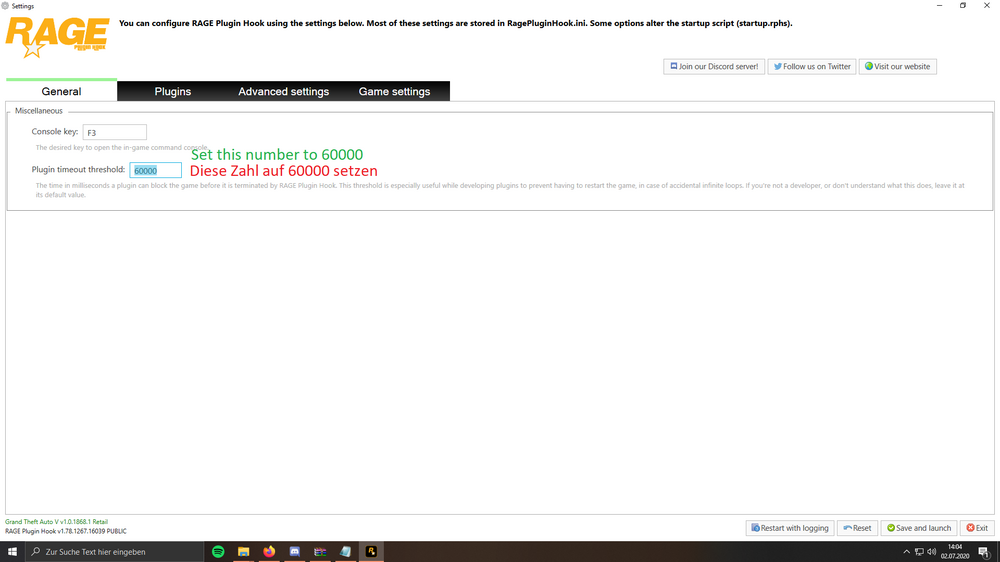
1. Update RageNativeUI in the main gta folder. 2. Set your RPH plugin loading time to 60000.
-
Try this and use the x64 version https://dotnet.microsoft.com/download/dotnet-framework/net462 Your topic has been moved to GTA V Support, this is not LSPDFR related. Please post in the correct location in the future.
-
You need to post the full log.
-
Remove/ update ScripthookVDotNet nightly in the main gta folder.
-
Post the Ragepluginhook.log from the main gta folder.
-
This topic has been moved to the appropriate forum. Please post in the correct location in the future.
-
This topic has been moved to the appropriate forum. Please post in the correct location in the future.
-
Post the Ragepluginhook.log from the main gta folder
-
Update RageNativeUI in the main gta folder.
-
Pls upload your log, it hasn’t worked.
-
 Hello! A general fix for the freeze error is to set the rageplugin loading time to 60000. This gives each plugin more time to load before beeing forcefully stopped, but glad it solved itself 🙂
- 237 comments
- 20 reviews
-
- lspdfr callout
- rph
- translation
- legacy
-
Tagged with:
-
@AstroBurgers if you wanna take a look at it
-
Post the Ragepluginhook.log from the main gta folder.
-
Operation is not valid because the specified Rage.VehicleWindow is invalid. Caused by: EpicEvents.Events.HomlessDisturbance.Start() -> Rage.VehicleWindow.Smash() Remove EpicEvents, its outdated and lastly updated over 4 years ago. Second crash is caused by XScanner, this is a known bug, you might wanna remove this file.
-
Post the Ragepluginhook.log from the main gta folder
-
Failed to decrypt file:lspdfr/patterns.dat Temporarily remove the gtav/lspdfr folder and replace it with the one from the lspdfr download.


