




Yasd
Community Team
-
Joined
-
Last visited
-
Currently
Viewing Topic: Ragepluginhook stuck on Starting Game
Everything posted by Yasd
-
 Thanks for reporting, is it only when starting with a callout manager? Do you get anything in the log? Would be helpful if you send me the rph.log, thx! Edit: I could reproduce an issue with the v1.7.0.0, the next update will fix the issue. You can still send me the log if you get the same error. Log part:
- 251 comments
- 21 reviews
-
If you verify game files the mods folder stays untouched. It's impossible to say what is causing the crash from the mods folder. You can revert the latest changes or start a new folder.
-
This topic has been moved to the appropriate forum. Please post in the correct location in the future. In one of your logs you played for around an hour. Your log looks good, there is no fix this and its gone. Remember its a modded game and is itself somehow unstable. Make sure to have a gameconfig, heapadjuster & packfile limit adjuster.
-
You're welcome! 💯
-
Hey! 🤗 I am looking for people who test beta versions of MCCallouts before release! I am searching for translators to different languages, too! Feel free to contact me! 👍🏽 🌍
- 251 comments
- 21 reviews
-
Update AdvancedHook from the ELS download, which can be downloaded seperately there.
-
I'm afraid this doesn't help. Rename your mods folder to _mods and try again.
-
Hello & welcome! Have fun! 🙂
-
You're welcome!
-
This topic has been moved to the appropriate forum. Please post in the correct location in the future.
-
Hello, install RageNativeUI in the main gta folder: https://github.com/alexguirre/ragenativeui/releases
-
Remove ManiacCallouts and try again.
-
Disable ambient events, by adding those lines to your lspdfr.ini: Main.DisableGameBlipHiding = true Install the latest Newtonsoft.json from Section136Callouts in the main gta folder. when updatin MCCallouts, make sure to install the NAudio.dlls in the main gta folder, cause they are currently missing. Update: 686Callouts MCCallouts IGCallouts
-
Install RageNativeUI in the main gta folder: https://github.com/alexguirre/RAGENativeUI/releases Install EUPMenu:
-
This means something in the mods folder is causing the crash. Install a gameconfig, heapadjuster & packfile limit adjuster. revert the latest changes or double check them.
-
Correct, update RageNativeUI in the main gta folder: https://github.com/alexguirre/RAGENativeUI/releases
-
Thank you very much, I can't wait to see GTA VC with PDFR 🙂
-
rename the mods folder to _mods and try again
-
then download the ia64 version:
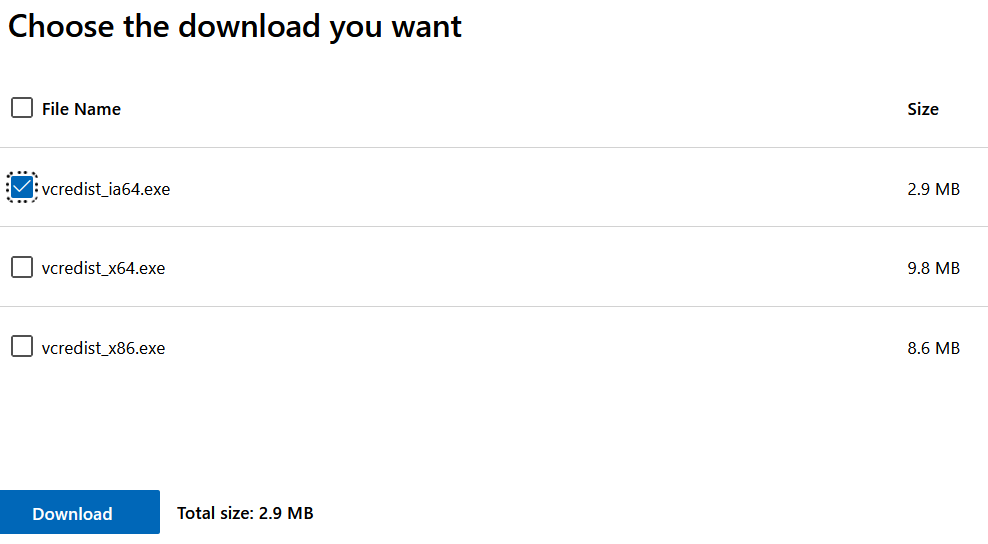
-
I dont think its possible. gta doesnt support this.
-
according to your log no plugins are loaded. you need to type in in hte console, open with f4: LoadPlugin LSPD First Response.dll
-
you need to enable directx hook for the console to work.
-
This mod is based on scripthookv and scripthookvdotnet, so it can run without lspdfr. so yes, you can use that with lspdfr.
-
This is the right one: https://www.microsoft.com/en-US/download/details.aspx?id=26999
-
Update ScripthookVDotNet nightly in the main gta folder: https://github.com/scripthookvdotnet/scripthookvdotnet-nightly/releases



