




Yasd
Community Team
-
Joined
-
Last visited
Everything posted by Yasd
-
Remove: BankCallouts IGCallouts PeterUCallouts Once your game is stable, you can try to readd those, but I do not recommend them cause they are outdated.
-
In your log lspdfr is loaded automatically on startup. then you attempting to load the plugin while the plugin is already loaded. your log doesn’t show a forced termination.
-
Exception message: Could not find a part of the path 'D:\SteamLibrary\steamapps\common\Grand Theft Auto V\Plugins\LSPDFR\StopThePed\Localization.ini'. You are missing at least one file from stoptheped. reinstall stoptheped completely.
-
Post the Ragepluginhook.log from the main gta folder. I suggest we continue in English, which will give you a fast answer. Alternatively I can move the topic to the French forum, but its not that active.
-
Reading content from file:E:/SteamLibrary/steamapps/common/Grand Theft Auto V/lspdfr/data/custom/stations_sahp.xml Exception message: Data at the root level is invalid. Line 28, position 1. the file stations_sahp.xml has an error, pls edit this file. you can use a xml checker website to help you find the error.
-
-
Hello, Update RagePluginHook from the latest lspdfr download. Additionally you might need to update your mods folder, scripthookv, gameconfig etc
-
Remember this is a modded version of gta and is somehow unstable, playing more than 2 hours it is likely to crash, there won’t be a fix in your case.
-
Please reupload the log
-
a safe way to go to his website is by installing an ablocker, otherwise you'll get strange or nsfw ads. other than that his plugins are awesome.
-
Update RageNativeUI in the main gta folder
-
Files in the gtav/plugins/lspdfr folder load as soon as you go on duty. they do not appear in the plugins tab in the Ragepluginhook settings. There only standalone plugins from gtav/plugin are listed there
-
Install RageNativeUI in the main gta folder.
-
Hey, a screenshot would be helpful! Additionally post the Ragepluginhook.log from the main gta folder.
-
Please update Deadly Weapons and replace all files, then the error should be gone.
-
Something’s wrong with the police4 vehicle. check the meta files or remove the vehicle.
-
You need admin permissions on your pc to set those permissions
-
-
Each plugin normally has a readme and tells you where it has to be installed. you can’t tell just by the name where it goes. sometimes the downloaded plugin comes with a folder structure, so you just have to drag and drop it in the gta folder
-
1.) Do you still have the same error message? 2.) Post the Ragepluginhook.log from the main gta folder
-
by default the vehicles are sheriff and sheriff2, are those your vehicle names or do you use different slots?
-
Its an issue with SimpleHud, check if you have it installed correctly.
-
Reinstalling is the last option. I suggest: Rename the folder gtav/lspdfr to _lspdfr and install the lspdfr folder from the lspdfr download. Pleae post the Ragepluginhook.log again, so I can check f.e. if you have removed the outdated plguins I told you above. If you have questions regarding these steps, feel free to ask!
-
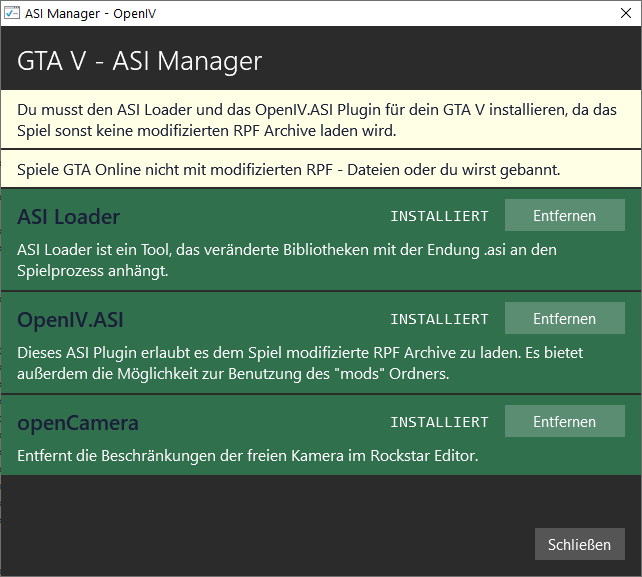
According to your screenshot, you still have an old version of AdvancedHook.dll from 2016. Download this version of AdvancedHook and install it. Make sure you have installed ScripthookV.dll with dinput8.dll in the main gta folder. In OpenIV you need to install the first two:


-
Sorry, I can see nothing, please attach the screenshots



