




Yasd
Community Team
-
Joined
-
Last visited
Everything posted by Yasd
-
Update RageNativeUI in the main gta folder: https://github.com/alexguirre/RAGENativeUI/releases
-
post the els.log from the main gta folder
-
 Du spielst mit alter GTA, LSPDFR & RPH version, für die ich leider keinen Support geben kann. Info: Es crasht an der Stelle, an der versucht wird, auf die VehicleBoneId/Index engine zuzugreifen, um diesen qualmen zu lassen.
- 251 comments
- 21 reviews
-
Aschtar has updated most of Albos Plugins some time ago, you could give it a try. Other than that, you can try Ransom Ambience, or SuperEvents
-
It will run, but at medium graphic seetings. Don't expect installing graphic mods.
-
make sure to have a gameconfig heapadjuster and packfile limit adjuster. Otherwise Rename mods folder to _mods This topic has been moved to the appropriate forum. Please post in the correct location in the future.
-
Post the Ragepluginhook.log from the main gta folder. So far I can only say you have a xml error from one of your config files
-
The crash was caused by Regular callouts, however this should be a one time issue. I recommend to remveo these outdated pluigns, cause they are likely to crash your game in the future: Arrest Manager CalloutManager LSPDFR+ TrafficPolicer Good alternatives would be: StopThePed CalloutInterface
-
If you read the message above, I invite you to test a possible fix, too! Join my discord server for it! 👍
- 251 comments
- 21 reviews
-
-

- 1
-
-
1. You are missing CalloutInterfaceAPI from CalloutInterface in the main gta folder 2. You are missing all .dlls required for MCCallouts in the main gta folder. 3. You are missing MyOfficerIni, which is probably the .ini and System.Data.SQLite from Attempted Crime Callouts. Your topic has been moved to LSPDFR 0.4 Support. Please post in the correct location in the future.
-
https://support.rockstargames.com/articles/360036000713/How-to-verify-game-files-in-the-Rockstar-Games-Launcher
-
Hello, update RageNativeUI in the main gta folder: https://github.com/alexguirre/ragenativeui/releases
-
Open a new thread in the support forum section and attach the Ragepluginhook.log from the main gta folder
- 251 comments
- 21 reviews
-
Command line option -nodx is specified. DirectX will not be initialized. Untick the option in the RPH settings
-
@GlitchGamingHD @Filipinogroyper59 @BlueLine Vibes Since I can't reproduce this crash, I would like you invite you to my discord server, there I will send you a beta version hopefully with the fix for you to test. Let me know if you're interested! 👮🏽♂️
- 251 comments
- 21 reviews
-
-

- 1
-
-
Verify your game files.
-
Next time use a xml scanner, this will show you exactly where errors like missing brackets are. https://www.xmlvalidation.com/ You are missing brackets in line 47 & 49 -> >
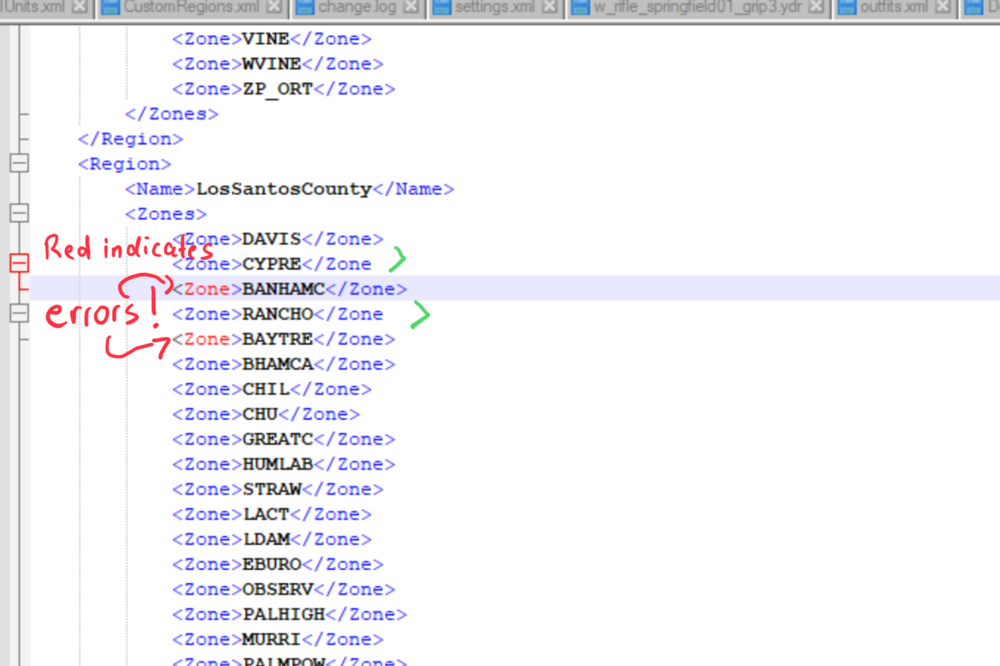
-
Why do you think the mods folder is not a problem? Rename the mods folder to _mods and try again. Command line option -nodx is specified. DirectX will not be initialized. Remove the hook from this setting in the Ragepluginhook settings, this has to be on.
-
Rockstar recently introduced the BattlEye anti-cheat system. To use mods like Scripthook V, RPH, and LSPDFR, you'll need to disable it. A new setting in the launcher allows this. To disable BattlEye, open the Rockstar Launcher, navigate to the 'SETTINGS' tab and uncheck the BattlEye setting, which is by default checked. If using third party launchers like Steam or Epic and these instructions do not work for you, you may need to create a commandline.txt file, with the contents -nobattleye or insert it into the command line arguments of the launcher. For more information, visit the Rockstar Games BattlEye FAQ.
-
XScanner caused the crash, you can remove it and/ or report it to the developer.
-
Can you post a screenshot of "lspdfr is disabled"? additionally post the Ragepluginhook.log from the main gta folder
-
Post the Ragepluginhook.log from the main gta folder make sure to have a gameconfig, heapadjuster adjuster and packfile limit adjuster Rename the mods folder to _mods and try again
-
This is often a permission or antivirus issue. Check the FAQ at page 3 and further. Make sure to: Rockstar recently introduced the BattlEye anti-cheat system. To use mods like Scripthook V, RPH, and LSPDFR, you'll need to disable it. A new setting in the launcher allows this. To disable BattlEye, open the Rockstar Launcher, navigate to the 'SETTINGS' tab and uncheck the BattlEye setting, which is by default checked. If using third party launchers like Steam or Epic and these instructions do not work for you, you may need to create a commandline.txt file, with the contents -nobattleye or insert it into the command line arguments of the launcher. For more information, visit the Rockstar Games BattlEye FAQ.
-
Attach a screenshot of the error. Post your Ragepluginhook log from the main gta folder
-
This gameconfig should be fine. Again rename your mods folder to _mods and try again.


