Yasd
Community Team
-
Joined
-
Last visited
Everything posted by Yasd
-
you need to have 2 seperate gta folders, one completely unmodded and one modded. However if you use the wrong folder one time you will be banned.
-
Lade das Plugin lspdfr. Gehe danach zu einer Polizeistation in duty.
-
Update gta, you are playing on an outdated version and the combination between Ragepluginhook/ lspdfr and and the gta version is incompatible. all your plugins in gtav/plugins/lspdfr are outdated, remove them
-
Rename your mods folder to _mods and try again
-
Post the Rageplugimhook.log from the main gta folder
-
LSPDFR has no blinkers. You probably refering to SimpleTrainer.
-
Your topic has been moved to LSPDFR 0.4 Support. Please post in the correct location in the future.
-
Nobody can tell you what exactly causes the issue, even a wrong set bracket in a text file can cause a crash. Again rename your mods folder to _mods to check if the mods folder is the issue for the crash. If it works then, again something in this folder is causing it. Since you haven't installed much, I recommend you to: - install every single mod one by one and start gta each time to see if it works. (You can also install 2 or a few mods nad then test it, but make sure to make small packs instead of installing all at once)
-
Your issue is in your mods folder, revert the latest changes or start a new one.
-
-
Disable ambient events, by adding those lines to your lspdfr.ini: Main.DisableGameBlipHiding = true
-
Rename your mods folder to _ mods Support is only given to the newest gta and Ragepluginhook/ lspdfr version So pls update
-
-
-
 Das hier ist eigentlich der MCCallouts Bereich und nicht der Support Bereich. Um zu testen, ob der Fehler mit MCCallouts verschwindet, könntest Du einfach mal den Mods Ordner deaktivieren, indem du ihn zu _mods umbenennst. Dann startest Du ein paar Mal die beiden "Problemcallout", um zu sehen, ob ein Unterschied da ist. Mfg
- 251 comments
- 21 reviews
-
Du hast ein Problem mit AmbientGameBlips, die kannst Du ganz einfach ohne Einschränkungen deaktivieren: Unter GTAV/lspdfr/lspdfr.ini: Main.DisableGameBlipHiding = true Das wird die Probleme nicht beheben, macht aber das Log Lesen fürs nächste Mal leichter. Aus dem Zombie-Call kann ich sehen, dass du vermutlich eine dlclist hast, die veraltet ist und manche patchdays nicht lädt/ das Spiel findet 2 Ped Models nicht. Verwendest Du gemoddete Autos abgesehen von Polizeifahrzeugen? Dein Spiel crasht immernoch, während es versucht die Engine Bone ID zu bekommen.
- 251 comments
- 21 reviews
-
-
You can change the keys in gtav/lspdfr/keys.ini
-
-
 This mod is a must-have! Due due gta's traffic light system, which is red most of the time, this mod is more then just welcome! Good job! 💯
- 112 comments
- 19 reviews
-
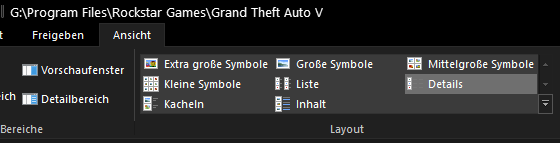
With this view we can't see dates. To fix taht go in Windows Explorer and on the top there should be an option with something like View -> Choose details and post the screenshot again
-
Thank you for reporting! It's known to me and an issue with the Update Checker. Right now pls update MCCallouts to the latest version, it will fix it temporarily. It will be completely fixed in the next update!
- 251 comments
- 21 reviews
-
Post the ScripthookV.log from the main gta folder & a screenshot of the gta folder to see the files and dates.
-
Your crash occured after LSPDFR tried to start a callout from ForestyCallouts. If the issue persists, remove it.
-
Post the ELS.log from the main gta folder