




Yasd
Community Team
-
Joined
-
Last visited
Everything posted by Yasd
-
Mach einen neuen Topic auf schildere dein Problem und lade deine Ragepluginhook.log hoch, die ist im Hauptverzeichnis von GTA
-
Ok das ist das richtige! 🙂 Probier mal das: oder ForceDirectX10.1 Wenn das nicht geht, das oben wieder rauslöschen, und probiere folgendes:
-
I never heard of this problem. Maybe a tip, but you can try to remove one/some/all plugins and see which plugins causes this.
-
Bitte poste deine Ragepluginhook.log, diese befindet sich im Hauptverzeichnis von GTA.
-
Lol. Ich habe dir keine Tipps gegeben und du sollst nicht einen screenshot von den logs posten, sondern den Textinhalt oder die Datei hochladen 😉 Der Dateipfad dazu wäre bei dir E:/SteamLibrary/steamapps/common/Grand Theft Auto/Ragepluginhook.log Ist aber kein Problem, ich helfe gerne, sonst würde ich das hier nicht machen 😉
-
@Noah Junkz @Robsy02Kannst du GTA 5 starten ohne RPH? @maxifcb Wenn das nicht geht, probiere folgendes: @Amon Stachat Poste bitte deine Ragepluginhook.log, die ist im Hauptverzeichnis von GTA.
-
Der Log bringt mir leider nichts. Poste den Log mit dem Crash.(Programm startet gar nicht also kein Crash?) Welches Antivirenprogramm nutzt du? Probiere das Antivirenprogramm ganz auszuschalten, ebenso Firewall. Es liegt zu 95% am Antivirenprogramm
-
also laut deinem log läuft das spiel, und nach 14 min hattest du einen Crash.
-
Go back to lspdfr 0.4.2 if you have a backup (u also need gta 5 backup) or wait for an update which can take very long.
-
Attempted to read or write protected memory. This is often an indication that other memory is corrupt. -> is a known bug many users have.
-
We need "Ragepluginhook.log", its in the main directory. Click choose files... or drag and drop the txt file right in your new post.
-
@pg maxiAlso als erstes machst du einen neuen Topic auf. Als nächstes eine ordentliche Fehlerbeschreibung. Zusätzlich postest du noch die "Ragepluginhook.log", die sich im Hauptverzeichnis von GTA befindet.
-
Glaube ich nicht. Welches Antivirenprogramm hast du? Hast du einen mods Ordner oder irgentwelche Grafikmods?
-
/\ | Kannste vergessen, der troubleshooter ist für lspdfr 0.3.1. der gibt nur falsche fehlermeldungen aus.
-
Dude, you are not playing with LSPDFR 0.4.2, do you?
-
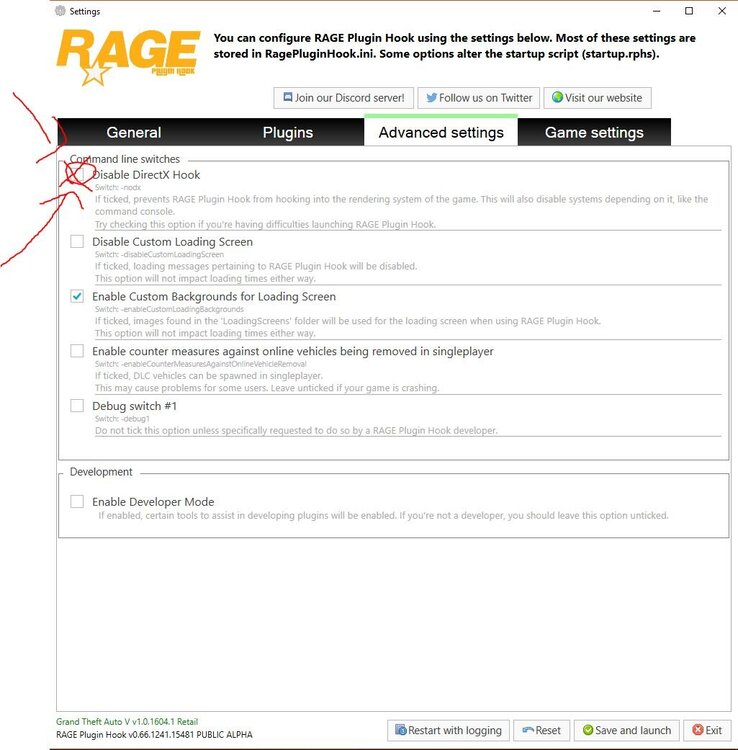
Versuch den Haken bei Disable DirectX zu machen. Wenn es dann immernoch nicht geht, Haken wieder raus machen. Wenn es immernoch nicht geht, Antivirus und Firewall ausschalten. Leave a like, if it has helped.
-
Have you already done this setup in the video at 3:36? It looks to me like you left the game too early, so the policeradio wont load.
-
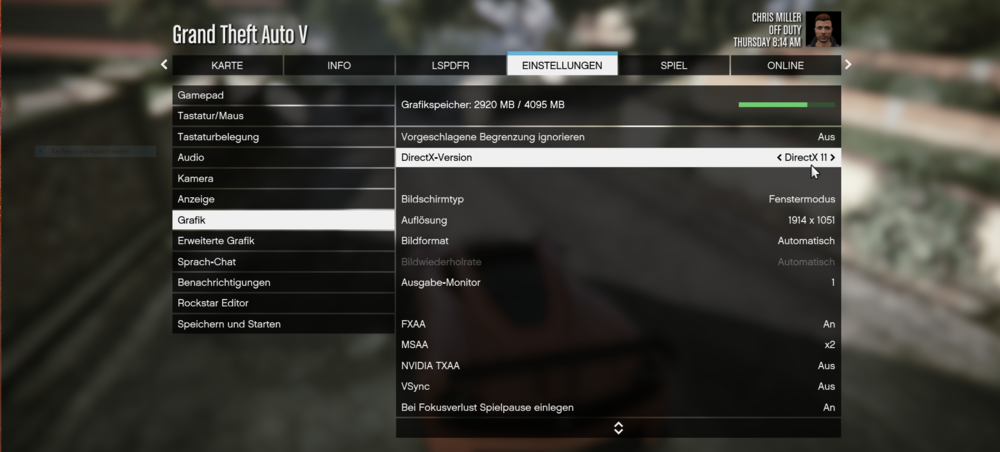
Probier eine andere DirectX Version zu installieren. Warum willst du unbedingt mit DirectX? Man kann die DirectX Version auch unter GTA 5 -> Einstellungen -> Grafik -> DirectX-Version ändern.
-
On certain systems, LSPDFR can take too long to load. If you're seeing this issue, LSPDFR will hang with a perpetual black screen and there will be an error message on the bottom left of the screen. Your log may also mention something along the lines of 'Warning! Plugin "LSPDFR First Response" was terminated because it caused the game to freeze' Fix Open the RAGEPluginHook settings menu (hold down SHIFT immediately after clicking RPH) Increase 'Plugin timeout threshold' to a higher value (e.g. 60000) Save and Launch Leave a like if it has helped.
-
You can install KDFDO, which means Keep the f***ng door open. You can hold shift or type multiple times at F to get the character faster in the vehicle.
-
On certain systems, LSPDFR can take too long to load. If you're seeing this issue, LSPDFR will hang with a perpetual black screen and there will be an error message on the bottom left of the screen. Your log may also mention something along the lines of 'Warning! Plugin "LSPDFR First Response" was terminated because it caused the game to freeze' Fix Open the RAGEPluginHook settings menu (hold down SHIFT immediately after clicking RPH) Increase 'Plugin timeout threshold' to a higher value (e.g. 60000) Save and Launch
-
With vanilla there is only a little chance of getting shot at. Ask @LMS
-
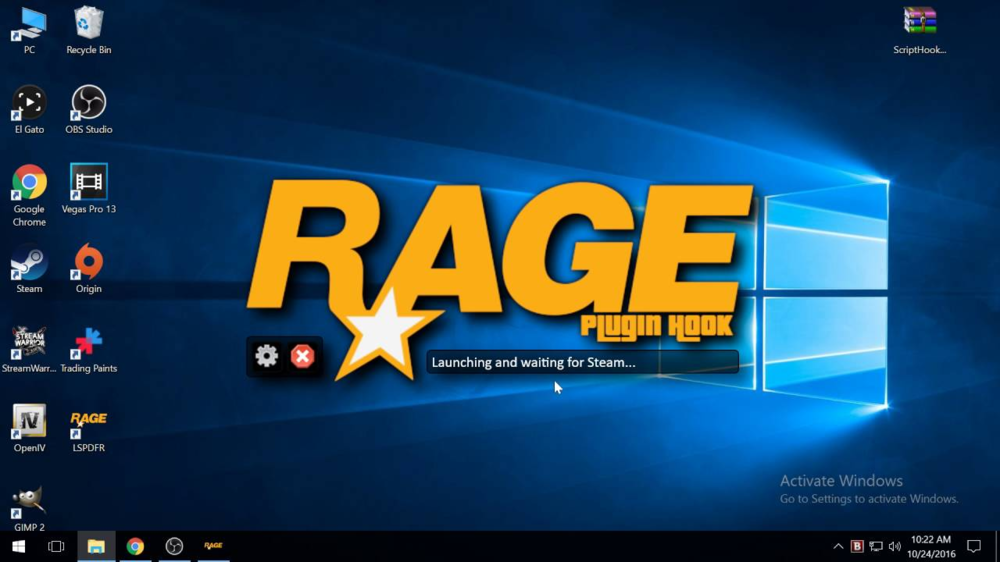
Pls post your Ragepluginhook.log. Its in the main directory of GTA. Possible solution: When starting RPH, click on the settings icon (next the red X) then, make sure, LSPDFR is checked like in the picture. Then click Save and Close.
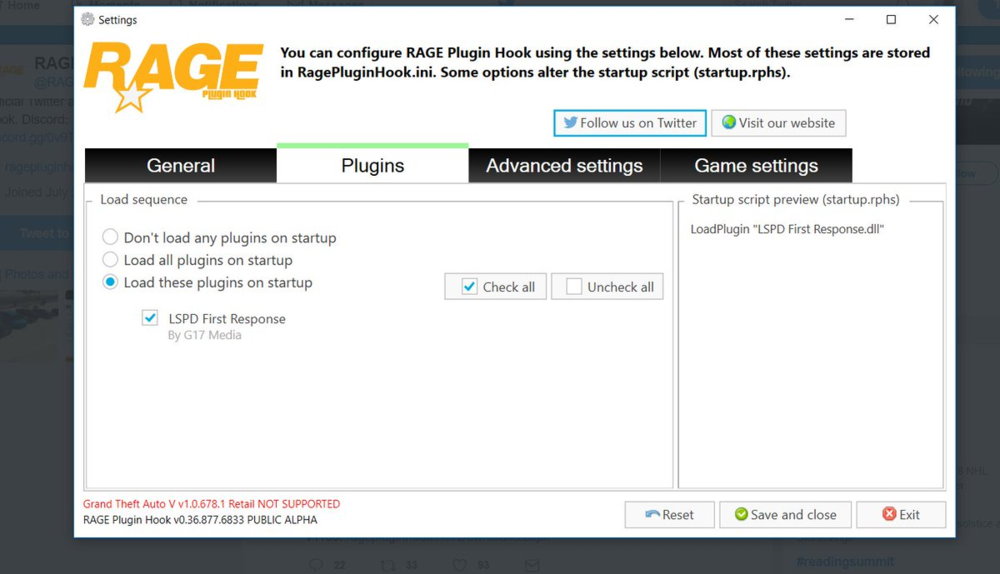
-
Possible solution: Reinstall PoliceSmartRadio [8/15/2019 8:35:02 PM.598] LSPD First Response: TowTruck Callouts1.1.0.0has been initialised - Made By Chad [8/15/2019 8:35:02 PM.605] LSPD First Response: Error while initializing plugin: TowTruck.Callouts.Main: Object reference not set to an instance of an object. at TowTruck.TowMenu.Main() in C:\Users\chadf\source\repos\TowTruckCallouts\TowTruck\TowMenu.cs:line 62 [8/15/2019 8:35:02 PM.605] at TowTruck.Callouts.Main.Initialize() in C:\Users\chadf\source\repos\TowTruckCallouts\TowTruck\Main.cs:line 21 [8/15/2019 8:35:02 PM.605] at pLuS(6cV"E\,;$o=RF (1n#Ba(.,IcDW![5<19yvZ^`,$Xa7o+W$() in E:\GTA V\LSPD First Response\LSPD First Response\Mod\Callouts\CalloutManager.cs:line 694 Possible solution: Remove TowTruckCallouts [8/15/2019 8:35:00 PM.964] LSPD First Response: Could not load file or assembly 'ParksTools, Version=3.0.6298.2824, Culture=neutral, PublicKeyToken=null' or one of its dependencies. The system cannot find the file specified. Possible solution: Remove the file (have you even installed it?) Some errors in the game. For the policeradio you can reinstall the plugin, override the new files and do a new first run setup ingame.
-
Hi, please post your "Ragepluginhook.log". Its in the main directory of GTA. Also post a screenshot of your main directory.





