




Yasd
Community Team
-
Joined
-
Last visited
Everything posted by Yasd
-
Post your Ragepluginhook.log, its in the main directory.
-
Bonjour, je m'appelle Baguette. Post francais in the french forum, and english in the english forum!
-
Post your Ragepluginhook.log from the main directory.
-
You can remove the plugin ASI Support, because have / should have ScripthookV.
-
You have posted a ragepluginhook.log file from 31.12.2019, thats 3 years ago. Are you living in the past or am I living in the future?⚠️😜
-
In this log is no crash, this time maybe a complete game crash? You can try disabling your plugins/ callouts. And you can try renaming mods folder to _mods -> disabling mods folder
-
Kevin, can you send your ragepluginhook.log please? you told me you cannot hit e to go on duty.
-
Did you install the manual version? The automatic installer is known to cause problems. What you still can do, is sending a screenshot from the main gta folder, and a screenshot of the exception from the antivirus.
-
An official ScripthookV update has come out: http://www.dev-c.com/gtav/scripthookv/
-
An official update has come out: https://github.com/alexguirre/RAGENativeUI/releases/tag/1.8.2
-
you can try to rename a vehicle, that doesnt work. for example, rename police to police2. Maybe those vehicles are broken.
-
Are you on the newest gta, lsdpfr and rph version? ELS requires ScripthookV, which is currently not supported and needs an update.
-
Details wären nicht schlecht. Z.b. das Spiel stürzt ab, wenn ich in ein Auto einsteige, es stürzt nur das Plugin LSPDFR ab, oder das ganze Spiel crasht zum Desktop. Ich habe die und die Mod installiert, außerdem police, police2 installiert usw. Außerdem die Datei Ragepluginhook.log aus dem Hauptverzeichnis anfügen.
-
I had exactly the same issue, i solved it by adding it to exception list in antivirus. But you already tried that. You can send us a screenshot of the rph settings tab, which you get by starting rph and holding shift or klicking on the cogwheel icon when starting.
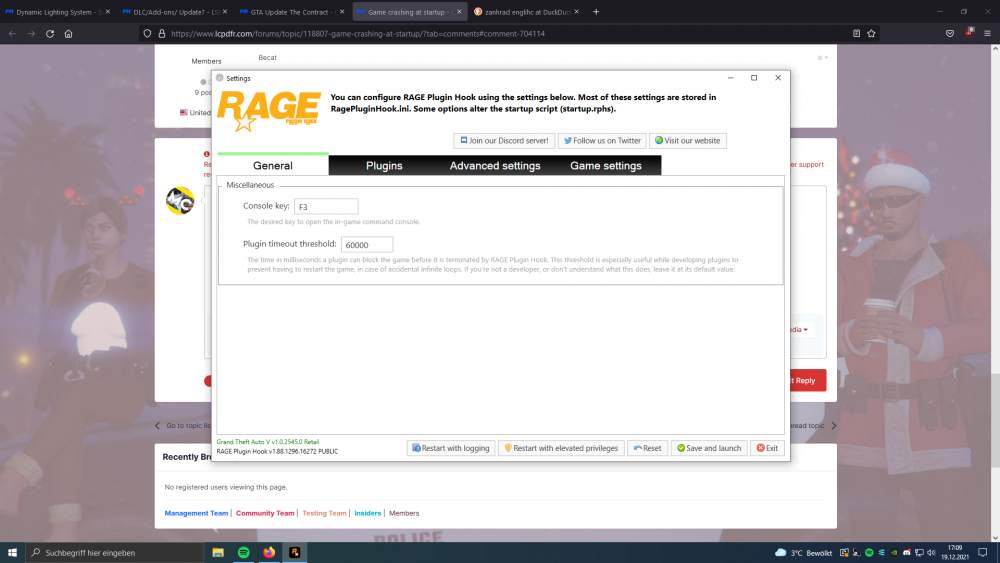
-
Hello, The new update The Contract, which has come out at December 15th. LSPDFR 0.4.9 and RPH 1.88 are already updated and compatible to newest gta game version 1.0.2545.0. RIght now, there is no ScripthookV update, which you need for most plugins.
-
Ive heard RNUI has relased a hotfix, which is not official yet. Heres a link: https://cdn.discordapp.com/attachments/788724864743637012/921696012760932382/RAGENativeUI_hotfix.zip
-
Pls post in english here, or go to the german forum. Bitte hier nur Englisch posten, oder ins deutsche Forum gehen.
-
Try to add your GTA folder as an exception in your antivirus/ windows antivivirus.
-
I would not recommend to anyone to let sb link into their computer. The problem, that comes with an gta update, is, that some plugins need to be updated. EUP will work right now, ELS requires ScripthookV, which is not updated yet (will be in a few days).
-
What you've just done was disabling the mods folder to see, if it's causing the crash. And tadaaaaaa, you have a problem with the mods folder.
-
There is no crash in the log, so you probably have a game crash. Rename your mods folder to _mods, to check, if this is the cause for the crash.
-
RageNativeUI is installed in the main directory?
-
Post your Ragepluginhook.log, please.
-
thats right, i hope you have it saved in your downloads.
-
im just letting you know updating rph and gta means you propably have to update all of your callouts and plugins, which is a lot of work. if you have a stable setup, you can keep that. right now, the error you get means you have to update gta 5. normally, this is done automatically by starting gta5 manually. i would recommend you to go back to rph v1.86.1288.16169


