




Yasd
Community Team
-
Joined
-
Last visited
Everything posted by Yasd
-
You log is in the main gta folder, called Ragepluginhook.log
-
Not at all, LSPDFR generates random owners for parked vehicles, that do not exist.
-
1. Always post your Ragepluginhook.log. 2. Rename mods folder to _mods and check, if it still crashes.
-
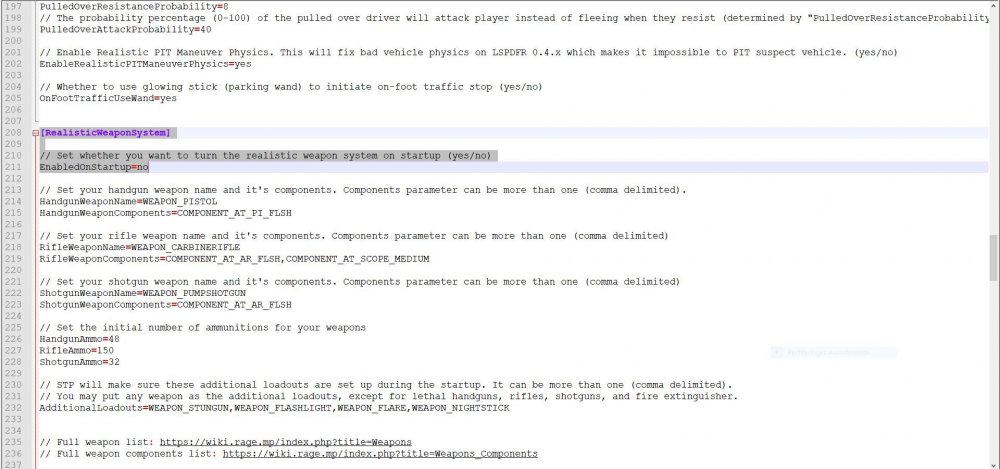
StopThePed has a realistic weapon system, which only allows you to have specific weapons. You can disable that in the StopThePed.ini and set EnabledOnStartup to no RichsPoliceEnhancements threw an error, maybe remove it.
-
post your ragepluginhook.log from main folder
-
-
1. Post your Ragepluginhook.log 2. Set your plugin loadtime to 60000.
-
Update your Callouts, for example StopThePed. Your version is known to crash when calling a tow truck.
-
1. Install RageNativeUI: https://github.com/alexguirre/RAGENativeUI/releases 2. You have installed 2 versions of StopThePed and UltimateBackup. Remove the older ones. LSPD First Response: StopThePed, Version=4.9.5.1, LSPD First Response: StopThePed, Version=4.9.5.0, remove this LSPD First Response: UltimateBackup, Version=1.8.7.0, LSPD First Response: UltimateBackup, Version=1.8.5.7, remove this
-
Install RageNativeUI. https://github.com/alexguirre/RAGENativeUI/releases
-
HAve you updated LSPDFR?
-
My Respect, @WithLithum🙂
-
what? Post your Ragepluginhook.log
-
Update RageNativeUI: https://github.com/alexguirre/RAGENativeUI/releases Charlie, Im fast as f444444444444ck boiii
-
After the game update, you have to: - update mods folder via OpenIV - update gameconfig, RadianceV (if installed) and everything in update.rpf - update ScripthookV, RageNativeUI, Trainers, LML
-
1. Always post your Ragepluginhook.log from main folder. 2. What exactly is your problem? Is your game crashing after installing STP or is it just not working? 3. You post english in the german forum? How about chosing the english one? 🤫❤️ https://www.lcpdfr.com/forums/forum/920-lspdfr-04-support/
-
Hallo, Deine Callouts sind im falschen Ordner, deswegen laden sie nicht. Der Dateipfad für Callouts muss sein: C:\Program Files (x86)\Steam\steamapps\common\Grand Theft Auto V\Plugins\LSPDFR\ (diesen Ordner evtl. neu erstellen) in diesen Ordner müssen deine Callouts: BetterEMS.dll, PoliceLifeS.dll, Traffic Policer.dll, etc. Der Dateipfad für das LSPD First Response.dll Plugin ist ein Ordner darüber(ist richtig installiert): C:\Program Files (x86)\Steam\steamapps\common\Grand Theft Auto V\Plugins\ Mit freundlichen Grüßen Chris
-
always include your ragepluginhook.log from main folder.
-
you need law and order first for that. You have to update RageNativeUI, which is causing your game to crash. https://github.com/alexguirre/RAGENativeUI/releases
-
wrong file. post your ragepluginhook.log
-
First of all, always include the RagePluginhook.log from main folder. Second, there is no Serve and protect for eup. The order to install is Emergency uniforms pack - Law & Order 8.3, and then Emergency uniforms pack - Serve & Rescue 1.5, also you need
-
I think its a LSPDFR bug, there are a few right now (apartement bug, character dies), which the LSPDFR Team propably tries to solve the next days now after the christmas days.
-
did you read my latest post? this is what i told you😜
-
so you marked that as solution, but doing what you have done means disabling everything you installed in your mods folder. so the error is in there. what did you install lately? since when does it crash?
-
I know 🤫😆😛



