Yasd
Community Team
-
Joined
-
Last visited
Everything posted by Yasd
-
https://de.gta5-mods.com/vehicles/2015-skoda-superb-unmarked-kobre-police-addon-replace-els https://de.gta5-mods.com/paintjobs/unmarked-estonian-skoda-superb
-
post your ragepluginhook.log from the main gta folder. try renaming your mods folder to _mods and try again.
-
first, post your ragepluginhook.log from the main gta folder.
-
Accept callout: You have: ACCEPT_CALLOUT_Key=Z ACCEPT_CALLOUT_ModifierKey=Y This means you have to press Y and Z at the same time, to accept a callout. You can: change ACCEPT_CALLOUT_ModifierKey=None so you only have to press Z to accept. Be careful, maybe you have to press Y, because of Qwertz and Qwerty keyboard layouts. There is no Request callout shortcut, you have to press N for the menu then police radio and then request callout.
-
post fx und shader quality müssen auf hoch oder besser eingestellt sein.
-
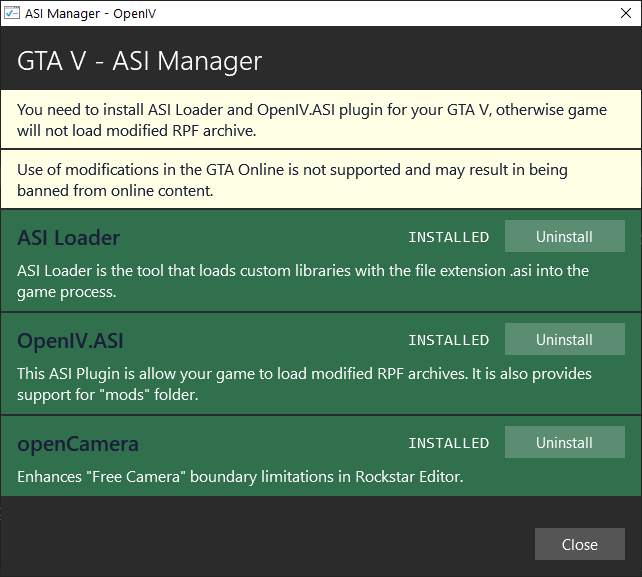
1 mal posten reicht, du hast 2 mal den selben post erstellt. öffne openiv, öffne asi manager, und entferne asiloader und openiv.asi, und installiere sie wieder. danach pc neustarten!
-
posting your error in 1 forum is enough, you do not need to put in in lspdfr 0.4 and gtav forum. thx
-
ecris dans le forum francais, ici cest englais. merci write english in this english forum, and french in the french forum thx
-
Failed to parse value for WorldEvents.IntervalMultiplier: check your lspdfr.ini in GTAV/lspdfr, it should look like this: WorldEvents.IntervalMultiplier = 1.0f WorldEvents.MaxNumberOfEvents = 1 Error while hiding ambient game blips, disable the ambient game blips in the lspdfr.ini, too. Main.DisableGameBlipHiding = true
-
Install RageNativeUI in the main directory: https://github.com/alexguirre/RAGENativeUI/releases this is not an error, you can ignore this.
-
post your ragepluginhook.log, a text file, from the main gta folder. post your keys.ini from GTAV/lspdfr, too.👍🏽
-
you have a crash report belonging to a backup menu never had one of these before
-
-
go to G:\Program Files\Rockstar Games\Grand Theft Auto V\lspdfr\chars and remove everything in there temporarily.
-
nope
-
how do you try to open speedradar lite? by default its LControlKey + I
-
what is dcontroller?🤔
-
-
I just take the thank you 🥳 But thank you ☺️👍🏽
-
@JosephM @patvmru open a new thread with your error described and your ragepluginhook.log from the main gta folder attached. 👍🏽 thanks Chris 🙂
-
try to start rph as an admin add your whole gta folder as an exception in your antivirus and in default windows antivirus, tutorial here: https://support.microsoft.com/en-us/windows/add-an-exclusion-to-windows-security-811816c0-4dfd-af4a-47e4-c301afe13b26 disable geforceoverlay do the steps on page 4 on the faq: https://docs.google.com/document/d/1Hp2Qco0qsgKfohkhjYWUxTr2OF7NSCkp8uSZwWz6rRQ/edit
-
CalloutInterface is not working, because its missing IPT.common, which you install in the main directory. The plugins are loaded normally
-
can you post your ragepluginhook.log and your asiloader.log? which graphic card do you use? update the driver?
-
is there a way to test your problem without visual v installed?
-
rename your mods folder to _mods and try again💦