




Yasd
Community Team
-
Joined
-
Last visited
Everything posted by Yasd
-
I think removing the 2 and 4 k textures should be good, but test it yourself😁
-
post your ragepluginhook.log from the main gta folder 🙂
-
this is from a LSPDFR discord server: https://discord.gg/N5qAysgh
-
perfect, thats the newest gta version. wrong, the newest gta version, 2699, is supported by lspdfr and rph. you need to update lspdfr and rph, which comes with it.
-
wrong file, post your ragepluginhook.log from the main gta folder, FAST! 😉
-
Ich empfehle dir die FAQ: https://docs.google.com/document/d/1Hp2Qco0qsgKfohkhjYWUxTr2OF7NSCkp8uSZwWz6rRQ/edit Lese nach unter: I keep getting the “Insufficient Permissions or Bad Antivirus” message. What do I do? Dort sind ein paar Schritte beschrieben, unter anderem eine Ausnahme im Antivirenporgramm zu erstellen.
-
-
-
Ich sehe keine Probleme, kein Crash im log
-
Attach a log
-
If the version number is higher it’s not a downgrade it’s an update. You can always update, but not downgrade, if you do not have backup files. just update everything to the newest right now everything is compatible.
-
It’s T Not R by default
-
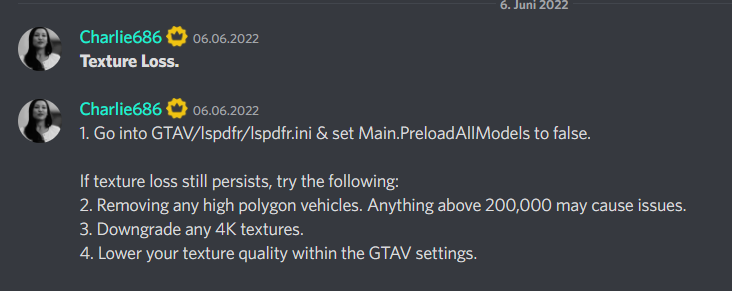
Remove securethevehicle, that caused the crash. you have many plugins, that may be outdated and incompatible with lspdfr 0.4.9. We have users with software that can read your log and tell which are outdated. Just wait for them. for the texture loss you can either lower your gta graphic settings or remove high graphic vehicles, which you installed.
-
You can install a less bright visual settings file. try this:
-
Error while hiding ambient game blips: System.AccessViolationException: Attempted to read or write protected memory. This is often an indication that other memory is corrupt. disable that In the lspdfr.ini under gtav/lspdfr your reason for the crash is you’re missing scripthookvdotnet3. Download scripthookvdotnet and drag and drop all files in the main directory.
-
set your rph loading time to 60.000
-
what the fuck?
-
post your ragepluginhook.log from the main gta folder. which callouts have you installed, that are not working?
-
the error says it cannot get access to the log file, seems like a problem with permission/ antivirus. add your whole gta folder as an exception in your antivirus/ default windows antivirus: https://support.microsoft.com/en-us/windows/add-an-exclusion-to-windows-security-811816c0-4dfd-af4a-47e4-c301afe13b26
-
rename your mods folder to _mods and try again. you already said you installed quantv and now its crashing. so quantv may be the problem.
-
post your ragepluginhook.log from the main gta folder.👍🏽
-
Could not load file or assembly 'ScriptHookVDotNet3 You havent installed that file. Drag and drop that file in the main directory.
-
nein, ich helfe nur im forum. poste deine ragepluginhook.log erneut, damit ich sehe, warum es crasht.
-
Error while hiding ambient game blips: System.AccessViolationException: Attempted to read or write protected memory. Disable ambient game blips in the lspdfr.ini, its under GTAV/lspdfr/lspdfr.ini edit the line there and set it from false to true: Main.DisableGameBlipHiding = true
-
if a gta update comes out, there are always new data like vehicles or weapons, which are located in the main directory and for you means to update your mods folder. it looks like this (see picture, a green notification in openiv)
-
Error while hiding ambient game blips: System.AccessViolationException: Attempted to read or write protected memory. Disable ambient game blips in the lspdfr.ini, its under GTAV/lspdfr/lspdfr.ini change the existing line there with: Main.DisableGameBlipHiding = true


