

SteveOhByte
Insiders
-
Joined
-
Last visited
Everything posted by SteveOhByte
-
 Hi! This is a strange one... Does your pump shotgun work correctly from this loadout? You can send me a direct message, could you attach the whole loadout's .lc file in a message to me so that I can test it in my own game? Thanks!
- 50 comments
- 5 reviews
-
-

- 1
-
-
- rph
- lspdfr plugin
- legacy
- rph
-
Tagged with:
-
Good ideas! I'll look into getting these implemented as new options for the next update soon 🙂
- 50 comments
- 5 reviews
-
-
- 1
-
-
- rph
- lspdfr plugin
- legacy
- rph
-
Tagged with:
-
Thanks for making a note, actually! I'll add in the next update a sort of default ammo amount, so that forgetting doesn't just break the whole loadout.
- 50 comments
- 5 reviews
-
-
- 1
-
-
- rph
- lspdfr plugin
- legacy
- rph
-
Tagged with:
-
Could you explain a bit more what you mean by that? In the main config file, there is already a "Default Loadout:" field, which will automatically give you that loadout when you go on duty.
- 50 comments
- 5 reviews
-
- rph
- lspdfr plugin
- legacy
- rph
-
Tagged with:
-
-
Thanks for the suggestion! Both have been added 🙂
- 50 comments
- 5 reviews
-
- rph
- lspdfr plugin
- legacy
- rph
-
Tagged with:
-
Thanks for the suggestion! It has been added 🙂
- 50 comments
- 5 reviews
-
- rph
- lspdfr plugin
- legacy
- rph
-
Tagged with:
-
-
Thank you so much! I had no idea that one was broken, so thanks for letting me know, I believe it should be fixed now. Please feel no pressure to donate! My mods are, and forever will be free 🙂
- 50 comments
- 5 reviews
-
- rph
- lspdfr plugin
- legacy
- rph
-
Tagged with:
-
 UpdateBuddy This mod was made to allow LSPDFR plugin developers and their players to easily add automated mod updates. UpdateBuddy is a silent executable, designed to only act when requested, displaying a simple notice to the user if an update is available for an UpdateBuddy-compatible mod. Please leave any suggestions in the comments, I'd love to make this tool the best that it can be! UpdateBuddy is open source! You can find the public GitHub repo here: https://github.com/SteveOhByte/UpdateBuddy For users: Simply install UpdateBuddy as you would any other RPH plugin (note: must be loaded on startup), it will be inert unless called upon by a mod which supports it. For developers: A complete guide on using UpdateBuddy and how it works is available here.
 -
It should work fine with add-on weapons. I just tried it out with the pistol you provided a link to, and it works. Are you sure your config file is correct? This is the one I have attached it to: Equipment: WEAPON_FN509MRDLE, weapon_pumpshotgun, weapon_flashlight, weapon_flare, weapon_fireextinguisher WEAPON_FN509MRDLE_ammo: 48 weapon_pumpshotgun_ammo: 32 weapon_pumpshotgun_components: COMPONENT_AT_AR_FLSH Rifle: weapon_carbinerifle Shotgun: weapon_pumpshotgun Medkit: True
- 50 comments
- 5 reviews
-
- rph
- lspdfr plugin
- legacy
- rph
-
Tagged with:
-
Those are good ideas! I'll be working on implementing them as soon as I find the time!
- 50 comments
- 5 reviews
-
- rph
- lspdfr plugin
- legacy
- rph
-
Tagged with:
-
Thanks so much for the comment! I'm not sure how "back" I am yet, starting with a small plugin like this one for now. I might have to make some updates to those tutorials if I can find the time. Moving the commons to the root directory is a good idea, to be honest I hadn't really put much thought into it. Essentially, just had it all together because that's how it's built. I'll be making that change in the next update. Thanks for the suggestion, and I'm glad to see those old videos helped someone! ~ Cheers Hi! I'm not sure I 100% understand the question, but I'll do my best. If you're asking if this can work for AI, no. The menu provided only affects the player. If you want to edit how EMS and Fire arrive that would depend on how you summon them, maybe SpecialUnits.xml from UltimateBackup could help you out? My mod is only for the player, sorry.
- 50 comments
- 5 reviews
-
-
- 1
-
-
- rph
- lspdfr plugin
- legacy
- rph
-
Tagged with:
-
Thanks! I'm glad you like it. That's exactly why I made it, I was wanting to use the STP feature but be able to switch loadouts, and decided to try and make it as smooth as possible. Thanks for trying it out!
- 50 comments
- 5 reviews
-
-
- 1
-
-
- rph
- lspdfr plugin
- legacy
- rph
-
Tagged with:
-
None I added, so if you're running into one, it's possible the base game has a limit. The attachments list simply tries to add each attachment to the weapon, but if they're incompatible, it would fail.
- 50 comments
- 5 reviews
-
-
- 1
-
-
- rph
- lspdfr plugin
- legacy
- rph
-
Tagged with:
-
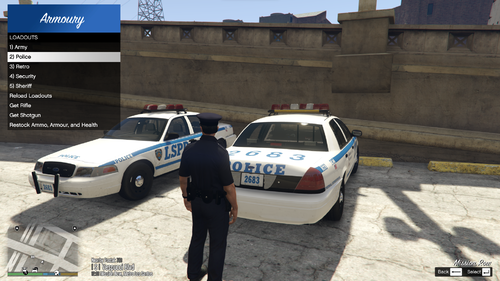
Armoury This plugin was inspired by the Realistic Weapon System in BejoIjo's Stop the Ped. Armoury allows the player to define custom loadouts each in their own file. These loadouts are accessible and reloadable through an in-game LemonUI menu. Please note, in order to use the loadouts feature of Armoury, you must be near or inside a Police vehicle. Please leave any suggestions in the comments, I'd love to make this mod the best that it can be! Armoury is open source! You can find the public GitHub repo here: https://github.com/SteveOhByte/Armoury I recommend installing UpdateBuddy to easily install all future updates of Armoury! F.A.Q. - Q: Does this work with add-on weapons? - A: Yes, however due to how add-ons are handled by the game, they cannot be present in a default loadout. - Q: How do I edit the .lc files? - A: LiteConfig or .lc files are simple text files, you can edit with any text editor such as Notepad. - Q: Can this manage AI Loadouts? - A: No, Armoury is strictly a player loadout management tool. - Q: How do I give weapons specific tints? - A: Weapon tints are defined similarly to weapon components, and there is an example in the Riot.lc file. You can provide either a tint index (a number), or one of the following strings to apply a tint to any weapon:
- 50 comments
- 5 reviews
-
-
-

- 10
-
-
- rph
- lspdfr plugin
- legacy
- rph
-
Tagged with:
-
Does anyone know the best way to open a vehicle's "trunk" (if it has one) via RagePluginHook? My current method: vehicle.GetDoors()[vehicle.GetDoors().Length - 1].Open(true, true); GameFiber.Sleep(3); // Test vehicle.GetDoors()[vehicle.GetDoors().Length - 1].Close(false); The issue is the trunk immediately closes itself, potentially through player collision? So I added this code, but it didn't change anything. Game.LocalPlayer.Character.IsCollisionEnabled = false; // Above code Game.LocalPlayer.Character.IsCollisionEnabled = true; Has anyone got an idea of how to do this properly? Is there some native method I should be leveraging?
-
I'm working on a small helper method for my RagePluginHook plugin, this is what I've got so far: public static int PlaySoundAtLocation(Vector3 position, string soundName, string soundSet, bool loop = false) { int soundId = NativeFunction.Natives.GET_SOUND_ID(); // Crashing on this line NativeFunction.Natives.PLAY_SOUND_FROM_COORD(soundId, soundName, position.X, position.Y, position.Z, soundSet, false, 0, false); if (loop) { NativeFunction.Natives.SET_VARIABLE_ON_SOUND(soundId, "Looped", true); } soundIds.Add(soundId); return soundId; } When I try to call the GET_SOUND_ID native, I get this error message: RuntimeBinderException: Cannot convert null to 'int' because it is a non-nullable value type Does anyone know why GET_SOUND_ID might be returning null? Is there some form of initialization it requires? Thanks!
-
Thanks for the tip! Managed to get everything working 🙂
-
Hello all, looking for information on how PlayScannerAudio is implemented as I'm trying to implement my own variant of it for a specific callout. Looking for a way to play audio in the game, and I haven't found anything relevant in the official RagePluginHook documentation. I thought about just using a simple winforms SoundPlayer but upon testing it appears to not be allowed to play due to some error with being hooked into a game process (possibly the RAGEngine could be blocking?). So I thought I would ask here if anyone would be able to offer a solution of how they got audio to play? I'm essentially still trying to do the same thing that PlayScannerAudio does for my callout, only without the prefix and suffix noises. If any clarification is needed please do ask, I'm half asleep while writing this post haha.
-
 Yes that would be 100% on me. The last update and what code I had written towards the next update were not optimized whatsoever as I was just trying to get it done and published before starting at a new job. Sorry about that haha.
 -
 Hello everyone, just leaving this here in case someone skips through the description. Security+ is no longer in active development. It's been incredible to see all your support, so thank you. In the description you can find a link to the open-sourced mod all on github, hope you have fun with that. Feel free to shoot me a message with any questions, and have a good one 🙂
- 174 comments
- 13 reviews
-
As far as I'm aware the way to achieve that would be generating the ped in a loop which checks their gender, and if it is the desired gender then proceed, but if not then generate a new ped and check again. Edit: Something like this should work suspect = new Ped(spawnPoint); while (suspect.IsMale) { suspect.Delete(); suspect = new Ped(spawnPoint); }
-
Hey everyone, I threw together a little google docs guide to making a callouts pack. It's not much but my hope is I've linked you to enough resources within it that you should be able to make whatever callouts you wish. Note: I won't be checking this thread very often, so if you have a question related to the guide a DM would be the best way to reach me. Hope this helps someone!
-
Mess around with the included "SecurityPlus.ini" file. Disabling the distance check often fixes this error
- 174 comments
- 13 reviews