

SteveOhByte
Insiders
-
Joined
-
Last visited
Everything posted by SteveOhByte
-
-
-
 The video audio is fake, patched together in post because I forgot to record game audio during the demo, but I'm glad you like it! That particular door sound was from freesounds.org, I just searched something like "Jeep door sound". And I'm glad you like the mod! That's a great idea! I'll look into this for the next update (:
 -
-
LSPDFR Action Hotkey LSPDFR Action Hotkey is a simple plugin designed to extend LSPDFR's Interaction Actions system. Instead of needing to navigate to the LSPDFR menu, select the desired action, exit the menu, and press the action key—you can simply press one key. Features: - All LSPDFR Interactions Supported: From hand-on-holster to dancing or showing your badge - True Integration: This plugin does not take over functionality, it simply tells LSPDFR which interaction you want to have selected, and then triggers the keystroke Please leave any suggestions in the comments, I'd love to make this mod the best that it can be! LSPDFR Action Hotkey is open source! You can find the public GitHub repo here: https://github.com/SteveOhByte/LSPDFRActionHotkey I recommend installing UpdateBuddy to easily install all future updates of LSPDFR Action Hotkey! Video Demonstration of the Features in Action: F.A.Q. - Q: How do I edit the .lc files? - A: LiteConfig or .lc files are simple text files, you can edit with any text editor such as Notepad.
-
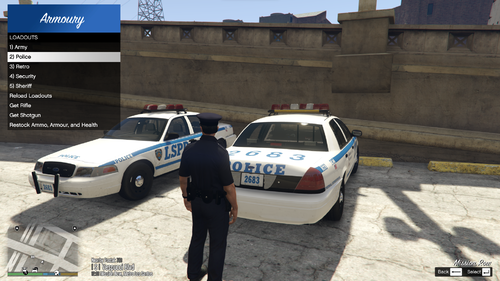 You had written "weapon_carbinerifle_components: COMPONENT_AT_AR_AFGRIP_02, COMPONENT_AT_AR_FLSH, COMPONENT_AT_SIGHTS, COMPONENT_CARBINERIFLE_MK2_CLIP_02" when it should have been "weapon_carbinerifle_mk2_components: COMPONENT_AT_AR_AFGRIP_02, COMPONENT_AT_AR_FLSH, COMPONENT_AT_SIGHTS, COMPONENT_CARBINERIFLE_MK2_CLIP_02" Try using this corrected file: Equipment: weapon_combatpistol, weapon_stungun, weapon_pumpshotgun_mk2, weapon_carbinerifle_mk2, weapon_nightstick, weapon_flashlight, weapon_flare, weapon_ball weapon_combatpistol_ammo: 250 weapon_combatpistol_components: COMPONENT_AT_PI_FLSH weapon_pumpshotgun_mk2_ammo: 250 weapon_carbinerifle_mk2_ammo: 250 weapon_carbinerifle_mk2_components: COMPONENT_AT_AR_AFGRIP_02, COMPONENT_AT_AR_FLSH, COMPONENT_AT_SIGHTS, COMPONENT_CARBINERIFLE_MK2_CLIP_02 Rifle: weapon_carbinerifle_mk2 Shotgun: weapon_pumpshotgun_mk2 Less Lethal: weapon_ball Less Lethal Title: None Armour: True Medkit: True Fire Extinguisher: True
- 50 comments
- 5 reviews
-
- rph
- lspdfr plugin
- legacy
- rph
-
Tagged with:
-
It looks like you may just have a typo for the components, you have a weapon_carbinerifle_mk2, but the components are just set for a weapon_carbinerifle
- 50 comments
- 5 reviews
-
- rph
- lspdfr plugin
- legacy
- rph
-
Tagged with:
-
Thanks for the suggestion! Added this in version 1.1.6
- 50 comments
- 5 reviews
-
-

- 1
-
-
- rph
- lspdfr plugin
- legacy
- rph
-
Tagged with:
-
Thanks for letting me know about this issue! Turns out mk2 weapons can have ammo fine, but not special ammo (such as the piercing you've tried there). I'm looking into how to fix this, but have so far come up empty. I'll update if I can work out a method of giving special ammo. This issue has been fixed in the latest update 🙂
- 50 comments
- 5 reviews
-
-

- 1
-
-
- rph
- lspdfr plugin
- legacy
- rph
-
Tagged with:
-
 I don't have a discord server, no - but you're welcome to comment here or just send me a direct message here too if you have more questions. The gude wwas written a little unclearly there, sorry. Basically, you aren't editing dropbox's own link, you need to copy the link, save it temporarily somewhere, and that's the link you make a change to. I updated the guide to hopefully be a little more clear there.
 -
 Hello, yes I'm still receiving lots of notices about this, as far as I can tell there are likely conflicts with other mods, though I haven't been able to work out which ones yet, which means I haven't been able to build patches for compatibility. Could you clarify what you mean by AI siren cycling? Is this like, while in a pursuit you would like the AI officers to change their sirens from time to time? How do you mean? In all my testing the dual sirens feature still works with the automatic siren cutoff.
- 53 comments
- 5 reviews
-
- rph
- lspdfr plugin
- legacy
- rph
-
Tagged with:
-
-
Could you send me your RPH log file please?
- 53 comments
- 5 reviews
-
- rph
- lspdfr plugin
- legacy
- rph
-
Tagged with:
-
That would be doing it, yes. Controller support is on the list for 1.0.4, along with a bunch of other fixes to common issues. Could you be more specific? Maybe send me a DM with RPH.log file? Most common issues will be fixed in the next update, so you could also wait and try that.
- 53 comments
- 5 reviews
-
-
- 1
-
-
- rph
- lspdfr plugin
- legacy
- rph
-
Tagged with:
-
First, verify the mod is installed correctly. In your GTAV folder, you should have both LiteConfig and OhPluginEssentials DLL files. In your plugins/LSPDFR folder, you should have the ELSSirenExtender DLL file. You should not have InputManager DLL file in your GTAV folder. If the issues persist, please send me a direct message with your RagePluginHook log file (found in your GTAV folder). Hello, are the issues persisting? If so, please follow the instructions in the FAQ 🙂 Hello! Are these issues still happening to you in the latest 1.0.3 version? If so, please follow the instructions in the FAQ! I'll look into this! I believe the automatic siren cutouts is included by default in DLS, but I'll see about making a version of the other features for DLS users. Will add this to my to-do list! Completely forgot about dual sirens when I was putting it together 🙂 Hiya! Please follow the FAQ instructions 🙂
- 53 comments
- 5 reviews
-
- rph
- lspdfr plugin
- legacy
- rph
-
Tagged with:
-
I can't seem to replicate this issue, could you DM me please? Does the suspect always take off when you exit the vehicle, or does the red text at the bottom of the screen show up saying "you cancelled the traffic stop"? It shouldn't be needed for ai backup vehicles, as these (as far as I can tell) are automatically disabling their sirens when they arrive on a scene.
- 53 comments
- 5 reviews
-
-
- 1
-
-
- rph
- lspdfr plugin
- legacy
- rph
-
Tagged with:
-
The new update should fix all the issues!
- 53 comments
- 5 reviews
-
- rph
- lspdfr plugin
- legacy
- rph
-
Tagged with:
-
This has been added! If you take a look at the video demonstration, are you doing what is done in that video? If so, what exactly happens? Nothing at all? Could you please send me a screenshot, or recording, via direct message about what issue is affecting you each? Thanks!
- 53 comments
- 5 reviews
-
- rph
- lspdfr plugin
- legacy
- rph
-
Tagged with:
-
Yeah, so the mod cuts out the siren by simply turning it off through the keybinding you have set in your ELS.ini file. So if a car can't have its siren toggled by the regular ELS keys, it won't be compatible with this mod. Did you install the OhPluginEssentials.dll into your main GTAV folder? A simple way to test the mod is to sit in a pd vehicle that is controlled by ELS. Use 'J' (or whichever key you rebound) to switch to stage three lighting. Then turn on your siren, and get out of the car. If it doesn't blip and turn off, then yes something is broken, and please send me a DM about it.
- 53 comments
- 5 reviews
-
-
- 1
-
-
- rph
- lspdfr plugin
- legacy
- rph
-
Tagged with:
-
How do you mean by hybrid? I've tested it on full ELS cars, and also on cars with only one stage of lighting, and it worked on both.
- 53 comments
- 5 reviews
-
- rph
- lspdfr plugin
- legacy
- rph
-
Tagged with:
-
This is actually already supported! But I'll update the description about that, thanks!
- 53 comments
- 5 reviews
-
-
- 1
-
-
- rph
- lspdfr plugin
- legacy
- rph
-
Tagged with:
-
ELSSirenExtender This plugin was inspired by and borrows code from @Rich's Automatic Siren Cutout. Permission was obtained directly from Rich for the creation of this plugin. ATTENTION: Rich's plugin is once again under active development This page will remain as is, and will likely see very few if any further updates. Please attempt to use the original plugin by Rich before trying this one, as it is only here for those who may not be able to get Rich's plugin working. ELSSirenExtender is a simple plugin to provide some additional features to users of ELS-vehicles. Please note, in order to use ELSSirenExtender, you must have ELS installed. Features: Automatic Siren Cutoff! — ON by Default If you exit an ELS vehicle while the siren is still turned on, it will automatically be turned off. Friendly Return Honking! — ON by Default If you honk or yelp near an AI emergency vehicle using ELS keys, they will yelp or honk back. AI Vehicle Avoidance! — ON by Default If you park (stationary) a vehicle with lights activated, AI traffic will curve around the vehicle. Leave Engine Running! — OFF by Default Simply disables the automatic engine turnoff when exiting a vehicle. All features can be toggled on/off via the included configuration file. Video Demo of the mod and its features: Please leave any suggestions in the comments, I'd love to make this mod the best that it can be! ELSSirenExtender is open source! You can find the public GitHub repo here: https://github.com/SteveOhByte/ELSSirenExtender I recommend installing UpdateBuddy to easily install all future updates of ELSSirenExtender! F.A.Q. - Q: How do I edit the .lc file? - A: LiteConfig or .lc files are simple text files, you can edit with any text editor such as Notepad. - Q: I'm having issues with some or all of the mod's listed features, what should I do? - A: Please send me a direct message. If possible, include a video of what you tried in-game, as well as your RagePluginHook log file (found in your GTAV folder).
- 53 comments
- 5 reviews
-
-
-
-

- 16
-
-
- rph
- lspdfr plugin
- legacy
- rph
-
Tagged with:
-
Thanks for letting me know! I'm pretty swamped at the moment, so it may be a while before I can put together a fix for this, sorry!
- 50 comments
- 5 reviews
-
- rph
- lspdfr plugin
- legacy
- rph
-
Tagged with:
-
Per-weapon tints have been added in the latest update! Info on how to use them is in the description, or check out the example Riot.lc loadout included.
- 50 comments
- 5 reviews
-
-
- 1
-
-
- rph
- lspdfr plugin
- legacy
- rph
-
Tagged with:
-
Hi! The guide for using UpdateBuddy in your mod is here: https://material-kiss-30e.notion.site/UpdateBuddy-Integration-Guide-e02f5335e07f492f8a58c8be0158ce12 Unfortunately I haven't had the time to record a video example yet, so that guide is all I've got - let me know if you have any issues!