


Matosh
Members
-
Joined
-
Last visited
Everything posted by Matosh
-
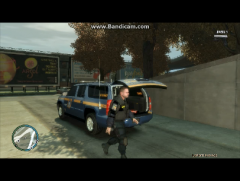 On what resolution do you play GTA IV?
 -
When you press CTRL+M keys to open up the ELS information panel, ambulance is going to be dispatched to your location too. Why? Because the keys to call an ambulance are also CTRL+M.
-
After the scripts are reloaded, press ALT+P to activate the LCPD:FR again then press CTRL+P to force the duty, and then use SImple Native Trainer to spawn police vehicle and change to police officer outfit. Also, no, you are not going to be chased by the police if you switch to police officer outfit using Simple Native Trainer.
-
No need, when LCPD:FR is activated you can also press CTRL+P to force the duty so you don't have to go the police station. You can use Simple Native Trainer to spawn police vehicle and change to police officer outfit.
-
Can you go to 'Programs and Features' in the 'Control Panel' and take few screenshots of the programs you have installed, from top to the bottom?
-
The first fix in my previous reply is not for the lights, it's for the ambulance being dispatched to your location after you press CTRL+M. Read it carefully.
-
ALT+P
-
Open ELS.ini, under [CONTROLS] section find FunctionKey = 17 and ComboKey = 18 then change FunctionKey number to 18 and ComboKey number to 17. That will switch the CTRL and ALT keys, and whenever you want to open the ELS display menu (press ALT+M to open the display menu) ambulance is not going to be dispatched to your location. And make sure that you are running the game with the administrative rights by going to GTA IV/EFLC folder, right click on GTAIV.exe/EFLC.exe, select 'Properties' then 'Compatibility' and enable option 'Run this program as administrator', also do the same exact thing to the LaunchGTAIV/EFLC.exe (if you have Windows 8, then ignore LaunchGTAIV/EFLC.exe part).
-
If those members have good graphics cards then they should use commandlines to make the game think that you have enough video memory, which could fix the 'out of video memory' error.
-
Use Fraps.
-
Your screenshots are small.
-
You will have to activate the LCPD:FR again.
-
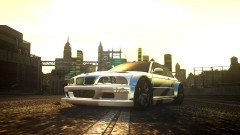 Looks like an ENB Mix by Dax1.
 -
I'm running out of options. Since you are using a Steam version of the game, then why is GTA IV not installed in one of the Steam directories?
-
Sorry my bad, type in reloadscripts (without a).
-
What ENB do you have?
-
Download 0.95 version and run the installer with administrative rights.
-
Download and extract latest Scripthook.dll and ScripthookDotNet.asi files to your GTA IV/EFLC root folder, and overwrite the files when/if asked (http://www.hazardx.com/details.php?file=83). If you receive script error in the upper left corner of the screen, reload the scripts by pressing the Tilde key which is above Tabulator and left of the Decimal 1 key, then type in reloadscripts.
-
Please check how much space you have left on the drive that you're trying to install the game into. This game needs around 15 GB at least. And don't forget to close all running applications before you start the setup.
-
Make sure that you are running the game with the administrative rights by going to GTA IV/EFLC folder, right click on GTAIV.exe/EFLC.exe, select 'Properties' then 'Compatibility' and enable option 'Run this program as administrator', also do the same exact thing to the LaunchGTAIV/EFLC.exe. Download and extract Scripthook.dll and ScripthookDotNet.asi files to your GTA IV/EFLC root folder, and overwrite the files when asked (http://www.hazardx.com/details.php?file=83). If you receive script error in the upper left corner of the screen, reload the scripts by pressing the Tilde key which is above Tabulator and left of the Decimal 1 key, then type in reloadscripts.
-
Have you bought the GTA IV via Steam or somewhere else?
-
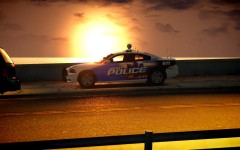 Livery on the screenshot and one more came with this Dodge Charger model. Link is below the screenshot.
 -
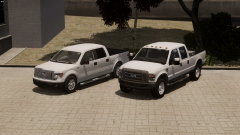 Federal Signal Valor or Whelen Legacy or Feniex Avatar on that second Ford. :)You said that you couldn't see the GTA IV under HKEY_LOCAL_MACHINE, maybe that is the problem. http://snaphackers.blogspot.com/2012/12/gta-4-patch-error-gta-was-not-detected.html
