FCV96
Members
-
Joined
-
Last visited
Everything posted by FCV96
-
-
This would actually be pretty awesome. Perhaps a reskin for Noose or maybe a texture for something like Lt. Caine's Landstalker ESU truck.
-
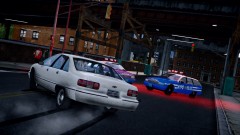 Gotta love the 91'-96' Caprice! :D
 -
Never really had a problem relating to crashing with ELSv6. I'm running GTA IV and I am currently using all low-poly police vehicles; the police slot holds the Driver San Francisco CVPI, police2 with the Driver San Francisco Impala, Noose Patriot with Lt. Caine's ESU Landstalker, Noose Cruiser with another Driver San Francisco CVPI, PStockade with an LCPD Burrito, and NStockade with a modification on the original nstockade to make it ELS. I'm also using the newest LCPDFR, Towing Script, PoliceHelper, TrafficFlow, an ENB, and quite a few others and have not had any issues. --- Perhaps posting the specs of your computer would be a good idea.
-
Very nice; I must say that your city's paint-job is simplistic yet effective and aesthetically pleasing too! :D
- 12 comments
- 6 reviews
-
-
The map is simply incredible, though it is a shame none of my trees will load. I do hope a definitive fix is out sometime in the future; it is one of the best map-mods out there and has some of the nicest roads.
-
-
-
This bit of information is incredibly helpful; I can finally avoid leaving prisoners where they are because two or more of them were detained! :D
-
This is definitely a cool idea! - I'll be sure to download it in the future.
-
-
-
-
Quick question for you, Abraxas. I currently have the road-flares installed and like them quite a bit, but I was curious as to whether or not it would be possible to have them glow bright red instead of the orange they glow now. All road flares I've ever seen have a red color to them, see them at about 0:50 in the video below;
-
-
-
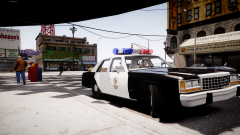 That's at least four-thousand times better than what I had in mind. :D
 -
 Always good to see an ELS lightbar on there!
 -
That's simply incredible, Compeast! I do hope we can get an NYPD version with red/clear aerodynic/aero-twin as well!
-
-
-
 This is great; I do like how you've based it off of the unlocked ESU truck.
 -
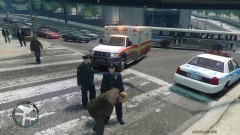 Precisely why I was so shocked to see how well the overhaul turned out. Generally, the paramedics injure at least 10+ while attempting to save one and then screw that up too. To see them actually driving safely and administering aid properly is beautiful! :D
 -
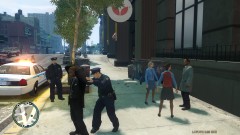
From the album: LCPDFR Escapades
A subject was frisked on the suspicion of his harboring of a weapon - it turned out that he had multiple arrest warrants. Thanks to Abraxas for the incredible update to PoliceHelper!