


FCV96
Members
-
Joined
-
Last visited
Everything posted by FCV96
-
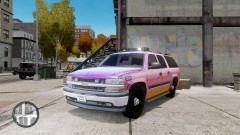 Looks quite interesting if I do say so myself.
 -
-
-
Be sure that you do not have both dsound.dll and xlive.dll in the root folder; they will conflict and therefore cause the game to potentially crash.
-
That's odd; I had no problem passing the loading screen and have always had ScriptHookDotNet.asi in my root folder; if I'm not mistaken it is installed with LCPDFR. Perhaps the problem is linked to a different file discrepancy? The only real way to solve it is to conduct some trial and error experimentation. Be sure to make backups, and if you make no progress I'd advise a fresh install.
-
[it's fine. :D] 1) No; I've only added ELS cars to the game's slots. Note that I have GTA IV and not EFLC. 2) ALPR system, indicator script, Braveheart's policing script, vDH PoliceHelper, vDH Towing Service, vDH Medical Examiner, TrafficFlow, Spotlight Script, etc. Pretty much the run of the popular scripts. 3) Yes; previously I got crashes when I went anywhere on the map beyond the Broker Police Station, though this was greeted with an "unrecoverable fault" message. 4) Yes; I previously got those constantly and rectified that problem by fixing the vehicle archive [as mentioned earlier] as well as performing a fresh install of GTA IV and reinstalling all of the mods I had.
-
I replaced my vehicles.img file with the default one and only modded in ELS police cars in their respective slots; everything else was left unaltered. If that does not work, I'd recommend a completely fresh install of GTA IV; it seems to be the best way in which one can rectify any problems. None of the popular scripts that I've tested conflict with ELSV7 and it is generally stable. My game was giving me a "unrecoverable fault" error near the Broker police station but that was evidently caused by a corrupt save file. A new game fixed that right up. Hope that helps!
-
The number of questions in this thread that could be answered by simply reading the instruction manual is staggering to say the very least. Also, I did eventually get ELS V7 to work fully and it has been great. Evidently my save file was corrupted and that was partly causing crashes. The insta-crashes were potentially defects in my vehicles archive; those have since been fixed.
-
-
I found out that my save file had corrupted somehow; starting a new game rectified my crashing problem, as did only modding the police car slots.
-
It is worth a shot! My game crashed immediately after the Broker safehouse loaded, though now it runs fine. [Though I do have "unrecoverable fault" crashes from something I haven't figured out yet. Not caused by scripts or ELS V7 for that matter.]
-
Just hold alt-J when turning on primaries. It goes backward through the lighting stages so that you start out on stage three.
-
I was actually able to get ELS V7 to stop making my game crash by changing my vehicles.img file out for the default one and subsequently adding in only ELS cars.
-
Glad that worked out for you; I do not have two .asi loaders but if I cannot find a script that may be interfering I will reinstall. Thanks for the info though.
-
Glad that you've made some good progress! I'll be sure to get on that right away. :D
-
Do be sure to share how that turns out for you. As I said in a different thread, I'll be uninstalling scripts one by one to see if any conflict.
-
Agreed; good to see that I'm not the only one having a problem. Good luck; I'll be taking out all other scripts I have one by one to see if any conflict with ELS V7.
-
-
I'm having the exact same problem and cannot seem to find a solution for this. I have read the manual at least four times in its entirety now, and while I appreciate how in-depth it is, I have not gathered any troubleshooting results from it. Everything is installed correctly [let's face it; not a difficult install if you bother to read the damn manual], and I have always used the dsound.dll asi loader included with LCPDFR. For reference, I am currently running Windows 7 64-bit Home Premium and I'm using standard GTA IV 1.0.7.0 from Steam.
-
I thought I'd post this problem here to avoid clutter in the main ELS V7 thread. I was able to get ELS V7 working on my first installation and was very impressed; the sheer amount of customization options available and how well-done everything else was is truly impressive - kudos to all that worked hard on it. With that said, however, on subsequent games of GTA IV I would encounter immediate crashes. The game would cycle through the loading screens fine, though within a maximum of three seconds of the Broker safehouse loading the game crashed. In attempts to rectify the problem I have used the scripthook and dsound files from LCPDFR, and tried the ones included with ELS V7; still crashing. The game runs fine without ELS installed and with ELS V6 installed. I've read and re-read the nicely put together instruction guide and am quite sure that the installation was correct - not to mention that I've reinstalled it several times and did get it to work once. Here's a photo of my root directory for further reference. If there is any other information I could provide to shed light on the problem, don't hesitate to ask!
-
Thanks for the suggestion, but I've already tried. Using the ScriptHook and dsound provided by LCPDFR didn't rectify the problem, nor did installing the two that came in the ELS V7 installation folder. And I'm using the standard Steam version of GTA IV.
-
That is precisely what occurs in my game. It will go through the loading screens perfectly fine, though it will only last about two seconds in-game before it crashes. The problem does not occur when ELS V7 files are taken out of the root directory, and the game ran flawlessly with ELS V6. Is there any further information that I could provide to elaborate on the problem?
-
That's the problem; my game crashes before I can actually leave the Broker safehouse; approximately two to three seconds in. Here's hoping we can find the source of the problem. :D
-
Thanks for taking a look; any help is greatly appreciated.
-
A word of the wise to those that have been experiencing instant Crashes-To-Desktop. I have the Steam version of IV and was suffering the same problem. Launching the game from the "Launch GTA IV" file in the root folder seems to fix things; guess you can't start the game from Steam with ELS V7 installed. With that said, ELS V7 is amazing. I love the sheer personalization of it all. EDIT: Never mind, still getting crashes to desktop. Does anyone have a solution? - the game does not crash when ELS V7 is not installed and I have read the manual for ELS 7 numerous times to no avail.

