




AlconH
Members
-
Joined
-
Last visited
Everything posted by AlconH
-
I don't get what your asking?!
-
lol, I don't think I've ever managed to close it any other way!
-
Awesome videos, loved episode 2! Can everyone remember to give +REP if they like the video..... It means quite alot to some people on this forum.
-
Nice video +1 I hope you do some more videos too....
-
-
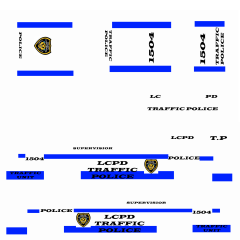 What vehicle are all these skins for? Cheers!
 -
That is pretty amazing! can't wait!
-
Really Useful. Thanks! +1
-
Basically, he's saying that he's installed 0.91 but when he hits alt+p nothing works....
-
Guys, I don't think he speaks fluent English, so using words like "Latter" and "Revise" isn't going to get you anywhere...
-
I get that too, i have to use task manager and end the GTAIV process otherwise it will just hang on my desktop......
-
Please post anything you did from the moment you installed GTA. Did you install any updates, patches or mods? Run the diagnostics tool (Link is below) and post the results. Make sure you run the diagnostics tool as administrator though. Upload the LCPDFR.log file from your GTA IV root folder.
-
You may have the files that are on the disk, but when you copy it and then try to use it you will get a error saying its corrupt. This is because of software implemented by R* to prevent piracy.
-
You can clean it but you can't remove the scratches. I don't know about this, hopefully someone else will. Steam is like a online shop where you can buy and then download the game. There are no discs involved and you can just re-download then re-install game if you have any problems. Good Luck!
-
Yep, SNT and LCPDFR work fine with each other. however the key-bindings sometimes interfere so if you turn them off your pretty much sorted. Have you got alot of vehicle mods installed? What error messages do you get before a reboot, possibly a BSOD?
-
Ok then seems we're done here. Requesting a close.
-
Have you patched to 1.0.7.0? if not the link is below in my signature.....
-
So did you try installing directx and checking for updates for your video card ? :confused:
-
Either way there is nothing to do with GTA IV on that link!!!!
-
Can you please list everything you have done since you installed the game and upload any logs, just like I asked in my first post! Also please, edit your posts rather than double posting (or in your case, triple!)
-
I don't know what I'm meant to see when I load up that link but it sure isn't GTA IV :confused:
-
Can you post the log anyway as well as the LCPDFR.log in your GTA IV directory please? Have you updated to patch 1.0.7.0? if not the link is below in my signature.
-
-
I think you are using the controls from the 0.91 version but you are playing on the 0.95 version (I hope that makes sense.) To view the controls for 0.95. Begin the game and go on duty. Once on duty press LSHIFT +TAB to view the controls...... I hope this helps! Enjoy
-
 Quite Happily LilQ :) Thanks everyone for the great feedback :biggrin:


