


Vampyre
Members
-
Joined
-
Last visited
Everything posted by Vampyre
-
![[WIP] Subdued Reflective K-9 Unit](//s3-gallery.int-cdn.lcpdfrusercontent.com/monthly_2020_03/small.20200306062021_1.jpg.015ac2a9cf86478d3ce7d9a1faf6a4be.jpg)
From the album: Vampyre's [WIP] Gallery and Screenshots
-
![[WIP] Subdued Reflective K-9 Unit](//s3-gallery.int-cdn.lcpdfrusercontent.com/monthly_2020_03/small.20200306063637_1.jpg.a7a4cdd2a4a3ad1b30c4b4e166e1cff0.jpg)
From the album: Vampyre's [WIP] Gallery and Screenshots
-
![[WIP] Subdued Reflective K-9 Unit](//s3-gallery.int-cdn.lcpdfrusercontent.com/monthly_2020_03/small.20200306063452_1.jpg.8a4ed06d7d49a5de021abd10288fd74a.jpg)
From the album: Vampyre's [WIP] Gallery and Screenshots
-
![[WIP] Subdued Reflective K-9 Unit](//s3-gallery.int-cdn.lcpdfrusercontent.com/monthly_2020_03/small.20200306063113_1.jpg.b2b29e84beabbd2690b0b1ecbf021bea.jpg)
From the album: Vampyre's [WIP] Gallery and Screenshots
-
![[WIP] Subdued Reflective K-9 Unit](//s3-gallery.int-cdn.lcpdfrusercontent.com/monthly_2020_03/small.20200306063045_1.jpg.8a2a6a6e4788748640d6f50fa31f4423.jpg)
From the album: Vampyre's [WIP] Gallery and Screenshots
-
I was bored so here's this.
-
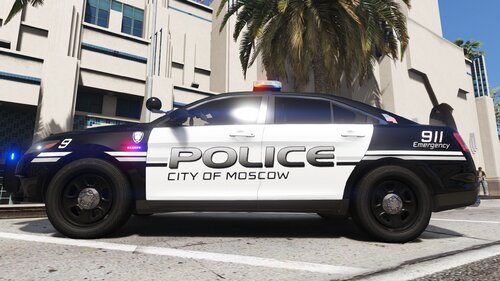 Here we have multiple textures replicating (as close as possible) the City of Moscow, Idaho Police Department vehicles. This skin pack is exclusive to LCPDFR/LSPDFR. Please do NOT upload anywhere else or represent this work as your own. If you would like another vehicle or vehicle pack added please send me a message. The below packs are known to work with this pack.
 -
Thank you! I was aware of the GetAllEntities method but as I said in my previous post I was worried about the resource intensiveness of having to store that then sort it for getting all peds. However, in your code you used a method I did not see before, GetAllPeds, this may be the way to do it - I will test out your code and see if this still works! Thank you again, I will be back if this doesn't work.
-
First off this is in the wrong section, you posted support for GTAV in the GTAIV section. 1. If this is your first time installing RPH make sure you have the requirements installed: Microsoft .NET Framework 4.6, or higher. Microsoft Visual C++ 2010 SP1 Redistributable Package (x64) Visual C++ Redistributable for Visual Studio 2015 (x64) 2. When you start RPH and hold down Shift does the RPH Settings menu pop-up? 3. Have you tried resetting all RPH settings using "Reset" at the bottom then Restarting with elevated privileges?
-
Thank you for responding, was starting to think no one was going to help. I did set the spawned Ped's group to hate both CivMale and CivFemale, but I'm not sure if all existing peds are automatically members of those groups and as far as I have found so far there's no easy way to just find all nearby peds within a radius. I can't recall the name right now but there was a Get All Entities function but I believe that would literally return ALL entities not just peds and to find peds in that list then find all nearby or just set all peds to groups would probably be too much for RPH/LSPDFR to handle.
-
99.9% of the time the original release of models does actually include the template for the vehicle in their download when there actually is a livery on the vehicle. The issue with templates not being included happens after the initial release when other people start releasing other versions of the vehicle without the original template in the download and either the template is the same or over time someone decides to modify it (several of the dev vehicles that are out now are being released in models with modified templates). It's an idea in any case to try and help the community, if some authors want to oppose it and hold things back I guess we can't do it.
-
I'm sure I'm probably not alone in this, when making skins for vehicles you end up at some point with a vehicle(s) that the uploader did not include the template for said vehicle(s) and unless you happen to have that template saved already somewhere else you have to go searching and downloading other similar packs hoping someone else included it. It would be great if we could have a section specifically for templates. This will help the community not only find and release templates better, but will also save bandwidth overall removing the need to add templates to packs and limiting the need to download multiple vehicles just to find a template.
-
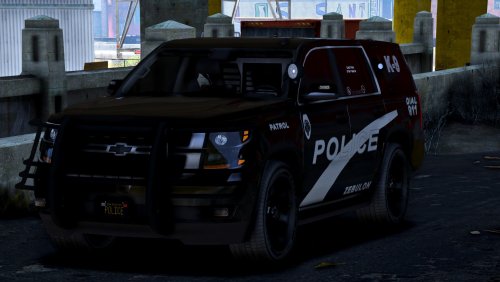 Great work so far on the look of the truck, but collisions not working for anything other than the engine make it unusable yet. The few other bugs and missing textures are minor compared to the fact that you can back the truck into a vehicle and practically swallow it because there aren't any collisions. Hopefully you can fix those collisions, I look forward to seeing the completed model.
- 22 comments
- 7 reviews
-
Update: If I use "mySuspect.Tasks.FightAgainst(Game.LocalPlayer.Character);" it will attack me at least; however, I want the ped to also attack nearby peds while I'm still on the way so you can hear the shots being fired. Any assistance or even ideas to test are appreciated.
-
I have tried everything I can find thus far and no matter what the spawned ped will just stand there with gun in hand and do nothing, won't even attack me as a Cop while standing next to them. I'm just trying to practice functions at the moment if someone can help let me know what I'm missing or is wrong. namespace CalloutPack.Callouts { //Name the callout, and set the probability. [CalloutInfo("Suspect with Gun", CalloutProbability.Low)] public class UnderFire : Callout { public Vector3 SpawnPoint; public Blip myBlip; public Ped mySuspect; public PedInventory SuspectInv; private RelationshipGroup red; public override bool OnBeforeCalloutDisplayed() { //Get a valid spawnpoint for the callout. SpawnPoint = World.GetNextPositionOnStreet(Game.LocalPlayer.Character.Position.Around(300f)); //Set myVehicle as persistent, so it doesn't randomly disappear. //myVehicle.IsPersistent = true; //Spawn mySuspect at SpawnPoint. mySuspect = new Ped(SpawnPoint); mySuspect.IsPersistent = true; mySuspect.BlockPermanentEvents = true; mySuspect.StaysInGroups = true; mySuspect.RelationshipGroup = Red; Game.SetRelationshipBetweenRelationshipGroups("Red", "COP", Relationship.Hate); Game.SetRelationshipBetweenRelationshipGroups("Red", "CIVMALE", Relationship.Hate); Game.SetRelationshipBetweenRelationshipGroups("Red", "CIVFEMALE", Relationship.Hate); mySuspect.CanAttackFriendlies = true; mySuspect.CanBeTargetted = true; //Give Ped Weapon mySuspect.Inventory.GiveNewWeapon(WeaponHash.Pistol, ammoCount: 999, equipNow: true); //If for some reason, the spawning of mySuspect failed, don't display the callout. if (!mySuspect.Exists()) return false; //If the peds are valid, display the area that the callout is in. this.ShowCalloutAreaBlipBeforeAccepting(SpawnPoint, 15f); this.AddMinimumDistanceCheck(5f, SpawnPoint); //Set the callout message(displayed in the notification), and the position(also shown in the notification) this.CalloutMessage = "Report of Armed Person(s)"; this.CalloutPosition = SpawnPoint; return base.OnBeforeCalloutDisplayed(); } public override void Process() { base.Process(); { //This states that if the player is less than or equal to 100 meters away from SpawnPoint, then it will do whatever is in the brackets. if (Game.LocalPlayer.Character.Position.DistanceTo(SpawnPoint) <= 100f) { mySuspect.Tasks.FightAgainstClosestHatedTarget(1000f); mySuspect.Tasks.Wander(); } } }
-
.thumb.png.9d0943161b37f863c291d6d6664edefb.png) @OJdoesIt Just encountered an issue where if you are in a helicopter yourself during a pursuit, the script will take control of your helicopter to use it for the script.... It will also not release control once the suspect is caught by AI.
@OJdoesIt Just encountered an issue where if you are in a helicopter yourself during a pursuit, the script will take control of your helicopter to use it for the script.... It will also not release control once the suspect is caught by AI.- 366 comments
- 33 reviews
-
POLICEB is not an audio hash no, only POLICE, POLICE2 or SHERIFF are I believe. That line is always the reason audio for a car is completely not working so if that doesn't fix it you might have put your meta lines in the wrong place or wrong meta file.
-
You're missing audioNameHash most likely. If it just says <audioNameHash /> replace it like below, you can use SHERIFF or POLICE. <ptfxAssetName>null</ptfxAssetName> <audioNameHash>POLICE</audioNameHash> <layout>LAYOUT_STD_EXITFIXUP</layout>
-
I'm having the same problem, also running bare Chrome with just ABP and whether its on or off I get the Ad blocking software detected message. However, I only get it if I'm not in the Forums, when I'm within the Discussion & Community section it's not there but as soon as I go to Mods or something it else it shows it.
-
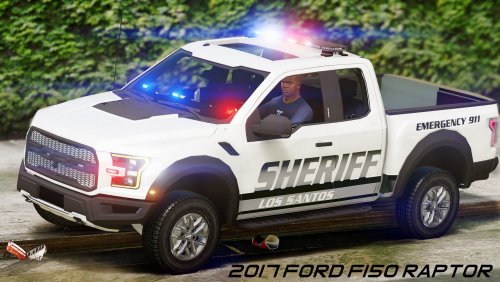 Second that! Great model and good work. I just have one comment, could you make the lightbar an extra as well so we can run this undercover too?
- 35 comments
- 5 reviews
-
-

- 1
-
-
You use a filter called Curve Bend and you can move the top and bottom independently to make it fatter in certain places to fit the curve better as well.
-
Hence why I said arguably. XD This has always been a source of conflict. Both are great tools just some people find one respectively better than others. Personally I just don't like the shortkey setup of Photoshop, it just isn't logical to me for the most part and it just complicates things.
-
I suggest using Captain14's FIB or one of Bxbugs' chargers, you can make most vehicles all blue with Custom Visuals by swapping out the texture files to the included all blues.
-
You left out GIMP as an option, which I know many people on here use as well. If you're unfamiliar it has most of the common functionality of Photoshop, but its free and arguably easier.
-
https://www.gta5-mods.com/search/gameconfig I don't remember which one I'm using at the moment, and what is stable for me might be different for you so read through them and try it. If you get crashes or major lag that you did not have before try a different one.

![[WIP] Subdued Reflective K-9 Unit](http://s3-gallery.int-cdn.lcpdfrusercontent.com/monthly_2020_03/small.20200306062021_1.jpg.015ac2a9cf86478d3ce7d9a1faf6a4be.jpg)
![[WIP] Subdued Reflective K-9 Unit](http://s3-gallery.int-cdn.lcpdfrusercontent.com/monthly_2020_03/small.20200306063637_1.jpg.a7a4cdd2a4a3ad1b30c4b4e166e1cff0.jpg)
![[WIP] Subdued Reflective K-9 Unit](http://s3-gallery.int-cdn.lcpdfrusercontent.com/monthly_2020_03/small.20200306063452_1.jpg.8a4ed06d7d49a5de021abd10288fd74a.jpg)
![[WIP] Subdued Reflective K-9 Unit](http://s3-gallery.int-cdn.lcpdfrusercontent.com/monthly_2020_03/small.20200306063113_1.jpg.b2b29e84beabbd2690b0b1ecbf021bea.jpg)
![[WIP] Subdued Reflective K-9 Unit](http://s3-gallery.int-cdn.lcpdfrusercontent.com/monthly_2020_03/small.20200306063045_1.jpg.8a2a6a6e4788748640d6f50fa31f4423.jpg)
.thumb.png.9d0943161b37f863c291d6d6664edefb.png)
