


Reddington
Members
-
Joined
Everything posted by Reddington
-
I believe patchday15. not entirely sure as I'm on an outdated game version. Whichever patchday is the highest number. :)
-
In OpenIV, go to ASI Manager and uninstall ASI Loader and OpenIV.ASI and then click install again to reinstall them. Next, restart your PC, and try loading into the game again and see if that works. If it still not working, please post the ASI log and ELS log files.
-
Hi there, Assuming you haven't modded the vehicles, it really doesn't matter where the other vehicles are, because you don't have to replace the vanilla vehicle files, just place in the replacement files in the newest patchday and you're set. This topic has been moved to the appropriate forum. Please post in the correct location in the future.
-
Do you have advancedhookv.dll in the main GTA V directory?
-
You're most welcome! I was the same way. It was just last year that I got into GTA V on PC and got into modding, so I completely get the trial and error stuff. :) The best way to learn is change things slowly, and always keep a back up so if something breaks, you can revert it and try to figure out why it broke to begin with. :) Good luck with the rest of your modding!
-
You add in the new vehicles. You see, how it works is, the game will take the entries from the most recent patchday. So if you place POLICE.yft, POLICE.ytd, and POLICE_hi.yft in patchday 15's vehicles.rpf, the game will use these and ignore previous patchday entries, so there's no need to worry about replacing the actual vanilla files.
-
Ha ha. :P Currently, I'm unaware of any gameconfigs that were updated for the most recent GTA version, so it may just be a waiting game. I'm not sure what the numerical limit of add-on cars is, but you can have quite a few before it starts crashing on launch, and that's when you know you've hit the limit. Game configs like the one linked in my signature pretty much allow for unlimited standalone cars as long as you do it right. I have several DLCpacks filled with standalone cars. I've even taken mods that have their own dlc (such as for the flatbed tow truck) and began using it for more standalone cars. The only thing you have to be cautious of is putting too many vehicles in the vehicles.rpf, or making the vehicles.meta or carvariations too large. For example, my first dlcpack I used for standalone cars was mpchristmas2. Here's some of the file sizes currently. carvariations: 167.5 KB Vehicles.meta: 336.1 KB Vehicles.rpf: 1988 MB. In the past I've had my game completely quit on me because I got one of the files oversized. Don't let those numbers fool you, though. You have quite a lot of room for vehicles. If you get to the point of wanting a brand new DLCpack to place standalone cars, please do PM me and I'll link you to the flatbed truck mod I previously mentioned.
-
The problem is you're using patchday3. The latest patchday is the highest number, so 16, 15, whichever the number is at now. I'm on an outdated version, so I actually have no clue what the latest patchday is.
-
Exactly! All vehicles need to have carvariations. If you click the first link in my signature for installing add-on/standalone cars, I provide a template carvariations that you can use. All you need to do is change the name to match yours. :)
-
The meta looks fine, so lets move to the carvariations. Did you install carvariations for these add-on vehicles? if so, check TAHOE15 carvariation and make sure sirensetting is set to 1.
-
In the meta for Tahoe15, look for <audioNameHash>. What does this line look like? :)
-
No we do not. Just go to where you have the vehicles installed in OpenIV and take a screenshot, be sure to include the navigation bar at the top, please.
-
Please take a screenshot showing me the path you're using to install these cars.
-
It's okay, I can move it. :) For the add-on cars, please make sure you have added FLAG_EMERGENCY_SERVICE and FLAG_LAW_ENFORCEMENT to the vehicles.meta. This topic has been moved to the appropriate forum. Please post in the correct location in the future.
-
Just to verify, are you referring to LSPDFR which is for GTA V or LCPDFR which is for GTA IV?
-
In OpenIV, go to tools-->ASI manager. Make sure OpenIV.asi and ASI loader are installed. If both are installed, the only thing I can think of is a user error.
-
The mods folder will save you from having to reinstall or back up. Please use it - http://openiv.com/?p=1132 Sometimes mod authors include a full vehicles.meta, other times they include one single line, which I believe is what SgtFluffy did. The line he included was just the LGUARD line. He expected that you'd just take that one single line and paste it over your LGUARD meta line.
-
You need to right click the file-->Open with Notepad++.
-
First of all, that user I quoted was referring to GTA V's ELS. Just because you have the same problem doesn't mean it's caused by the same thing. Jazzman created his own topic, where he said this: It's not about "measuring dick size" or preventing people from getting help, it's about keeping threads tidy so we don't have one thread with three different people and three different problems. We are all volunteers who are choosing to help you. We don't have to, we could just let the posts line up and ignore them. So please show us some respect and understand we do things a certain way for a reason.
-
Looks like you may not be able to use Redux.
-
You can open XMLs with Notepad++ - https://notepad-plus-plus.org/
-
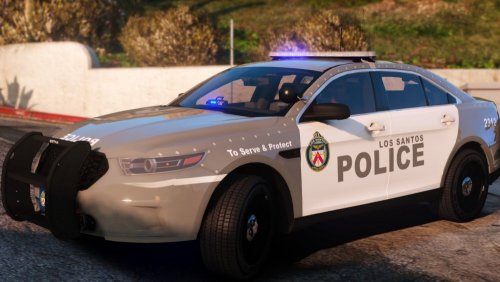 I'm very eager for this to be a full pack and to replace my current textures. This one just looks really gorgeous!
- 3 comments
- 2 reviews
-
-

- 2
-
-
I'm just trying to verify if the issue is actually with the mods folder, hence changing the name.
-
Also if you mean the blue Sheriff texture it's also released on here.
-
Your topic has been moved to LCPDFR Support Requests. Please post in the correct location in the future.

