


Reddington
Members
-
Joined
Everything posted by Reddington
-
You'll need to verify integrity of game cache.
-
Hi there, When remaking your update.rpf, you'd delete it, then go into the vanilla update.rpf (in OpenIV) and click "edit mode". Then you'd be prompted to create this folder in the mods folder. Your topic has been moved to GTA V Support, this is not LSPDFR related. Please post in the correct location in the future.
-
 Just a thought, how about both? One version as LSPDFR plugin, another RPH plugin. I say this because for folks such as myself, we are still on older versions of Rage/GTA. If it's limited to just Rage 0.57, we're SOL.
- 93 comments
- 18 reviews
-
-

- 1
-
-
Ha ha, you're welcome.
-
Try launching GTA V normally, please. (As in launch via Steam or GTA 5.exe). If it does the same thing of infinitely loading, try installing this gameconfig, please - https://www.gta5-mods.com/misc/add-on-gameconfig-1-0-1180-2
-
Did you reinstall it after GTA V's update, or did you have to sit through an update?
-
When GTA V updated, did you update the update.rpf that is in your mods folder?
-
When the mods folder is named _mods, nothing inside that folder will work because the folder has to be named mods. :) When you're on the loading screen, at what point does it get stuck?
-
I wouldn't advise this unless you have a really good PC. Having too many modded cars, some of which might be high poly, will cause memory errors/crashes. If you really want to use some real life models, just replace one or two cars and see how your game reacts.
-
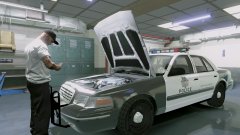 Damnit! I wondered why I got a thousand 2011 CVPI results.
 -
Love you too. :P You're welcome.
-
:) Please give it a shot.
-
Do me a favor, please, and still try doing what I posted. That should allow you to load in with the mods folder. :)
-
Hi there, For the fatal error, double click RagePluginHook.exe as if you're opening it. When the Rage logo appears on screen, click the gear icon in the lower left. Once the Rage settings are open, go to advanced options and uncheck "enable counter measures against online vehicles".
-
-
I know nothing when it comes to vehicle development, but I'm going to say it won't work. If it does work, it may not function properly. This topic has been moved to the appropriate forum. Please post in the correct location in the future.
-
Hi there, Yep, that would be the case! Contrary to popular belief, ELS will work for non-ELS vehicles, just not in the same way. ELS utilizes the extras, so for non-ELS vehicles, you will have the extras flash. If you'd like to use non-ELS vehicles, just modify the XML so that the extras aren't utilized.
-
-
That pack by Captain14 is ELS styled. That pack was created long before ELS was released and was meant to replicate ELS. Due to all the customizations with Captain14's pack, it's not compatible with ELS. You'll need to use ELS specific vehicles.
-
I would've thought that as well. Just because they are handcuffed doesn't mean they aren't a threat.
-
From the album: Red's LSPDFR chaos
-
Hi there. Do you have ELS installed?
-
You're welcome. :) Yep, main directory.
-
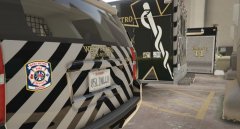 I really, really like these textures.
 -
Are you on Steam or disc version?

