


Reddington
Members
-
Joined
Everything posted by Reddington
-
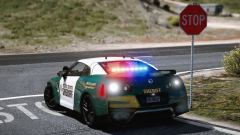 I WANT THIS SO BAD! Actually, is this a new vehicle, or the older non ELS one?
 -
Unfortunately there's no way to downgrade GTA, assuming you have no backups of your game.
-
You do need OpenIV. ScriptHookV is not required, but there are plugins that do need it. Check the mod pages and/or the readme to see if it has a requirement for SHV.
-
If you're primarily looking for smart AI that will drive/follow you, I'm sorry to say but there's nothing like that and I doubt there will be. LSPS does have something similar to what you're wanting, but along the lines of multi SWAT group convoys with AI drivers? Maybe you can talk to the guy who developed LSPS and see if it's something he'd consider.
-
A while back something in my mods folder got corrupt, and I had to remake it. Ever since, my LGUARD slot will not work with Computer+, and yes, it previously did. What's confusing me even more is that the AI recognizes it's an emergency vehicle. I can pull people over, they yield, it works fine. The only thing that won't work is Computer+. I've replaced my LGUARD meta with a working one, and I've quadruple checked my carvariations, everything is working except for Computer+. It works on every other slot. Is there something I'm forgetting? @BejoIjo if you have the time.
-
The bodyguard AI in trainers is pretty trash, but if you use Simple Trainer, and set the bodyguard task to "look at player", they will get in the car and drive with you. This isn't foolproof, as sometimes they will still glitch out. Another alernative is Darkmyre's police partner mod. The AI will get in a car with you and stay there until you get out.
-
Um, what? I have no idea what you're trying to say. I can guess you're unable to download LSPDFR, but can you explain why? This topic has been moved to the appropriate forum. Please post in the correct location in the future.
-
I get what you're saying, but I'm positive we will never get to a point where LSPDFR has everything and there's no need for people to make LSPDFR mods. LSPDFR is an amazing mod by itself, but it also thrives off of the community and those that create the mods for it. Trying to add all the functionality of all the other mods to LSPDFR would be far too much work for just our team to maintain and might create an impossible scenario. Not to mention what would be the point of anyone making mods if we just took the features their mods offered and made them all available with LSPDFR? It's beneficial to everyone to have all these extra, optional plugins. There are plenty of people who play barebones LSPDFR and don't want to dive into any other mods. Something else to consider, look at all the plugins we have now, and how many INIs we have. Imagine how worse it could be if you'd try jamming every single option in each INI to just the one LSPDFR configuration file.
-
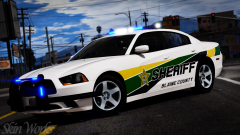 That looks really good!
 -
We can't see in the screenshots, but I assume tattoos will also be something we can add to our character? I can hardly wait to see what else 0.4 brings to the table! Awesome work Will Sam!
-

From the album: Red's LSPDFR chaos
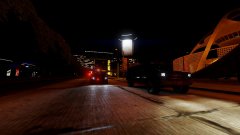
Night time is calm, peaceful, quiet. The only noise you hear is that of the wind or fellow night animals such as the beautiful owl. The dark can bring on peace and a level of calm you didn't think was possible. If you want to experience the city without a plethora of cars and pedestrians, cruise around after midnight, or better yet around 2-3am when everyone is tucked into bed with no thoughts of being out. Enjoy the silence, the beauty, and the cool breeze of the late night. -
 The four door version was perfect. They missed out with not bringing it back.
 -
This topic has been moved to the appropriate forum. Please post in the correct location in the future.
-
This topic has been moved to the appropriate forum. Please post in the correct location in the future.
-
That light bar is so tiny it reminds me of the Fisher Price police car. Jokes aside, I love the look of that car.
-
Your topic has been moved to GTA V Support, this is not LSPDFR related. Please post in the correct location in the future.
-
Just to clarify, as I know a lot of people make assumptions. None ELS vehicles will work with ELS, but not in the way you're hoping or thinking. You will only have the very basic functionality of turning your lights and siren off/on, that's it. Nothing you change in the VCF will truly matter aside from lststageactivation, which for non ELS needs to be set to auto, as well as disabling the extras from being utilized.
-
This topic has been moved to the appropriate forum. Please post in the correct location in the future.
-
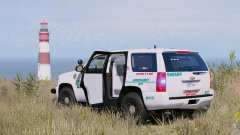 Love the Tahoe, but the marked CVPI also looks bad ass. Love the light bar.
 -
 Most of the time when I play LSPDFR, I use my controller, but during times where I'm testing things, or just want to mess around in unmodded GTA, I'll use the keyboard. Most of us know by now keyboard driving is absolute garbage. While this mod isn't able to fix the jank turning with A and D, it helps a lot with the speed. It adds some of the same functionality as a controller with being able to lightly pull down the right trigger and driving slowly. Having that ability on keyboard and mouse is a real game changer, and while this mod is not LSPDFR dependent, I think it will still be very beneficial.
- 329 comments
- 24 reviews
-
-

- 6
-
-
This topic has been moved to the appropriate forum. Please post in the correct location in the future.
-
Unfortunately not. To my knowledge, LSPS is the only mod which allows for that escort functionality,
-
You're most welcome. :)
-
That's the cause. The audionamehash dictates how the vehicle will sound. When you put POLICE, POLICE2, or any emergency slot, it has no radio because emergency vehicles don't have them. If you put the audio hash of a regular car, such as the WINDSOR, GAUNTLET, etc, it adopts those audio qualities, which includes the radio. I've found that for vehicles such as Explorers, Tahoes, trucks, it's beneficial to use the name hash of the corresponding vehicle just so you don't have a Tahoe that sounds like a Charger. If you want to continue using the WINDSOR hash, you can. All you need to do is turn the in-game radio volume all the way down/off. Otherwise, just change the name hash to POLICE or whatever corresponds with that vehicle.
-
Check in the vehicles.meta, and look under the POLICE2 line. Now look for this line: <audioNameHash> What does that say? Does it say <audioNameHash /> ? Or what?

