




unitedOrange66
Community Team
-
Joined
Everything posted by unitedOrange66
-
Are you using BetterEMS? If so, you’ll need to make some changes in the .ini and EMSUnits.xml.
-
If you are using any mods/scripts that modify your default health, such as setting your health to 5k in Simple Trainer, that will likely be the cause.
-
GTA V has a GPU/CPU bottleneck. Because of that, when running memory-demanding mods, such as LSPDFR, you are likely to have a higher CPU usage than GPU usage. This is the nature of GTA V itself, and has nothing to do with LSPDFR or other modifications.
-
This topic has been moved to the appropriate forum. Please post in the correct location in the future.
-
Your topic has been moved to LSPDFR 0.4 Support. Please post in the correct location in the future.
-
https://sites.google.com/view/immersive-plugins-team/grammar-police?authuser=0
-
Your topic has been moved to GTA V Support, this is not LSPDFR related. Please post in the correct location in the future.
-
Does your game still look like that with a clean copy of GTA V? If you have a "mods" folder, disable it by either dragging it to your desktop, or renaming it to "mods_." This is likely caused by certain mods in your "mods" folder.
-
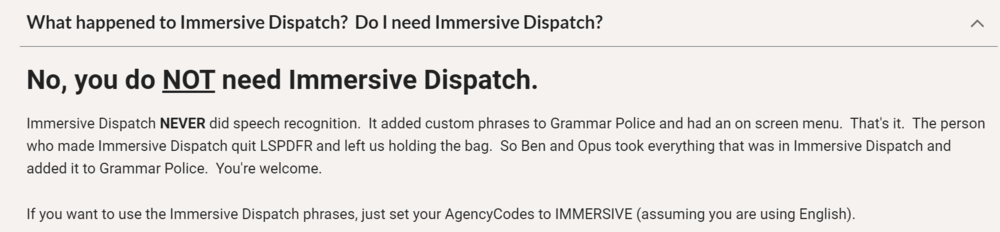
It is not outdated, Grammar Police took over and "merged" it into one plugin. If someone still has Immersive Dispatch, it should still work without issues. If for some reason Immersive Dispatch is causing issues, I recommend replacing it with Grammar Police instead, it features an on-screen radio which is better than in-game menus. Your topic has been moved to LSPDFR 0.4 Support. Please post in the correct location in the future.
-
Your topic has been moved to LSPDFR 0.4 Support. Please post in the correct location in the future.
-
 @TitanSloth Great callouts overall, and thanks for the update! One thing I'd like to point out after some testing - I cannot report any active threats that are created by this callout via the LSPDFR report crime function. For example, during the terrorist activity call, upon accepting the call, there are no blips on the mini-map; and when multiple suspects are shooting, I cannot report them to dispatch. Also related to this, during the kidnapping call, I could not initiate the pursuit, because the fleeing vehicle was not recognized by LSPDFR as a suspect who was resisting arrest.
- 174 comments
- 46 reviews
-
 A plugin doesn't get an update very often doesn't mean it is "outdated." Partially because there is nothing to "fix." Make sure you have installed the latest RageNativeUI 1.9.2. The author is still active in terms of monitoring this plugin, feel free to ask him for clarification. For your information, I've been using this plugin since 2019, and it's been working fine along with many other plugins on the latest version of GTA V and LSPDFR/RPH.
- 781 comments
- 85 reviews
-
-

- 1
-
-
It doesn't need to be updated. It still works as it should be. All of the "rumors" about "this plugin is broken" are most likely caused by other factors that are irrelevant to this plugin. This is unrelated to "BetterEMS." You are likely using an old/outdated plugin that was made for the older version of RPH/LSPDFR. "BetterEMS" does not have the function you described.
- 781 comments
- 85 reviews
-
Your topic has been moved to GTA V Support, this is not LSPDFR related. Please post in the correct location in the future.
-
Our support forums are for LSPDFR and single-player modding only. We do not provide support for FiveM.
-
This topic has been moved to the appropriate forum. Please post in the correct location in the future.
-
Not yet. I think the author is only making an announcement that he is going to overhaul/update this callout pack. The plugin itself hasn't been updated as of January 14th.
- 174 comments
- 46 reviews
-
Your topic has been moved to GTA V Support, this is not LSPDFR related. Please post in the correct location in the future.
-
Did you edit CustomQuestions.xml, or any other .XMLs in Stop The Ped folder? The slightest editing error will prevent them from loading into the game.
-
This topic has been moved to the appropriate forum. Please post in the correct location in the future.
-
Your topic has been moved to LSPDFR 0.4 Support. Please post in the correct location in the future.
-
Your topic has been moved to LSPDFR 0.4 Support. Please post in the correct location in the future.
-
Unlike GTA V LSPDFR where you can get critical information on the causes of certain crashes. With GTA IV or LCPDFR, in order for me or anyone to provide support for you, you will need to provide detailed information on the game crash. A log file is quite irreverent since many things that cannot be logged could cause crashes in GTA IV, simply saying "My game crashed when I loaded the game" is not sufficient, we need more information than that.
-
It is likely caused by the vehicle model itself. Try to replace that vehicle with a better model, there are many NYPD-based car mods that are free to download.
-
Did it cause any issues such as game crashes, or script crashes? If not I presume you can safely ignore it.




