




unitedOrange66
Community Team
-
Joined
Everything posted by unitedOrange66
-
Like I said: If you are losing too many FPS, like 10 above, you are either running too many plugins, or some of those plugins are poorly coded/outdated therefore causing a huge FPS drop.
-
This topic has been moved to the appropriate forum. Please post in the correct location in the future.
-
1. Limit the amount of plugins you're using in Plugins and LSPDFR folder. 2. Only use plugins that are compatible with LSPDFR 0.4.9. 3. Install a decent Gameconfig, along with HeapAdjuster, PackFileLimitAdjuster, and ResourceAdjuster. 3. Lower graphic settings, and eliminate any background tasks, such as Google Chrome, etc. Please note that it is normal to lose a certain amount of FPS upon loading LSPDFR, because LSPDFR is a very memory-demanding plugin. The above steps will not "completely solve" the performance drop "issue" as you described above, it may only help you from losing more FPS as you should. Your topic has been moved to LSPDFR 0.4 Support. Please post in the correct location in the future.
-
Your topic has been moved to GTA V Support, this is not LSPDFR related. Please post in the correct location in the future.
-
Are you on the 1070 or 1080 patch? What mods do you have installed? Crash at startup usually indicates some of the mods you've installed are not working properly.
-
Do you have ENB or any graphic mods installed? Have you tried to launch GTA V first then tab out and launch RPH?
-
Download LSPDFR and select the manual install option, and drag everything from the zip folder to the GTA V main directory. That is all you need to do.
-
This topic has been moved to the appropriate forum. Please post in the correct location in the future.
-
This topic has been moved to the appropriate forum. Please post in the correct location in the future.
-
This topic has been moved to the appropriate forum. Please post in the correct location in the future.
-
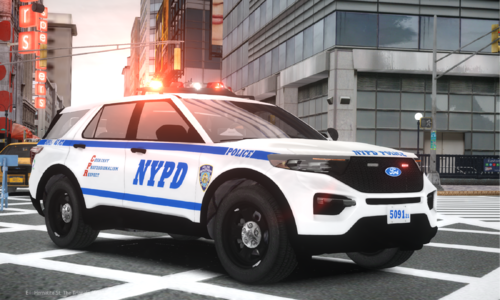 Great job. But low bean headlights, tail lights(not brake light), and front indicators don't work. Is it possible to fix these lights? That would be awesome.
 -
This topic has been moved to the appropriate forum. Please post in the correct location in the future.
-
Please attach the RagePluginHook.log, it is located in the GTA V main directory. Your topic has been moved to LSPDFR 0.4 Support. Please post in the correct location in the future.
-
Are you able to solve this issue? You've created a new topic regarding a LSPDFR crash, I assume this issue has been resolved.
-
Please attach the RagePluginHook.log from GTA V directory.
-
Unfortunately we do not provide support for older versions of RPH and LSPDFR. Please consider updating your game.
-
This topic has been moved to the appropriate forum. Please post in the correct location in the future.
-
Are you using an ELS-compatible vehicle? If so, does the vehicle in question have a custom ELS config? It's an XML file and should be installed in "ELS - pack_default."
-
This topic has been moved to the appropriate forum. Please post in the correct location in the future.
-
Your topic has been moved to LSPDFR 0.4 Support. Please post in the correct location in the future.
-
Did your game crash to the desktop without errors? Do you have "PoolManager" installed? Remove that first if you do. Also, the lspdfr.ini included in the RED is missing a few config lines, please download the latest LSPDFR and compare the configs, then manually add the missing lines.
-
Does LSPDFR crash without NVE? The crash you're experiencing is likely caused by a mod or multiple mods in the "mods" folder, try to disable it by renaming it to "mods_" and launch LSPDFR again. Your topic has been moved to LSPDFR 0.4 Support. Please post in the correct location in the future.
-
Sorry for the late response, I'd recommend replacing it with the original "PedHealth.meta." That works too.
-
@wadsfd This is an English-only forum. Please translate further responses into English.
-
Redux might have replaced PedHealth.meta. Go to “mods - update - update.rpf - common - data.” Open “PedHealth” and check player health’s value. If you do not see “PedHealth.meta” in the above path, go to “mods - common - data” instead.


