




unitedOrange66
Community Team
-
Joined
Everything posted by unitedOrange66
-
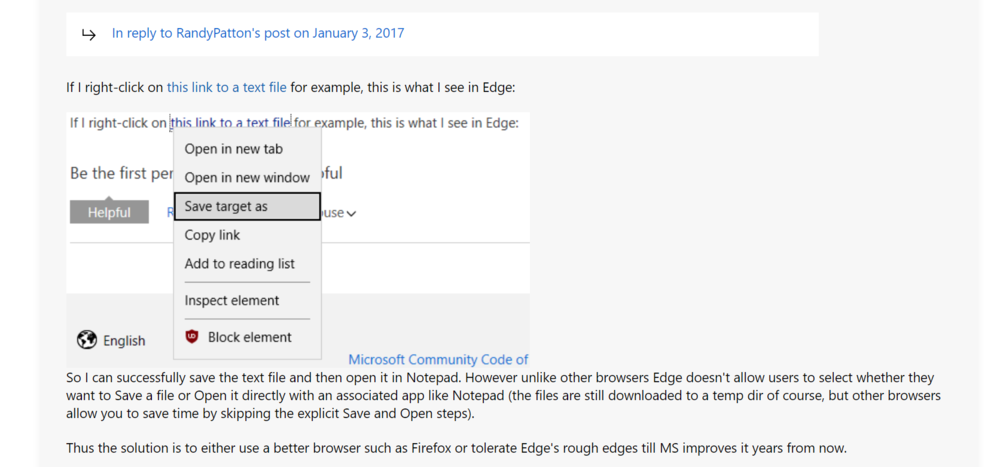
If you are downloading it from Edge, try this:
-
If you have Notepad++, yes, it's better and I recommend opening it with that. If you edited the document, you will need to save it before closing it. You can simply press "Control + S" to save it.
-
Right click on it, select "open with," and choose "notepad." Your topic has been moved to GTA V Support, this is not LSPDFR related. Please post in the correct location in the future.
-
If you are talking about "increasing the volume of audio files," then you will need to edit the degree of amplification of that audio file. Here is a video on how to do it precisely. (This screenshot below was taken from the video's description.)

-
Hi VRDog, It's nice seeing you again. There is a "mod" called "No Dirt Mod." It's a modified "Decals.dat" that decreases the dirt level or changes it to zero. (I assume). But I'm not sure whether or not it'll work on addon cars. If you have a blood mod installed, it's recommended to edit "Decals.dat" manually via Visual Studio, that way you can compare the two files and only replace the part that is related to dirt on vehicles.
-
Yes, it should be false. Thank you for the correction. If none of that worked then yes, he probably got either 4K vehicle textures or very high poly cars spawning in traffic.
-
With only cruise lights on, there are no lighting reflections. I don't have the exact answer of why; my theory is that the environmental lights (reflections) only get activated when the main lighting stages are enabled. This topic has been moved to the appropriate forum. Please post in the correct location in the future.
-
Hi, I've already reported this to the developer regarding FPS drop on the latest version, the developer did release an update shortly after Christmas aimed at "improving performance." But the "improvement" was almost unnoticeable. Other than simply not using XScanner, there are no solutions on the users' end; unless XScanner can prevent itself from taking too many frames when running with other plugins. I recommend notifying the developer of this issue by commenting on XScanner's download page.
-
Go to "lspdfr" folder, open lspdfr.ini with notepad, and change "main.preloadallmodels" to true.
-
Were you using OverWolf in-game overlay? Disable OverWolf completely and try again. Your topic has been moved to GTA V Support, this is not LSPDFR related. Please post in the correct location in the future.
-
Hi, You are having the classic texture loss issue. This happens when your game is running low or ran out of memory, since LSPDFR is a very memory-demanding modification. You can fix this by installing a gameconfig, and a few scripts which allow GTA V to allocate more in-game memory: 1. Gameconfig. (personally I use this one) 2. Install HeapAdjuster. 3. Install ResourceLimitAdjuster. 4. Install PackfileLimitAdjuster. In addition, if you have any police vehicles with 4K liveries, I recommend resizing those to 2K.
-
Your topic has been moved to GTA V Support, this is not LSPDFR related. Please post in the correct location in the future.
-
Your topic has been moved to LSPDFR 0.4 Support. Please post in the correct location in the future.
-
This topic has been moved to the appropriate forum. Please post in the correct location in the future.
-
The answer is very simple. I assume you are using fire callouts from LCPDFR.com, it is a callout plugin depending on LSPDFR since it is in the "LSPDFR" plugin folder. It does not fully transform the game into a firefighter/EMS simulator, unlike Gangrenn's Rescue mod V.
-
Your topic has been moved to GTA V Support, this is not LSPDFR related. Please post in the correct location in the future.
-
Take a look at this topic, it could be helpful:
-
This topic has been moved to the appropriate forum. Please post in the correct location in the future.
-
It is a known bug after the recent GTA Online update. For now only flatbed works.
-
Your topic has been moved to GTA V Support, this is not LSPDFR related. Please post in the correct location in the future.
-
Hi, Have you tried to install this one instead? Seems like this one is a replacement for the old Visual C++ 2010 package, that's probably why the download link from RPH did not work. You can also take a look at this thread, it might be helpful: https://github.com/ytdl-org/youtube-dl/issues/28845 Your topic has been moved to GTA V Support, this is not LSPDFR related. Please post in the correct location in the future.
-
Hello, Simply changing the key binds for those two menus will prevent them from overlapping. Your topic has been moved to GTA V Support, this is not LSPDFR related. Please post in the correct location in the future.
-
As I explained before, ELS corona is different than non-ELS corona. For that reason you cannot make ELS lights as bright as non-els lights from a distance. You can only try to maximize your visual experience by following the above steps.
-
Hi, ELS works differently than non-ELS. Unfortunately this is the way how it is. Because non-ELS vehicles use a different type of lighting corona that can be seen far away. You can try to maximize your visual experience by trying to Increase these values in ELS.ini below: "LodCoronaInitDistance ElsMaxRangePl ElsMaxRangeAi" In addition, you can also check out some ELS lighting enhancement mods, such as Radiance V.
-
This topic has been moved to the appropriate forum. Please post in the correct location in the future.





