




unitedOrange66
Community Team
-
Joined
Everything posted by unitedOrange66
-
a) Make sure GTA V is up to date. b) Make sure you're installing LSPDFR via the manual installation method, as it contains the latest version of RPH. For how to get LSPDFR to work on Epic Games, please take a look at this topic:
-
1. If you are using a ELS vehicle, set "ElsTrafCtrlOn" to false in els.ini. 2. Download and install this plugin so that you can order the suspect to pullover to the desired location after you've stopped them.
-
This topic has been moved to the appropriate forum. Please post in the correct location in the future.
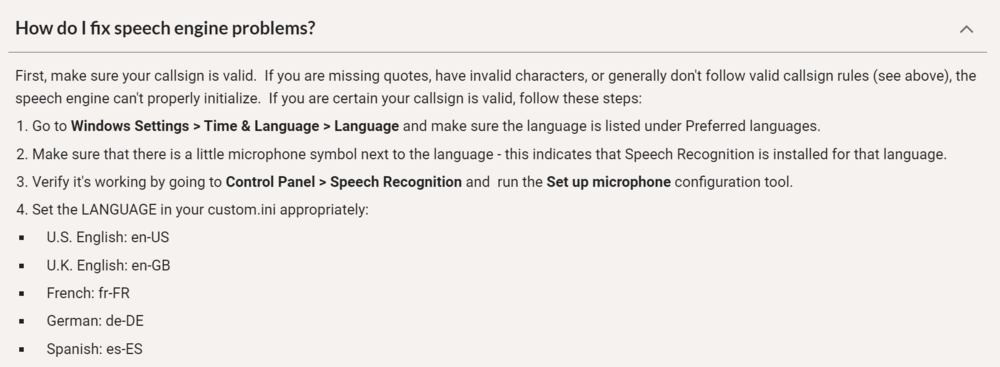
-
Your topic has been moved to GTA V Support, this is not LSPDFR related. Please post in the correct location in the future.
-
This topic has been moved to the appropriate forum. Please post in the correct location in the future.
-
Here is a video tutorial. This topic has been moved to the appropriate forum. Please post in the correct location in the future.
-
You have a decent spec, I'd recommend lowering certain graphic settings such as SMAA, extended distance scaling, and installing the above scripts if you haven't already done so. Like I said above, unlike in the old days, LSPDFR 0.4.9 can be very demanding, FPS drops and a reasonable amount of lags are expected.
-
Hello again, What is your PC spec? Unfortunately LSPDFR is a very demanding/memory-consuming modification on low to mid-end systems, even on some "high-end" systems. To achieve maximum performance, I personally recommend upgrading your hardware, especially GPU and RAM. (In my opinion this is the only way to make a real difference) However, you can try to minimize the number of plugins and mods(especially high-poly vehicle mods with 4K liveries) you've installed to free up more space for LSPDFR; and/or lower certain in-game graphic settings. In addition, make sure you have a custom Gameconfig installed, along with a few script mods that allow GTA 5 to utilize additional in-game resources beyond its limit: Resource Adjuster HeapAdjuster PackFileLimitAdjuster Please note that the above "fixes" may or may not significantly boost FPS while LSPDFR is running.
-
This document might be helpful: https://sites.google.com/view/immersive-plugins-team/grammar-police?authuser=0
-
Make sure "Ambient.DisableEscapedSuspectEncounter" is set to "true" in lspdfr.ini. This topic has been moved to the appropriate forum. Please post in the correct location in the future.
-
This is a "mod" on GTA 5 Mods that modifies "decals.dat" to achieve the "no dirt" effect on vehicles: https://www.gta5-mods.com/paintjobs/no-dirt-mod I strongly advise you to only copy and paste the part where it controls the dirt effect, instead of replacing the entire file; especially if you have blood mod installed. And please be aware that this may not work with addon vehicles. Your topic has been moved to GTA V Support, this is not LSPDFR related. Please post in the correct location in the future.
-
With vanilla LSPDFR controls, to arrest a pursuit target you have to aim at them at gunpoint and hold E. If you have StopThePed installed, follow this instruction below: (For arresting pursuit targets with StopThePed, aim at them and double-tap E.) Your topic has been moved to LSPDFR 0.4 Support. Please post in the correct location in the future.
-
What did you do in terms of troubleshooting? Based on your brief description of the problem, I can only assume that either a)you have some mods in the "mods" folder that are causing a crash; or, b)you are using ENB. Your topic has been moved to GTA V Support, this is not LSPDFR related. Please post in the correct location in the future.
-
This topic has been moved to the appropriate forum. Please post in the correct location in the future.
-
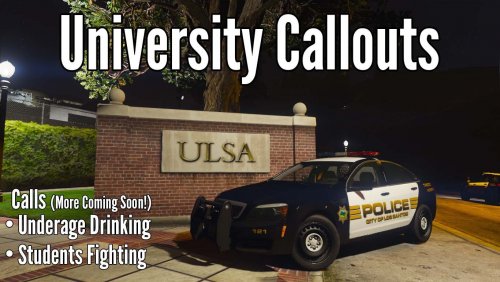 Are you planning to update Variety Callouts as well? I'm looking forward to it.
- 36 comments
- 4 reviews
-
Do you have any police car mods installed? If so you might want to remove those car mods, your game probably can't load those cars therefore causing a freeze.
-
It still works, I've been using it since 2020. I have no knowledge of how to edit vehicles' handling.
-
There is a script mod that decreases excessive acceleration: https://www.gta5-mods.com/scripts/traction-control-system Alternatively you can install a custom handling mod.
-
This topic has been moved to the appropriate forum. Please post in the correct location in the future.
-
Your topic has been moved to LSPDFR 0.4 Support. Please post in the correct location in the future.
-
This topic has been moved to the appropriate forum. Please post in the correct location in the future.
-
Have you tried to remove "smooth driving v?" If that mod also modifies AI vehicles' handling then it might be the cause.
-
This topic might help you to understand why the liveries aren't working properly:
-
This topic has been moved to the appropriate forum. Please post in the correct location in the future.
-
Make sure the radio key is set to the key you were pressing in "custom.ini," inside GrammarPolice folder.




