




unitedOrange66
Community Team
-
Joined
Everything posted by unitedOrange66
-
"Attempted to read or write protected memory. This is often an indication that other memory is corrupt." Does this happen very often? It could be an random crash. You can try to diagnose the root of the crash by disabling the "mods" folder - renaming it to something else such as "_mods."
-
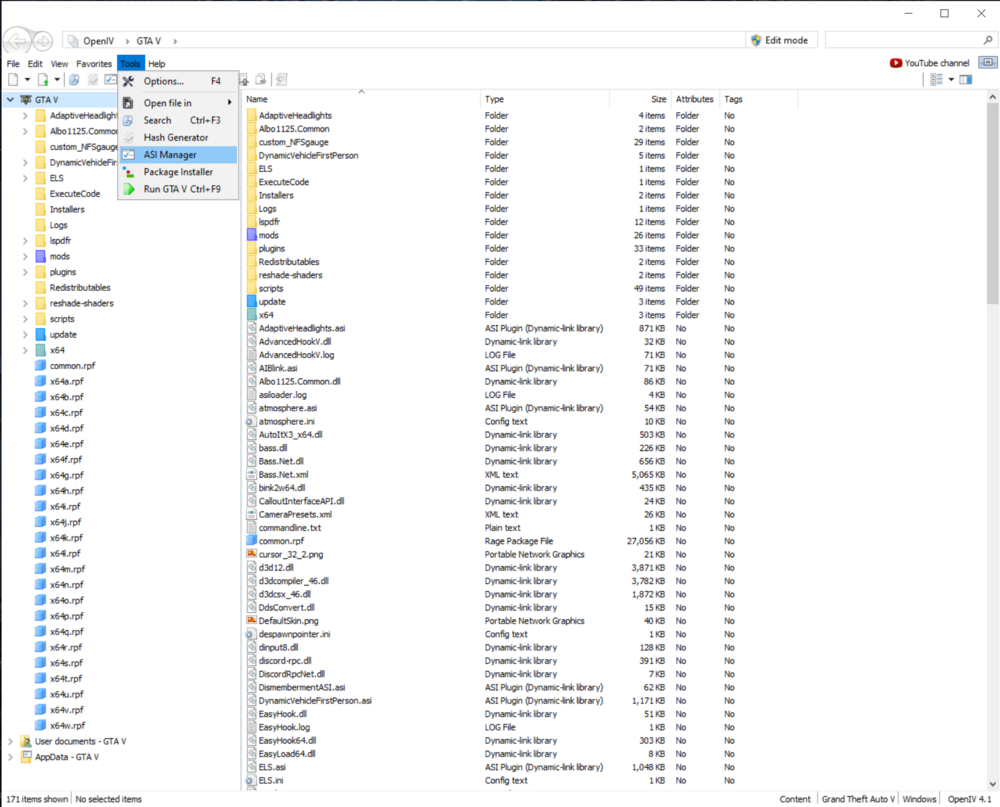
Launch OpenIV, click on "tools," then select "ASI manager." This topic has been moved to the appropriate forum. Please post in the correct location in the future.
-
This topic has been moved to the appropriate forum. Please post in the correct location in the future.
-
Hello, This topic has been closed because it is a duplicate topic of "Invisible EUP Menu." Please proceed further discussions on the original topic. If you feel this topic has been closed in error, please report this post.
-
Your topic has been moved to GTA V Support, this is not LSPDFR related. Please post in the correct location in the future.
-
Your topic has been moved to GTA V Support, this is not LSPDFR related. Please post in the correct location in the future.
-
Your topic has been moved to GTA V Support, this is not LSPDFR related. Please post in the correct location in the future.
-
Your topic has been moved to GTA V Support, this is not LSPDFR related. Please post in the correct location in the future.
-
Your topic has been moved to GTA V Support, this is not LSPDFR related. Please post in the correct location in the future.
-
This topic has been moved to the appropriate forum. Please post in the correct location in the future.
-
This topic has been moved to the appropriate forum. Please post in the correct location in the future.
-
 I know it has been a while since anyone commented here. But it seems like certain audios don't play when engaging in pursuits in LSPDFR; such as "suspect on foot," and "suspect in custody" upon arresting the target.
- 35 comments
- 3 reviews
-
Download and install this, certain MP clothing slots are causing this crash: "This mod replaces all the stub files of the MP characters clothes with "empty" drawables in order to prevent the game from crashing and makes scrolling past a certain ID work." https://www.gta5-mods.com/player/mp-stub-clothes-patch
-
Your topic has been moved to GTA V Support, this is not LSPDFR related. Please post in the correct location in the future.
-
Your topic has been moved to GTA V Support, this is not LSPDFR related. Please post in the correct location in the future.
-
This topic has been moved to the appropriate forum. Please post in the correct location in the future.
-
This topic has been moved to the appropriate forum. Please post in the correct location in the future.
-
Welcome to PC gaming and the modding community. Since you're on Epic Games, I hope this topic will provide you with some helpful information:
-
Your topic has been moved to GTA V Support, this is not LSPDFR related. Please post in the correct location in the future.
-
@scobastic Please do not create duplicate topics. The other topic has been trashed.
-
This topic has been moved to the appropriate forum. Please post in the correct location in the future.
-
Hello, This is an English-only forum, please edit your topic and translate the title and content into English.
-
This topic has been moved to the appropriate forum. Please post in the correct location in the future.
-
Your topic has been moved to GTA V Support, this is not LSPDFR related. Please post in the correct location in the future.
-
This topic has been moved to the appropriate forum. Please post in the correct location in the future.





