


Join the Discord support server for help and updates on future projects.
ApxRadio UI is a functional Apx-style radio UI for LSPDFR. It includes handheld and in-car radio skins for a clean visual display in dispatch plugins like GrammarPolice, NexusDispatch, etc. It CAN be used with any dispatch plugin.
more radio skins coming soon; join the server to leave suggestions 👀
v1.3.4
Features include:
Interactive handheld and in-car radio controls
Options for different radio types. 6 radio skins: three for handheld and three for the car
APX8000
APX7000
APX4000
E5 Control Head
O2 Control Head
Viking VM7000
Up to 16 customizable zones with 16 channels per zone
Resize, reposition, and save both radios independently
Wi-Fi Smart Connect, Bluetooth, and GPS controls
3-4 pages of working menus that serve a purpose
Time-synchronized day and night displays
Animated signal, connection, and transmission indicators
Customizable callsign, keybinds, sounds, and voice prompts
Partial controller support
Extensive configuration through
apxconfig.inior the in-game menu.
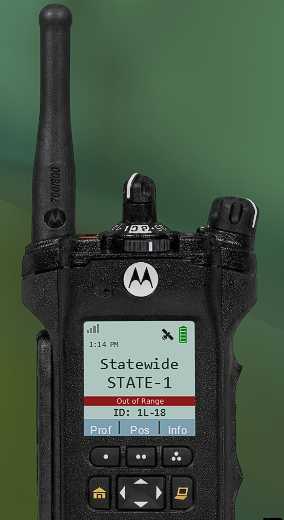
out-of-range photo example
Press "F8" to open the in-game configuration menu. Keybinds can optionally be changed in the INI.
ApxRadio is a visual and immersion-focused plugin and does not replace your existing dispatch plugin.
Requirements:
GTA V Legacy
RAGE Plugin Hook
RAGENativeUI
LSPDFR
Tutorial & YouTube Preview
Check the Instructions.txt file for more information on setting this plugin up. After installation, you MUST match ApxRadio’s transmit keybind to the transmit keybind used by your primary dispatch plugin if you want the "transmitting" text to appear on your radio.
Edited by OwenAb
added stuff in the desc
What's New in Version 1.3.4
Released
What's new in V1.3.4?
Options for different radio types. 4 new radio skins: two for handheld and two for the car.
APX8000
APX4000
E5 Control Head
Viking VM7000
Minor bug fixes.
I'll be adding LAPD's radio soon, as I'm sure most people who play LSPDFR larp that department. If you have suggestions for new radios, feel free to send them in the comments or private messages.
Short Description
AI disclosure
The author has disclosed that AI tools were used in creating the following aspects of this file:
- Mod and Mod Content (Moderate)
Fixing broken code/debugging.



.thumb.png.59d05d91e184fd0e413931530914fdf4.png)



![Riverside County Sheriff Office EUP [FiveM Ready Male Only]](http://s3-screenshots.int-cdn.lcpdfrusercontent.com/resize/500/-/monthly_2026_10/image1.thumb.png.610ced849b902200c1e41060ec521220.png)


![NFSHP2: Class 2 Police pack [Addon / Template / Sounds]](http://s3-screenshots.int-cdn.lcpdfrusercontent.com/resize/500/-/monthly_2026_10/1.thumb.jpg.14d1e6da00183e26da76596672dbff60.jpg)

.thumb.png.5a2cda12204c8d56deb80ba35d0fae8f.png)

Recommended Comments
Create an account or sign in to comment