




PNWParksFan
Insiders
-
Joined
-
Last visited
Everything posted by PNWParksFan
-
 LSPDFR crashes in the middle of a pursuit. We've all been there. Maybe it's while developing a new callout, maybe it's a slightly unstable plugin you like to use, maybe LSPDFR just crashes on your computer sometimes. Now your map is littered with flashing red and blue blips and the suspect is still showing up red even though you arrested them. You reload LSPDFR, but the messy map remains. Abandoned police cars block the road. Do you waste a bunch of time restarting GTA, or do you just move some cars to the side of the road and deal with it? Well, now there's a better solution! The CleanAllTheThings Plugin has several different modes to help you clean up the game world - whether there was a crash, some cops just randomly abandoned their vehicles, or just because you feel like it. CleanUpLSPDFRCrash removeEmptyPoliceVehicles Combines most commonly used commands when cleaning up from an LSPDFR crash during a pursuit. Calls the following commands, described below: RemoveAllBlips DismissPeds DismissVehicles (policeOnly=true, occupiedOnly=false) DeletePeds (deadOnly=true) DeleteVehicles (policeOnly=true, unoccupiedOnly=true) IF removeEmptyPoliceVehicles is true FixAllVehicles policeOnly, occupiedOnly Repairs and cleans all vehicles in the game. If policeOnly is true, only fixes police vehicles. If occupiedOnly is true, only fixes occupied vehicles. This command is useful if you're in a pursuit and a police vehicle is unrealistically damaged due to smashing into things thanks to the hyper-active pursuit AI. RemoveAllBlips Removes all blips from the map, including red/blue flashing blips for pursuits. Note that this command does NOT delete the underlying object, it just removes the blip from your map! That means if you call this command while a pursuit is active, the pursuit will continue - you just won't be able to see where the suspect is. You would have to use a Dismiss or Delete command to actually remove the underlying objects. RemoveBlipsFromVehicles policeOnly, occupiedOnly Turns off the blips for all vehicles loaded in game. Specify true or false for policeOnly and occupiedOnly to only remove blips from police vehicles, and/or only remove blips from occupied vehicles. DismissVehicles policeOnly, occupiedOnly Dismisses vehicles, clearing any tasks assigned to them and allowing the game to unload the vehicle if you leave the area they are in. Specify true or false for policeOnly and occupiedOnly to only dismiss police vehicles or occupied vehicles. DeleteVehicles policeOnly, occupiedOnly, unoccupiedOnly Deletes vehicles, and any peds inside those vehicles, anywhere in the game world. Specify true or false for policeOnly, occupiedOnly, and/or unoccupiedOnly. policeOnly = only deletes police vehicles occupiedOnly = only deletes vehicles with peds in them unoccupiedOnly = only deletes vehicles without peds in them If you specify both occupiedOnly and unoccupiedOnly to be both true or both false, then it will delete all vehicles. DeletePeds deadOnly Deletes all peds in the game. Specify true or false for deadOnly to only delete dead peds, or to delete all peds. Note that in some cases, a ped may appear to be dead, but is actually alive and set to appear unconscious by a plugin. If deadOnly is set to true, these peds will not be removed. DismissPeds Dismisses all peds, terminating any tasks and allowing the game to despawn them if you leave their area. Any peds stuck in place due to a callout should start walking or driving away, including any arrested peds. _____________________________ Hope you find this plugin useful! Please leave a comment and let me know if you encounter any problems, and if the plugin helps you out consider leaving a review. Plugin tested on RPH 0.34 with LSPDFR 0.3.Yeah I'm aware of that function but I wanted more flexibility - the ability to dismiss peds/vehicles, and the ability to only delete police vehicles, and the ability to clear blips.I created a plugin that has various cleanup options, useful for when LSPDFR crashes mid-pursuit or if a callout is a bit buggy resulting in some peds just standing around forever. It can do the following: Dismiss all peds in game Dismiss all vehicles in game Remove all blips from map Delete all vehicles (option to delete only police vehicles and/or only occupied vehicles) It works fairly well, although for some reason the "remove all blips" needs to be re-run a few times to clear all the blips, so I'm still working on fixing that before I upload the plugin.Yeah as far as I can tell, chance only applies to peds, but @Sam or @LMS would have to confirm that.Eh, I was mostly just curious... I think it would be of limited use in a plane. Nice for roleplay value - having a surveillance plane, doing aerial speed enforcement, etc, but it doesn't really work with the callout paradigm in LSPDFR. I imagine it's difficult to fly and control the camera at the same time? Might be interesting if you could enable an AI pilot for the heli, putting the player in the passenger seat and letting them focus on operating the camera, shooting out the side door, or whatever. If a pursuit was in progress the pilot could follow the pursuit; otherwise I guess you'd have to set a waypoint or something.Does the heli can work on fixed wing aircraft too, or just helicopters?
 Little Seoul/Innocence Boulevard. I got the same callout today to the same location. I had just installed the latest version of Assorted Callouts, and the car didn't blow up, so I'm guessing you put something in for that? The car did spawn in an awfully wacky position Since the screenshots seem to be mysteriously disappearing, here they all are in an imgur album: https://imgur.com/a/nEIqP I like in the 2nd screenshot how the gas station owner is looking around like " my gas station, what have you done!"
- 1,081 comments
- 166 reviews
@alexguirre it looks like you accomplished this somehow? Might you be able to share how you did that?The location of a callout is shown when a callout is dispatched, and is heard over the radio when requesting backup. Is there any way to tie into that system in a plugin? I know you can use PlayScannerAudioUsingPosition to have the radio say the location, but I want to get the location text as shown in the notifications when initiating a callout. I found GetStreetName in the ragepluginhook API, but that's too specific. I want the more general locations, like "Paleto Forest", "Davis", "Los Santos Airport", etc. Any idea how to get that?
I won't be able to get in-game until late today, but I'll try to find the location for you!- 1,081 comments
- 166 reviews
So here's an odd bug for ya... Gas theft callout. Goes to CCTV. The gas thief's car spawns into the gas station... in the middle of a gas pump, promptly blowing up the station, the thief, and his car. The callout proceeds. The (dead) thief and (burned out) car are teleported to a freeway a little ways away, and just sit there, not moving since... you know, the suspect is toasted. Meanwhile, fire department swarms the gas station lol. I reach the suspect's location, it says the suspect is fleeing! I get out of my car to approach, and it then says the suspect is dead. Possible workaround: I don't think you can make a gas station explosion-proof, but maybe you can make the thief and their car indestructible during the CCTV bit, and then set them back to normal when they're teleported out.- 1,081 comments
- 166 reviews
 I'm also having this issue. The light corona is visible, but the lightbar itself (and push bumper) disappear.
- 221 comments
- 34 reviews
Thanks for letting me know about that. It'll lead to enormous vehicle sets to get desired probabilities, so if you can add support for "chance=" in future versions it would be much appreciated. Adding more entries does work in the meantime though. Can you comment on the issues some of us are having with enabling/disabling extras not working as expected? http://www.lcpdfr.com/forums/topic/58961-backupxml-sharing-thread/#comment-392376First off, huge thank-you to the LSPDFR team for LSPDFR 0.3 - it's awesome! I'm enjoying customizing my backup.xml, but am finding myself wishing for a bit more flexibility, especially with probability of certain backup units arriving. It appears that each <VehicleSet> has an equal probability of responding, regardless of how many <Vehicle> entries are in that set. This means, for example, that I get a police bike almost 50% of the time when I call for State Patrol backup, even if there's 4 different vehicles listed under the non-bike group. It would be nice to be able to set the probability like you can with peds for any of the sets or vehicles groups, e.g.: <StatePatrol> <LosSantosCity> <VehicleSet chance="80"> <Vehicles> <Vehicle chance="15" extra_2="true" extra_7="true" extra_12="false">police4</Vehicle> <Vehicle chance="15" extra_1="true">fbi</Vehicle> <Vehicle chance="70" livery="4" extra_2="false" extra_4="false" extra_3="true">police2</Vehicle> </Vehicles> <Peds> <Ped comp_shirt="1" comp_decals="1" comp_pants="1" helmet="false">s_m_y_hwaycop_01</Ped> </Peds> <NumPeds min="1" max="2" /> </VehicleSet> <VehicleSet chance="20"> <Vehicles> <Vehicle>policeb</Vehicle> </Vehicles> <Peds> <Ped comp_shirt="1" comp_decals="1" comp_pants="0" prop_head="0" helmet="true">s_m_y_hwaycop_01</Ped> </Peds> <NumPeds min="1" max="1" /> </VehicleSet> </LosSantosCity> It would also be nice to be able to add additional response regions. We currently have LS City, LS County, Blaine County, and North Yankton. I'd love to be able to add a region for the parks, so I could configure park rangers to respond in some areas. It would also be cool to be able to configure LS International Airport as a separate area, and have Airport Police, TSA, etc. be able to respond. It seems like there is some way of determining where you are in the game, e.g. callouts say "Backup required in... umm, Raton Canyon". Whatever system estimates what region you're in for that, could be adapted into the XML file. At the top of the file, before <BackupUnits>, you could have <ExtraBackupRegions>. Each entry would override the default regions included when the player is in that region. The format might be like: <ExtraBackupRegions> <BackupRegion name="Parks"> <IncludeArea>Raton Canyon</IncludeArea> <IncludeArea>Paleto Forest</IncludeArea> <IncludeArea>Mt Chilliad State Wilderness</IncludeArea> </BackupRegion> <BackupRegion name="Airport"> <IncludeArea>Los Santos International Airport</IncludeArea> </BackupRegion> <BackupRegion name="Port"> <IncludeArea>Terminal</IncludeArea> <IncludeArea>Docks District</IncludeArea> </BackupRegion> </ExtraBackupRegions> <!-- Resume file as normal, allowing the regions above to be used in any of the backup unit sections. If a region is missing a definition for one of the categories, then just use the default for the area, e.g. if no "state patrol" is specified for Los Santos International Airport, just send the regular state patrol defined for City of Los Santos --> <BackupUnits> <LocalPatrol> <Parks> <VehicleSet> ... Thanks for the quick reply. Upon closer inspection it turns out I had copied the <item> section into my vehicles.meta, but had forgotten to copy the bit at the end for vehicle interior definition... derp! Sorry to have wasted your time.
- 371 comments
- 38 reviews
-
-

- 1
-
Are you sure you uploaded the right files for the latest update? The Sadler and Bison both have horribly misapplied interior textures, and all the junk is in the back of the bison. I installed the vehicles.meta and carvariations.meta.- 371 comments
- 38 reviews
Found a minor bug in the "officer needs transport" callout. If your vehicle doors are locked (which More Control V does whenever you drive) then the officers try to get into your car, fail, and then stand there. I can't seem to get them back in no matter what I do. Would be nice if you could press Y again to try again, or if the officers could warp into your passenger seats if for some reason they can't initially get in.It is pranger. Are you updating carvariations.meta in the right place? I believe as of the latest GTA update carvariations.meta is in mpchristmas2.You probably forgot to update the carvariations.meta or vehicles.meta as specified. Note that carvariations.meta is now in mpchristmas2, not mpluxe2 as many readme's state, due to the latest GTA update.Excited to see the next release. What's your timeline looking like? If you need help testing any of the new callouts, just let me know ;)Check out /r/buildapc, they're really helpful for people new to building their own PC. Subscribe to /r/buildapcsales too and wait until the GTX-970 or R9-390 comes on sale.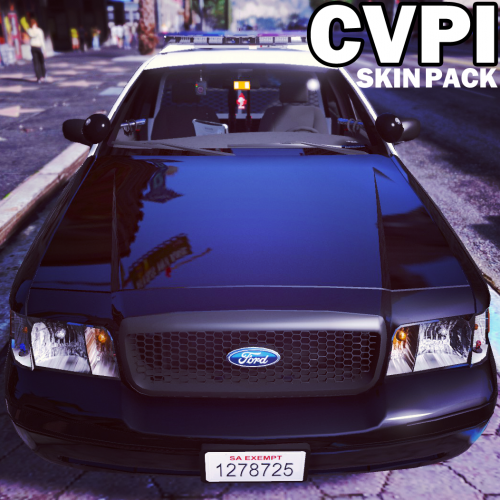 Nice skin. High quality, looks great. If you have issues with the vehicle not spawning, make sure to remove liveries 7 and 8; the file might be too big.
- 64 comments
- 18 reviews
-
-
- 1
-
I tried using the bulk import rather than importing individually, and I deleted two of the liveries. Seems to work fine now. Not sure what exactly the issue was, but it's working now. Cheers!- 64 comments
- 18 reviews



