




PNWParksFan
Insiders
-
Joined
-
Last visited
Everything posted by PNWParksFan
-
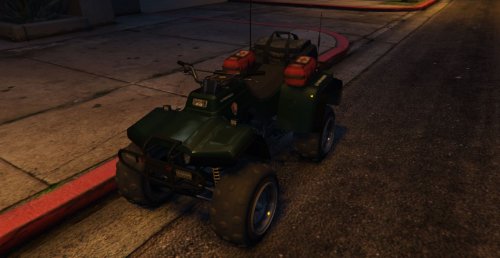 Very nice model. Looking forward to seeing a version with red/blue lights, and fully UV mapped to allow for custom templates. An excellent start - we've been needing a police ATV!
- 58 comments
- 5 reviews
-
-

- 1
-
-
I released a simple Park Ranger skin, and will release a better one once the UV mapped model is released.
- 58 comments
- 5 reviews
-
-
- 2
-
-
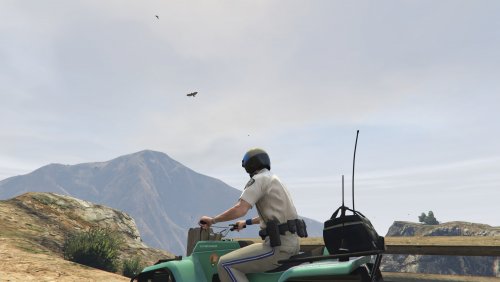 This is a very simple US Park Ranger skin for the new LSPD ATV. The model isn't UV mapped yet, so a fully detailed livery isn't yet possible. I will release an updated skin when the UV mapped model is available.
 -
Woo! Looking forward to it. Looks like I got my newest Ranger skins out just in time.
-
Looks great! If you release a UV mapped version I'll make a US Park Ranger skin for it. I would also prefer the red and blue, and maybe even a red-only version for lifeguards or fire department.
- 58 comments
- 5 reviews
-
-
- 2
-
-
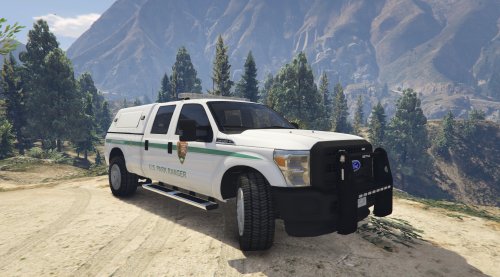 Last year the US National Park Service unveiled the new livery for all new US Park Ranger Law Enforcement vehicles starting in 2016. Mt. Chiliad National Park has been gradually repainting their fleet and has acquired several new vehicles with the new liveries. Vehicles now on patrol with the new graphics include old and new Ford Police Interceptor Utilities, two generations of Chevy Tahoes, the Ford F150 Raptor, the Chevy Silverado, and the Dodge Ram 3500. Based on close analysis of photos provided by @USRanger213 - a real NPS Law Enforcement Ranger - these 4k skins were recreated in great detail to match the new liveries for US Park Ranger vehicles. US Park Rangers are federal law enforcement officers, with all the same powers as any other sworn officer. So, don't hesitate to do some real policing while you're driving around in these new liveries! You can also get the older style NPS Park Ranger skins for the Interceptor Utility, Suburban, and Raptor, as well as US Forest Service Law Enforcement skins for all three of those vehicles, in my Park Ranger Skin Pack. Old-style NPS and current US Forest Service skins: Supported models for the new NPS skins: PLEASE DO NOT EDIT, MODIFY, REDISTRIBUTE, OR TAKE COMPONENTS FROM THESE TEXTURES. ALL TEXTURES ARE BY PNWParksFan, ALL RIGHTS RESERVED. If you would like a Park Ranger (or other) skin created for a vehicle model, please feel free to send me a PM. I can put one together for you quickly and for free. If you're wanting to create your own park ranger skins, that's awesome. You're welcome to PM me for suggestions on where to get good logos and other resources. Please do not cut logos or other textures out of my liveries and paste them directly into yours though. That's both impolite and usually looks ugly.
- 11 comments
- 4 reviews
-
-
- 5
-
-
Is it possible to configure it so that when you turn on the high beams, the side and rear flood lights will come on? I know on some other models the alley lights and takedowns on the lightbars come on when you toggle on the high beams, and it would be cool to have the option for scene lighting on an ambulance!
-
 With the latest version I occasionally am getting crashes during pursuits. Here is a sample of the logfile from a time that occurred:
- 176 comments
- 46 reviews
-
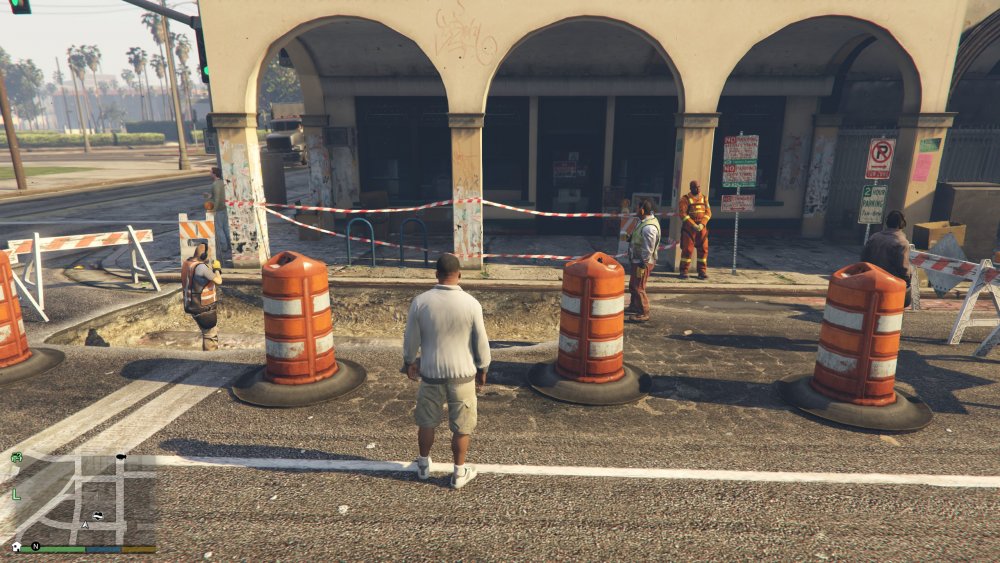
So, disclaimer, I'm not pursuing developing this at the moment because I'm busy working on other stuff, but it might be theoretically possible to get police tape in game. I don't think there's an actual police tape texture, but there is this red/white striped tape which would be close enough to start: I'm not sure if this would be the right way, but I would guess (again, no testing done whatsoever, no promises this would work) that it could be spawned using the ROPE native functions. So, if a sufficiently talented developer wanted to do so, they might be able to get police tape working in the game.
-
If you use MoreControl V then it'll lock the doors as you walk away, preventing it from being stolen.
-
 Thanks guys for pointing out how to reproduce the noise issue. I actually had it happen for the first time while playing yesterday... did you jinx me!? I'll see what I can do and keep you posted.
 -
Update: It appears that calling "Functions.SetPedAsCop(CopPed);" first before adding the cop to the pursuit stops the crash, although I need to do some more testing to be sure. If that's the case, I would suggest that the AddCopToPursuit function either raise an exception if the ped is not a cop, or automatically set the cop as a ped.
-
I am working on a plugin which adds pursuit units to the game. I spawn the units as follows: LHandle pursuit; pursuit = GetPursuit(); Vehicle ResponseVehicle; Model rVehicleModel; Ped CopPed; Model CopModel; Vector3 SpawnLocation = World.GetNextPositionOnStreet(PlayerPosition.Around(250)); rVehicleModel = new Model("policeold1"); CopModel = new Model("s_m_y_cop_01"); if (!rVehicleModel.IsValid) { Game.DisplayNotification("~R~Unable to create model " rVehicleModel.Name); return; } ResponseVehicle = new Vehicle(rVehicleModel, SpawnLocation); ResponseVehicle.MakePersistent(); ResponseVehicle.IsSirenOn = true; ResponseVehicle.ShouldVehiclesYieldToThisVehicle = true; CopPed = new Ped(CopModel, SpawnLocation, 3f); Functions.AddCopToPursuit(pursuit, CopPed); CopPed.WarpIntoVehicle(ResponseVehicle, ResponseVehicle.GetFreeSeatIndex().GetValueOrDefault(0)); Now, if I comment out the line with "AddCopToPursuit", the unit still joins the pursuit due to LSPDFR 0.3's auto-pursuit feature. That said, I want to explicitly add the cop to the pursuit so that it won't be affected by plugins like @Albo1125's auto pursuit disabler. When I have Albo's plugin installed, then if I just spawn the cops without adding them to the pursuit, they just sit there (as expected). The problem is, if I call AddCopToPursuit, then when the cops I spawned and added myself approach the suspect, LSPDFR crashes with the errors shown below. Note this happens consistently, even when I have no other RPH or LSPDFR plugins enabled other than the one I'm developing. The crash doesn't happen immediately on spawning the units, it only happens when the units get close to the suspects. All of my game fibers are named, so the crash appears to be originating in LSPDFR; additionally the crash refers to specific lines in the LSPDFR code. [1/24/2016 10:50:29 PM.069] LSPD First Response: [1/24/2016 10:50:29 PM.070] LSPD First Response: ============================== [1/24/2016 10:50:29 PM.070] LSPD First Response: UNHANDLED EXCEPTION DURING GAME THREAD TICK [1/24/2016 10:50:29 PM.070] LSPD First Response: ------------------------------ [1/24/2016 10:50:29 PM.070] LSPD First Response: Origin: Game fiber "<UNNAMED THREAD>". [1/24/2016 10:50:29 PM.070] LSPD First Response: ------------------------------ [1/24/2016 10:50:29 PM.071] LSPD First Response: Exception type: System.NullReferenceException [1/24/2016 10:50:29 PM.071] LSPD First Response: Exception message: Object reference not set to an instance of an object. [1/24/2016 10:50:29 PM.071] LSPD First Response: ------------------------------ [1/24/2016 10:50:29 PM.071] LSPD First Response: Inner exceptions: [1/24/2016 10:50:29 PM.071] LSPD First Response: ------------------------------ [1/24/2016 10:50:29 PM.072] LSPD First Response: Stack trace: [1/24/2016 10:50:29 PM.072] LSPD First Response: at ?????????????????????????????????????????.?????????????????????????????????????????() in E:\GTA V\LSPD First Response\LSPD First Response\Engine\Scripting\Chase.cs:line 413 [1/24/2016 10:50:29 PM.072] at ?????????????????????????????????????????.?????????????????????????????????????????() in E:\GTA V\LSPD First Response\LSPD First Response\Engine\Main.cs:line 52 [1/24/2016 10:50:29 PM.072] at LSPD_First_Response.Mod.LSPDFR.MainLoop() in E:\GTA V\LSPD First Response\LSPD First Response\Mod\LSPDFR.cs:line 607 [1/24/2016 10:50:29 PM.073] at Rage.GameFiber.Main() [1/24/2016 10:50:29 PM.073] LSPD First Response: ============================== [1/24/2016 10:50:29 PM.073] LSPD First Response: Am I using AddCopToPursuit wrong, or is there some bug in LSPDFR?
-
If anybody can give me steps to reproduce the audio white noise problem I'll see if I can do anything about it!
-
Has there been any progress with this? It would be really nice to be able to interactively debug an LSPDFR plugin.
-
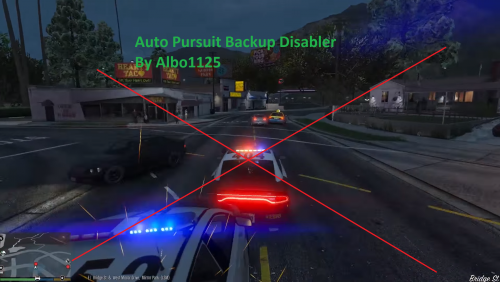 If you call for backup, will it always result in a new unit spawning, or would it allow an already-existing but suppressed unit in the area to then join the pursuit? How are you doing this from a code perspective? I'm curious because I'm working on a mod which is related to backup and want to ensure these won't interfere with each other. If I call LSPD_First_Response.Mod.API.Functions.AddCopToPursuit() on a ped I spawned, will this prevent it from responding to the pursuit? I assume that if I just spawn a police ped + vehicle, it won't get auto-added like it does by default in 0.3.
- 57 comments
- 15 reviews
-
Yeah, I think it's more likely to be useful for those who develop plugins... you make one little mistake, LSPDFR crashes, and now your whole game is full of half-stuck entities that you want to clear up. That said I've been using it while playing recreationally to remove abandoned police cars fairly often (deletevehicles true false true).
-
Thanks for clarifying Albo. That's a good suggestion to check the sprite. That said, to be safe, it's probably a good bet to always just reload LSPDFR if you want to clean things up - if you're at a point where things are stuck and you need to clean up, then starting LSPDFR fresh is probably a good idea anyways.
-
1/24/2016 5:42:28 PM.275] LSPD First Response: Handled the main exception. [1/24/2016 5:42:28 PM.323] LSPD First Response: Rage.Exceptions.InvalidHandleableException: Operation is not valid because the specified Rage.Blip is invalid. [1/24/2016 5:42:28 PM.323] at Rage.Blip.set_IsRouteEnabled(Boolean value) [1/24/2016 5:42:28 PM.323] at Arrest_Manager.EntryPoint.?????????????????????????????????????????.?????????????????????????????????????????(Blip , Boolean ) [1/24/2016 5:42:28 PM.323] at Arrest_Manager.EntryPoint.?????????????????????????????????????????.?????????????????????????????????????????() [1/24/2016 5:42:28 PM.323] LSPD First Response: Handled the main exception. @Kilyin it appears the problem is with @Albo1125's Arrest Manager. It isn't checking if the ped blip is valid (blip.IsValid()) before trying to do things to it. Part of the cleanup process is deleting all blips, to clean up the map. Therefore, the blip that Arrest Manager is expecting to be there, is no longer there, so if Albo's plugin doesn't do a check to see if the blip is still present and valid, it causes an exception in that plugin. The reason it continues forever is because wherever Albo is calling that code is likely in a loop. The only way to get around it would be to unload LSPDFR, reload it, and ForceDuty to ensure a fresh start. It's not really Albo's fault, since he wouldn't expect another plugin to be messing with his blips, but if he did add some code to check if the blip is valid before doing something to it, that would also avoid the problem.
-
Well, the CleanUpLSPDFRCrash function does stuff which you would generally use if LSPDFR crashed, so the plugin is no longer running. If you call it when LSPDFR is still running you may get errors if it tries to delete cops which LSPDFR is trying to do things to. It's meant to be used as a cleanup plugin, so generally I would unload LSPDFR first, clean things up, then reload LSPDFR and call "ForceDuty" to go back on duty. That said, to check, I just did the same thing described above but called the cleanup function without unloading LSPDFR first, and I didn't get any errors.
-
Just to be sure there wasn't some difference in how I was running it, I just loaded LSPDFR, started a pursuit, called a ton of backup, then unloaded LSPDFR. Called CleanUpLSPDFRCrash true and didn't get any errors, just a few lines in the console saying it had run various cleanup tasks. This was with development off and the release build of the plugin DLL, same as the one uploaded here. If you can get me a copy of the errors then I'll try to figure out what's going on - there may be some kind of incompatibility with another plugin or something; I've been doing the development without other plugins enabled.
-
Hmm. I'm sorry to hear that. If you can send a snippet of the errors that would be helpful!
-
Sorry the instructions weren't more clear. Things like unoccupiedOnly are the name of the flag; you have to type "true" or "false". So you would type, for example: deletevehicles true false true and that would delete all unoccupied police vehicles. You have to specify true or false for each argument. The delete vehicles command will take care of their cars, and the dismiss peds command will take care of them being frozen and let them walk away. You can try dismissing first and see if they drive off in the cars before deleting the cars.
-
 Well the LOD problems seem worse with the latest update somehow... sometimes the whole vehicle except the lights disappears at a certain distance. Kind of frustrating since there's no other FPIU models which work as a slicktop right now.
- 221 comments
- 34 reviews
-
This gives more options than CleanWorld. CleanWorld does not remove blips, which is the most annoying thing to me personally. It also doesn't have an option to filter by police vehicle, filter by occupied/unoccupied, or dismiss entities. I haven't experienced that, so I'm not sure what to look into. If I could reproduce the error I could try to figure out how to approach it.


