




PNWParksFan
Insiders
-
Joined
-
Last visited
Everything posted by PNWParksFan
-
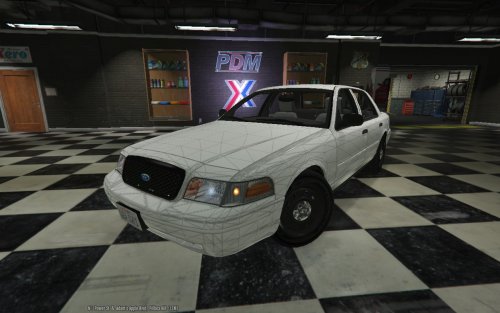 Is it UV mapped? It would be awesome if this is going to become "the" CVPI base model to not have to make a new texture every time somebody releases a car based on it.
 -
Heavy rescue looks aweeesome! Looking forward to seeing how that develops. Are you still planning to make changes to the rambulance? I'm waiting to make a skin pack for it until we see if the lighting can be touched up a bit. I know the lighting is challenging - thanks for your hard work!
-
It sounds like you have file extensions hidden. If you turn file extensions on, then you'll see that it was named CustomBackup.xml all along, and by renaming it you had it under CustomBackup.xml.xml! It's very annoying that Windows defaults to hiding the file extension.
-
Please check the troubleshooting/support section of the documentation PDF. Upload your XML file, Ragepluginhook.log file, and INI file.
-
Usually it's just a matter of changing the handling ID to an appropriate vehicle. For a Ram 1500, probably something like the bison. So you would just change <handlingID>whateveritisrightnow</handlingID> to <handlingID>bison</handlingID>, for example.
-
 [19-May-16 21:52:04.585] LSPD First Response: Going on duty with custom backup menu [19-May-16 21:52:04.618] LSPD First Response: CustomBackup.xml file could not be found: Die Datei "D:\Programm Files (x86)\GTA V LSPDFR\Plugins\LSPDFR\CustomBackup\CustomBackup.xml" konnte nicht gefunden werden. [19-May-16 21:52:04.619] Die Datei "D:\Programm Files (x86)\GTA V LSPDFR\Plugins\LSPDFR\CustomBackup\CustomBackup.xml" konnte nicht gefunden werden. Looks like the XML file isn't in place is the issue.
- 378 comments
- 23 reviews
-
That's the file, yes. If you can upload a copy of that log file after having the issue you mention, I may be able to figure out what's causing it.
- 378 comments
- 23 reviews
-
-
If you have the latest beta installed, they shouldn't run away any more. I made a change in beta 2 which should block them from being scared by gunfire, etc. I've looked into doing stretchers. Problem is there's no good prop for it. There's a hospital bed prop but that's very large. Eventually if it's possible to install new props I might look into doing a stretcher if a 3D modeler wants to help out with that, but as far as I know that isn't possible right now.
-
-
-
The response time is real: the units actually spawn at the nearest hospital or fire station, and drive to the scene from there. You can press a key to warp them closer if you don't want to wait. Eventually there'll be an INI option to set the speed of the response vehicles, but you'll always be limited by how far away they are. I may eventually add a helicopter function, but am not developing it at this time. Very tricky to get the helicopter AI to work well. I recommend using Wilderness Callouts if you'd like an air ambulance option; it has that functionality built in. I may consider adding a police escort option. It's been suggested by others. We'll see what happens.
-
Just to let everybody know, I'll be a bit light on updates for the next week. Got a lot going on at work, and I want to give you all some time to play test the beta and let me know how things go. But don't fear, I'll pick back up soon! Looking forward to getting this thing ready for general release.
-
You can customize this in backup.xml. You can configure ped components, e.g. comp_hat="2" or helmet="true". Check the documentation of the backup.xml file.
-
For anybody currently beta testing, if you'd like to have more variety in the EMS units responding check out my fire department textures for the 2015 tahoe. There an example XML file included in the beta download for using these:
-
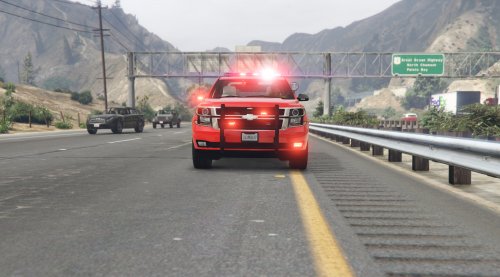 This is a fire department texture pack and red light replacement for the 2015 Tahoe by @Captain14. This pack includes textures for all Los Santos Fire Department stations, Blaine County Fire Department stations, and EMS units for both departments. It also includes textures to convert the lighting from red/blue to all red on the SUV. Check out this video by @STEVETHEGAMER featuring this texture pack:
- 10 comments
- 2 reviews
-
-

- 7
-
-
Yep, I'm still working to resolve those issues with the peds not staying where I want them. It's going to take some time to get it right, but I am definitely working on making the ped behavior and animation more realistic, and to eliminate the instapopping.
-
The default backup.xml doesn't support changing weapons. My custom backup mod lets you change weapons, but often LSPDFR's AI will just take over the peds and change their weapons to its defaults anyways.
-
MissingMethodException means you're probably either missing a dependency or have the wrong version. Did you download the newest version of RPH and the newest version of whatever mod you're trying to use?
-
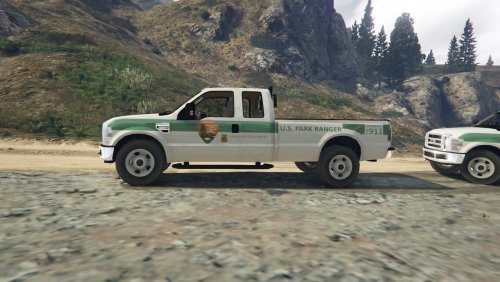 You clearly took the Law Enforcement text, possibly the U.S. Park Ranger text, and the NPS LEO badge shield from my Park Ranger texture pack. Please don't re-use other people's texture components without getting permission. And at the very least, if you're going to rip something from somebody else's textures, you should give them credit. Not cool man. For anybody looking for a cleaner, more realistic skin for this rig, I've added it to my texture pack, with a life-like accurate 4k US Park Ranger texture.
- 9 comments
- 1 review
-
Alright, I've fixed the upload, it now includes the latest version of ParksTools.dll. It also includes a new copy of my custom backup plugin DLL file for people who use that, compiled to work with the newest version of ParksTools.dll. Please give it a try and let me know your feedback!
-
Most likely. It'll crash when trying to place the medic's position by the injured ped. Unfortunately I'm at work and don't have access to my files.
-
Uh oh! Looks like I forgot to include the changes to ParksCommon.dll in the beta 2 download, so things will be broken. I'll upload that as soon as I get home... in like 8 hours. Sorry, all!
-
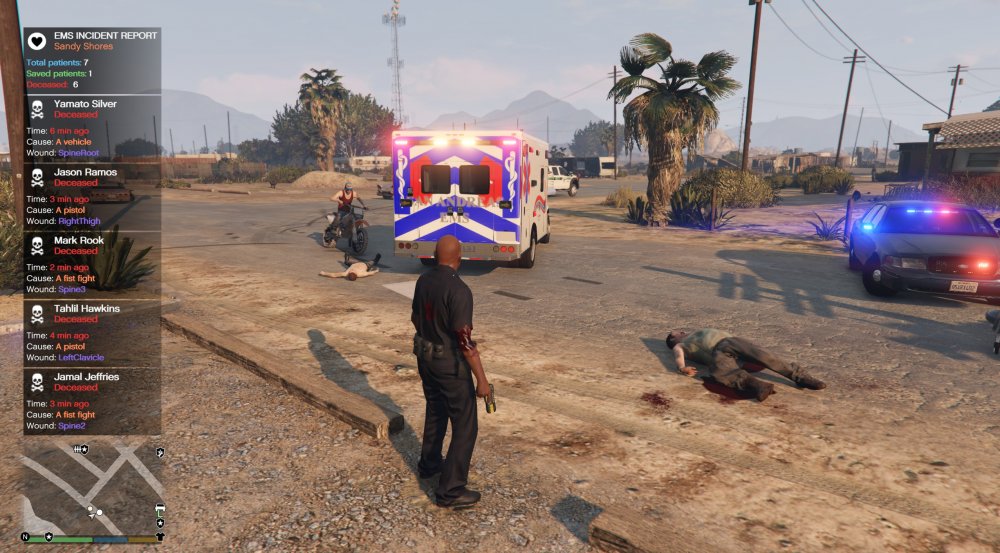
Beta 2 has been released. Those of you helping with the testing, the same download URL I sent you previously will now have the updates version. Please download it there, and check out the info in the new readme file. Thanks everybody for your help! Injury report has been cleaned up quite a bit:
-
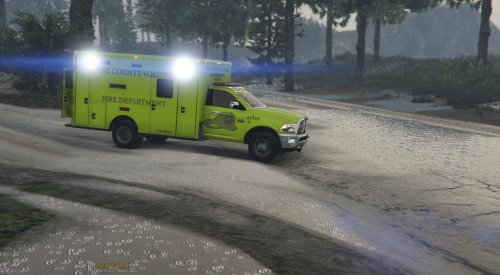 I really like the model of the vehicle. I'm not a fan of the lights though: The lightbar has rotator coronas, but has LED-like flashers that look very dim. Overall the lightbar looks really weird. On the rear lightbar, adjacent amber and red modules illuminate simultaneously, which looks weird. Should swap the outer two red modules so it's every other. The scene lights on the side flash alternately with the emergency lighting. No ambulance works that way; those lights are supposed to illuminate steady as scene lighting when the vehicle is parked with the doors open. It would make sense to tie those to the high beams, like people do with spotlights on police cars. I think it would be better to use whichever sirensetting allows the most lights, and then to remove/hide the blue coronas, like people have done with some models. Or I guess if you release the dev model like you've talked about then somebody might take the opportunity to do that. Would be awesome to see a proper Whelen Liberty or UltraFreedom on this thing! And if somebody can get the scene lights to work tied into the high beams that would amaaazing.
- 23 comments
- 9 reviews
-
-
- 3
-



