




BlueLine Vibes
Members
-
Joined
-
Last visited
Everything posted by BlueLine Vibes
-
Don't need to explore the whole map if you have a trainer installed. I just "reveal entire map" with Simple trainer and save settings.
-
Also, try and turn off Antivirus software. Another thing you can try as this happens to me occasionally is to disable "ingame-Overlay" if you have Geforce Experience installed. Did you replace any vehicle files recently, but more importantly did you replace a vehicle.meta file?
-
Yep, better to start off with a clean vehicle.meta file first. See if you can play. Which handling ID were you using? Could be the way you spelled it or if you left a space in there also etc.
-
I think this is a trainer issue. If you have Simple Trainer go into Options > I think it may be on the second page with arrow over. "Ignore Player" might be enabled. It is on one of those pages.
-
Could be a full screen result menu with Stop the Ped. You could try and edit the StopThePed config file and change it to this and see if it continues with the freezing issue. // This may force search result to be displayed always in full screen even if you're not using search warrant (yes/no) ForceSearchResultFullScreen=no
-
Already there
-
.thumb.png.31a1a0f7456f4ec57f4c85ba155ee3b7.png) I was just about to say "This mod is useless because we have trainers" However, I did the right thing and read your description. I am a streamer and I must admit, the crashes and then loading back into the game, getting everything set up the way I needed it is a huge hassle while everyone just sits and waits on stream. This plugins sounds great. Gonna give it a try and I will report back with a review. Great idea.
I was just about to say "This mod is useless because we have trainers" However, I did the right thing and read your description. I am a streamer and I must admit, the crashes and then loading back into the game, getting everything set up the way I needed it is a huge hassle while everyone just sits and waits on stream. This plugins sounds great. Gonna give it a try and I will report back with a review. Great idea. -
Could be an outdated version of LSPDFR. You have 0.4.6 installed Did you use to play LSPDFR a few months back by chance? I would say update your game to LSPDFR 0.4.8 however, a lot of the plugins may not be compatible at this very minute. Tomorrow may be a different story. I think they are uploading 0.4.7 as I type this and it will be approved shortly and you can try updating to that one if you wish. But 0.4.6 is not compatible with GTA 5 v2060.1
-
Looks good
-
Not just yet. Go to your plugins > LSPDFR folder. Rename that LSPDFR folder to something like LSPDFR-copy now try. If it works now, it is not your mods folder but more like a plugin issue. Meaning that you will have to install the plugins in that folder one by one to see if there is an issue. Just troubleshooting 101. Also you might try temporarily disabling your AV software and perhaps firewall just for now if the above doesn't work.
-
Could be a bad vehicle.meta file perhaps. Easiest way to trouble shoot this is to rename your mods folder to something like mods-copy now try. If it loads, there is an issue inside the mods folder. Could be that vehicle.meta file or maybe one of the vehicles. Replace the meta file with the original one outside the mods folder and try that first.
-
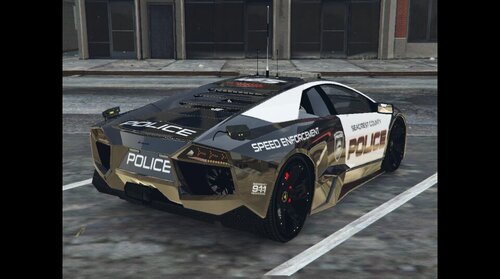 Vehicle meta file included with this download needs a bit of work. For example you can't pull over any vehicles. You will need to add this text to <flags> FLAG_LAW_ENFORCEMENT FLAG_EMERGENCY_SERVICE To make this happen.
- 21 comments
- 4 reviews
-
-

- 1
-
-
.thumb.png.a9a86a0a1d49b6667adb4acaec45339e.png) A lot of comments in here about Non-ELS Yes you can mute the siren with lights still on - basic function of LSPDFR Yes you can have a few siren options while still using a Non-ELS vehicle Yes you can have ELS lights show up on Rockstar Editor - I do it all the time on my videos No you not need a script to turn off sirens, with lights still on. However, I do admit the script might come in useful for when you get back into the car with sirens going off. BTW, nice pack of Non-ELS vehicles here.
A lot of comments in here about Non-ELS Yes you can mute the siren with lights still on - basic function of LSPDFR Yes you can have a few siren options while still using a Non-ELS vehicle Yes you can have ELS lights show up on Rockstar Editor - I do it all the time on my videos No you not need a script to turn off sirens, with lights still on. However, I do admit the script might come in useful for when you get back into the car with sirens going off. BTW, nice pack of Non-ELS vehicles here. -
-
 Sorry that I never left a review for this fantastic mod Love the uniforms, author spent a lot of time on this and it shows. 5/5
- 79 comments
- 27 reviews
-
 Definitely the best type of radiance mod I have installed. If you want your police lights bright during the day and night, then you want this visual setting! BTW, You can add this on top of other visual mods to make it an even better game play experience.
- 109 comments
- 20 reviews
-
-
- 1
-
-
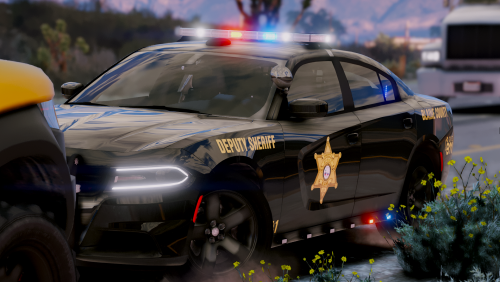 Love this vehicle. Drives very well as well. Hand are not quit on the wheel but overall the vehicle lighting is really great. Great job @StraightGlitcheZ
- 25 comments
- 3 reviews
-
-
- 2
-
-
 WOW not one single response from the community yet? MatrixNative, sure you figured this out already but just encase you are still having issues. The hidden text is from Grammar Police you have installed. You really only get that when you forceduty or (go on duty) If you need the PLD text above the grammar police text use the settings config below // LUXART PLAYER LOCATION DISPLAY by Lt.Caine (Ver. 4.00) [ GENERAL ] LocTextPosX = 320 LocTextPosY = 980 LocTextPosX_RadarLrg = 470 LocTextPosY_RadarLrg = 1035 LocTextSizeMult = 1.1 DisplayGameTime = true AllowRadarSizeToggle = true AllowControllerUse = false [ MULTIPLAYER ] ShowPlayerObituaries = false DisplayPlayerBlips = false DisplayTeamBlipsOnly = false
- 220 comments
- 55 reviews
-
-
- 4
-
-
Might be from SceneManager plugin. Try uninstalling that and see what happens. That is the only thing I can think of that is related to CrimesManager error.
-
.thumb.jpg.37cdb54de83d6dee03b6b15e76b2f5fd.jpg) Good to see new callout packs. Off to a good start. Just need to change either the text speed for the conversations at bottom of screen. Hard to read off what is happening. Possibly a button prompt to get to next message. Otherwise this would get a 5 star review. Keep up the good work and hope to see more from you in the future.
Good to see new callout packs. Off to a good start. Just need to change either the text speed for the conversations at bottom of screen. Hard to read off what is happening. Possibly a button prompt to get to next message. Otherwise this would get a 5 star review. Keep up the good work and hope to see more from you in the future.- 183 comments
- 24 reviews
-
-
- 4
-
-
Great start to this callout pack. Just a bit of feedback for @YobB1n If you can make the text for the callout at the bottom of the screen go a bit slower that would be great. Or better yet, if you can make it a button function to where we are prompted to press T or Y for example to interact and have us press the button go to the next sentence would be better. Thanks for the new content. Video will release soon on my channel and I will leave a review for you.
- 183 comments
- 24 reviews
-
-
- 2
-
-
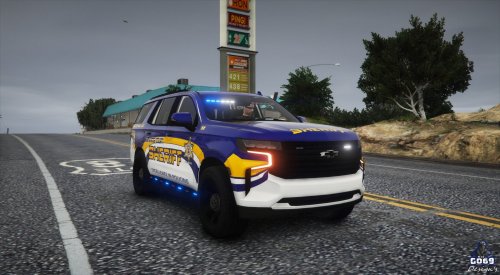 Well this deserves more reviews for sure. First the livery is fantastic. Love the blue and the yellow. Really makes the colors pop and with the proper uniform it is even better! Thank you @Big G 069 for providing all of the vehicle links and having the proper named png files. A lot of modders do not do that anymore. Will be streaming with this pack and including these in some episodes on the YouTube channel. 5/5
- 22 comments
- 3 reviews
-
Thanks sounds good. I will be streaming this vehicle skins by the way in tonight's stream at 7 pm CST if you want to stop by 😉
- 22 comments
- 3 reviews
-
-
- 1
-
-
Looks great @Big G 069 Side question: Which uniform are you wearing that is in yellow on one of the pics?
- 22 comments
- 3 reviews
-
-
- 1
-
-
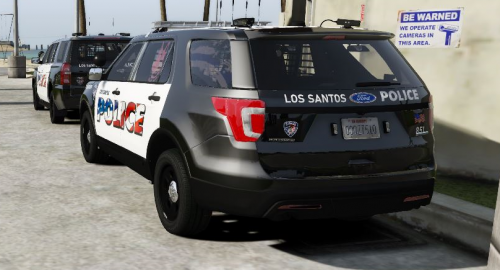 Livery looks great. It just gets exhausting trying to find all the vehicle links and such.

.thumb.png.31a1a0f7456f4ec57f4c85ba155ee3b7.png)

.thumb.png.a9a86a0a1d49b6667adb4acaec45339e.png)


.thumb.jpg.37cdb54de83d6dee03b6b15e76b2f5fd.jpg)
