BlueLine Vibes
Insiders
-
Joined
-
Last visited
Everything posted by BlueLine Vibes
-
Hey there CJ, Nothing much to add more than what others have already stated. Here is what I did to get things smooth for me. Personally I just deleted the mods folder completely. I started with a fresh mods folder. I copied over the update folder to the mods folder. Patchday24ng is working great for vehicle install btw. Haven't noticed much of other problems thus far, but I will be on the look out for it and message you on discord if I need to.
-
Shouldn't really need the auto one. Take all contents in the download (minus the license folder as you don't need to install that) and throw it in the main game directory. Done
-
Just curious here. Do people just book mark the forums to come to post? Or do they just avoid the front page that has the HUGE ASS BANNER that says it needs to update?
-
Yep as per the large ass Banner that is about as big as the page itself on the front of this website. LSPDFR needs to update.
-
Best to stay in offline only mode on steam, otherwise it will continue to update the game.
-
This is how we all learn about all of this stuff. The GTA 5 update was planned for release. So if you wanted to, you could have selected the option to not load Steam on startup. Then when started steam and it tries to update, just click off that to close it out and then go to Steam and then to "offline only" mode. This will work for awhile, but eventually Social Club will want to connect again. At that point you can maybe try rebooting PC and see if you can go back into offline mode. I tell you this, because Rockstar will continue to update GTA 5 and milk their online baby for several more years. Use this as a learning experience for next time.
-
Stop the Ped feature is double tap E key near ped. That will open a questioning menu that you can arrest someone. Left Control + T will grab the ped. Yes only T will cause you to maybe pistol whip someone so use the modifier key. If you hold E key for about 2 seconds, you will interact with them again, rather it be with LSPDFR or simply getting their attention again with STP If they are in active pursuit where your map is flashing, the only way to get them to respond is by gunpoint/taser point and either holding down E key or double tapping E key to arrest. Remember to change your interact key on traffic stops in the keys.ini file in your lspdfr folder in main game directory. If you need more info on Stop the Ped, you can find my Stop the Ped tutorial. It is long but I have everything you need to know by timestamps in the description and pinned comment on that video on my YouTube channel.
-
Hard question to answer to be honest. I know Script Hook V has been updated. This is the one that usually takes 3-14 days to update, but Alexander Blade was pretty fast on this one. RagePluginHook is updated as well and I know RPH and G17 Media is usually pretty fast with the updates. So look for LSPDFR update pretty soon.
-
I know this sounds silly, but maybe double check that you haven't got a waypoint set to your map somewhere. If you have a waypoint anywhere on the map, all backup will only go to that waypoint. Includes Fire/EMS if I am not mistaken. If that doesn't work, take out police smart radio (getting rather out dated to be honest) reinstall STP and UB again. If that doesn't work, perhaps check your trainer in your Simple Trainer or other trainer if you have it and make sure "Police Ignore Player" is not selected as sometimes the police back up along with Fire/EMS will sit on highways. Have you messed with Default Regions of Ultimate Back up by chance if all this fails?
-
Doesn't take long for G17 media to update LSPDFR. It will come soon enough. Perhaps by tomorrow or the next few days.
-
Aye looks like a Win 10 type of setting. You can try white listing the entire GTA folder and that should work as well. Also, you will need LSPDFR to update before you can play with the new Script Hook and RagePluginHook
-
Make the banner animated with font size 64 please 😉
-
Well SH and RPH is udpated now. Just need to wait for LSPDFR to update. Should be soon.
-
Script Hook V is updated, RPH is updated. Still need to wait for LSPDFR to update.
-
-
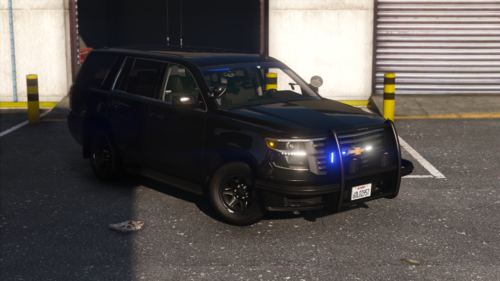 No reason to say "my bad" there is no pics of red in there so it is a valid question.
 -
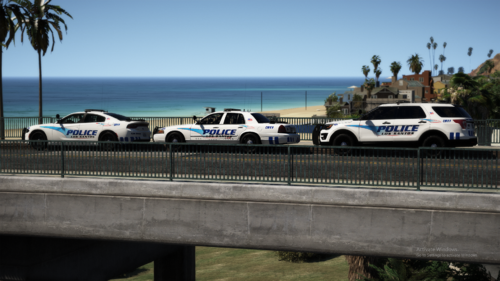 Enjoyed this pack ELS on point Interior's look great as well Drive very well Love the liveries and the Extra Ghost skins
- 66 comments
- 18 reviews
-
-
Not one time have I heard anything about updating it through OpenIV?? I guess this is a new thing?
-
Can you please post back if it is corrected. People find these threads on Google and I am trying to trouble shoot this issue for a member. Yet this was posted months ago. Any luck?
-
You need to change the TRAFFIC_INTERACT in the lspdfr folder under keybinds.ini
-
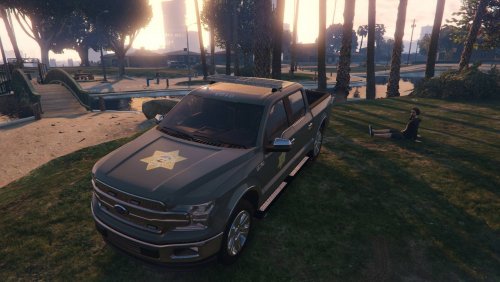 Do you have a link for the vehicle?
 -
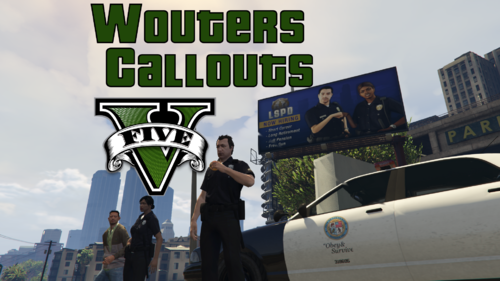 First I would like to thank you for making an interesting callout pack. It is good to see some new packs that are using more imagination and that are different from others and not so repetitive. I do not want to leave a negative review as it seems to hurt the upload and it leave a negative connotation so that others may not want to even try it. However, I do want to point out issues with the calls below and I hope that you can address these. Fleeing suspect I tried this multiple times on a Live stream on my YouTube channel and after 3 times, I could not find the suspect. I get the description of the suspect which is good, but could not locate suspect after driving around for 15 minutes each time. Had to code 4 the call all 3 times. No suspect running from the area and the radius of the suspect location never changed. Always possible that suspect could have fled the area, but then again the map is massive so no way to telling. HEMS Assistance Love this concept. The helicopter had a bit of an issue landing but all 3 times of trying to callout, the heli did manage to land without issues or crash landing which is great. However, once the medics get into the vehicle and you approach the location marked on the map, all 3 times the callout just does Code 4 and the medics just walk off. Is this intended? Would be great to see the medics work on a scene or perhaps get into a ambulance, but they just appear to walk off. Illegal protest This callout seems to work most of the time. Haven't had big issues. However, would be good to see maybe when you press NumPad 5 to see some text on the screen "Police please disperse" or something of that nature, maybe have them walk off and a few stay and be defiant which is fine as well. Skinny Dipping Actually this callout turned out pretty funny on the Live Stream and it is different which is great. Big plus that I didn't get demonetized. So thumbs up. 😉 Suicide attempt This needs some work. Once you arrive on scene, there are no other police vehicles or anything on scene. Not a big deal as sometimes you are the first on scene. However, the text starts immediately before you even get out of the car. The JUMPER is already talking from 10 stories up and I barely have even got out of my car and didn't even have time to read the first sentence then he/she is onto the 3rd sentence. The menu suggestion of talking to the jumper went off the screen too fast as I was trying to read what the jumper was saying. I can see how maybe a menu would be nice for when you arrive on scene. Give the officer responding time to set up a scene with cones, road blocks, police tape perhaps and then activate the conversation menu. Would be much cleaner, but the call shows promise. Trespassing Did not get to this particular call so no thoughts as of now. Suspicious parked vehicle I like calls like this. Simple police work sometimes. Robbery alarm Fun callout. However, the alarm does not shut off at all. Would be cool to talk to the suspect inside which would add uniqueness to the call. Just something to think about. Those are my thoughts so far. Like I said it is off to a great start and I hope to see more work from you in the future.
 -
 This does not work well with Visual V, sorry. The light blooms around the street lights are unbearably bright. Also your Uninstaller does NOT work.
- 67 comments
- 10 reviews
-
-

- 1
-
-
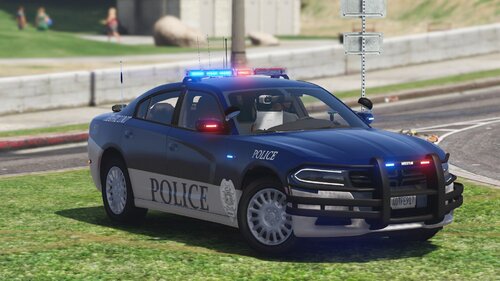 Love the skin pack. Colors look really well and fits the vehicles perfect. 5/5
- 18 comments
- 2 reviews
-
-

- 1
-