BlueLine Vibes
Insiders
-
Joined
-
Last visited
Everything posted by BlueLine Vibes
-
 I do not believe there is a function yet to search peds with UB that I am aware of. However, Beljoijo does seem to update his work about every 2 weeks 😆 You can change the vest in the ini file through Open IV if you wish. Just go to the pathway you installed the K9 mod to Grand Theft Auto V\mods\x64e.rpf\models\cdimages\streamedpeds_a_c.rpf\ Open the a_c_shepherd folder and Find the file named below. It is the 'b' one accs_diff_000_b_uni.ytd Drag that file into a folder and just make 7 additional copies, that is what I did. Probably wasn't needed, but I did it anyways. Hope that helps.
- 134 comments
- 33 reviews
-
Not the x64 folder. Need to read the readme carefully. Goes into the x64e.rpf Grand Theft Auto V\mods\x64e.rpf\models\cdimages\streamedpeds_a_c.rpf\ Wrong folder. Needs to go to the x64e.rpf
- 134 comments
- 33 reviews
-
-
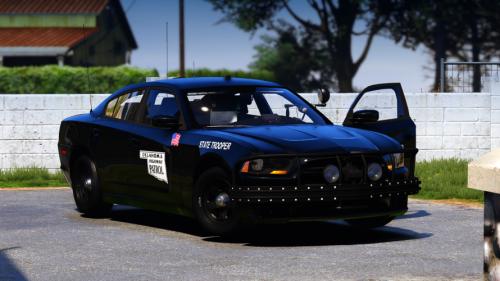 Great looking car. Love the rambar! ELS lighting point Interior is great Livery is beast mode
- 6 comments
- 6 reviews
-
-

- 1
-
-
 Personally I would love to see this get updated. It is very nice to be able to use this as it feels more like a CAD system and you can also manipulate the image to make it even look better. The flickering and being unstable steered me away from this over to Compulite now.
- 1,743 comments
- 172 reviews
-
-
- 6
-
-
I know the update screwed a lot of things up for most people. A lot of us had to create a new mods folder. As the update also screwed over the visualsettings.dat file and dlclist. You could try perhaps making a brand new mods folder. Reinstall a fresh visualsettings.dat (I recommend a better radiance, as I have found it to be good on both day and night cycles) Install into Patchday22ng see if that helps. Downloading GTA 5 all over again sucks, but I also had to do this last week trying to figure out my texture loss situation.
-
-
Ya the XML files should be fine. Have tried to reinstall ELS to make sure that the update didn't flub up something? Also describe what is happening with the lights. Like they are not flashing at all? Which vehicles are currently testing it out on?
-
Gotcha, For you just make sure the directory looks like this: D:\SteamLibrary\steamapps\common\Grand Theft Auto V Try to launch in Single Player mode first. Make sure you can get into the game properly (connecting to social club, spawn into story mode walk around etc.) Reinstall Script Hook, LSPDFR which I think has the latest Ragehook in there of 1.81 No other plugins installed and launch the game. Report back 😉
-
Ok Have you installed the XML files correctly into the ELS folder pack_default
-
Thanks!
-
Is that the clean directory? Not seeing Rage or lspdfr etc. Also I see the pathway is incorrect. Is this just a copy of your clean version?
-
Move vehicles to Patchday22ng I found that patchday23ng to be an issue with spawning in new cars.
-
A lot of those plugins and callouts are a bit outdated and they will give you warning messages. Most work okay but some cause issues still. Chill callouts is one of those problems that causes crashing issues I found as well. Personally I like to use Stop The Ped as it does everything Traffic Police does and Arrest Manager combined, but hey that is just me. Also, just a suggestion, when asking a question on the forums you might get a faster response if you do a Google Translate from Russian To English.
-
You trying to get to Rage Menu? Double click RagePluginHook.exe and hold SHIFT key for 3-5 seconds.
-
Few things you can try First Reinstall your EUP Menu and your EUP OIV. I found that after the update, I had to reinstall both for whatever reason. Make sure you have EUP menu ticked off to lead at start up in Rage Menu. Reason I say this is that I see an error with EUP and the outfits for the peds are giving a large variety of errors. Secondly if all that fails try this. Take your mods folder and remame it to mods-copy Try the game. If it is working without errors, you probably have more outdated or corrupt data in the mods folder and you need to create a new one. I ultimately had to do this. It was a pain in the ass, but better than having to re-download an entire game again.
-
Yep needs to go into Patchday8ng instead. Like this Grand Theft Auto V\mods\update\x64\dlcpacks\patchday8ng\dlc.rpf\x64\models\cdimages\weapons.rpf The modder of the Max Payne Glock mod was only going on information that he had when he made the mod and that was 5 years ago.
-
Did you update Script Hook V? Also list out which plugins you have installed besides LSPDFR.
-
Please attach your RagePluginHook log file that is found under your RagePluginHook.exe file in your Grand Theft Auto V main game directory. Attach it like a spoiler. That little eye icon in the comment section. Easier to help when we can see what is going on in your game.
-
I remember when I use to play with Albos mods, I would occasionally get some frame loss. Just curious, did you not want to try out Stop the Ped? Does everything Arrest Manager does and Traffic Policer for the most part. Also Assorted callouts has several callout bugs as well.
-
Never seen a Rage Log look this small before. Usually they are large. Do you have Script Hook up to date? If you have Geforce Experience for your Graphics card, try turning In game overlay off. Also disable AV software to make sure it not trying to block things in the background. last but not least, try attaching your entire RagePluginHook log found below your RagePluginHook.exe in the comments under "Spoiler"
-
First do you have a mods folder? If so, rename your mods folder to something like mods-copy Did it work? If so, your mods folder more than likely has a lot of issues. Best advice is to tell you to delete out your mods folder and make a new one. Did not work? Are you using EUP? If so, you need to reinstall it. I am seeing issues with what appears to be EUP. Another thing you can try is if you have a folder inside your Plugins folder called LSPDFR, you can rename this folder to LSPDFR-copy. See if you can get into the game. If it now works, you have outdated plugins or other plugins conflicts and it is best to reinstall these one by one until you can find the issue. Good luck.
-
Doubt this has anything to do with your problem. However, did you have EUP installed earlier? If so, looks like it is throwing up errors. You need to reinstall EUP and probably along with a fresh install of EUP menu as well. Not 100% on this, but I see a lot of ped issues. Maybe try the following: Delete out your startup.rphs file that is found inside your Grand Theft Auto V folder. Click on the uninstall feature for LSPDFR in your main directory. Reinstall LSPDFR 0.4.7 latest build. Some people including myself were reporting errors and bugs with the latest update and sometimes the startup.rphs file creates multiple versions of lspdfr and other plugins at the same time. Report back if problem still persist.
-
-
Looks hella nice. Aggressive! FYI: Might need to change the ELS file name to police.xml Mainly for people that are new here.
- 6 comments
- 6 reviews
-
-
- 2
-