


A Stranger
Members
-
Joined
-
Last visited
Everything posted by A Stranger
-
You can only have them spawn by using scripts or bypasses. Pretty sure the latest version of SimpleTrainer used to have a fix for that. I am unsure, however, if that still works. I did use the popgroups gen you linked a while ago and it worked fine. Just fyi.
-
If you have ELS installed, you need to be in Stage 3 (J 3x pressed) in order for them to stop.
-
It's "A" on a XBOX Controller by default. If you did not change it in your keys.ini, it's going to be "A" despite that message. I've gotten that myself too. For ELS you need to be in Stage 3 to pull them over.
-
If you installed enbseries into your Grand Theft Auto V folder, you have to launch RagePluginHook separately. 1. Launch Grand Theft Auto V without RPH. 2. Load into the Singleplayer story mode. 3. Once successfully loaded into your character, tab out of the game (ALT+TAB). 4. Launch RagePluginHook and wait for it to successfully hook. 5. Tab back in.
-
RDE is a mess and it's been causing issues for a long time. It was also updated last for version 1180, in 2017. I recommend removing it.
-
If you have a mods folder; rename it to _mods. If you don't have one; verify your game files. Also; if you use LML you will have to disable it. Rename the LML folder to _LML and vfs.dll to _vfs.dll.
-
I see you have custom vehicles installed. Can you either send a link to the pack or show the vehicle files in OpenIV with their sizes? It they are high-poly cars (Bigger than 12-16MB) they can cause texture loss. Especially 2-4k liveries and med-pc's have this issue. You can downscale the textures with programs like Paint, GIMP or PhotoShop.
-
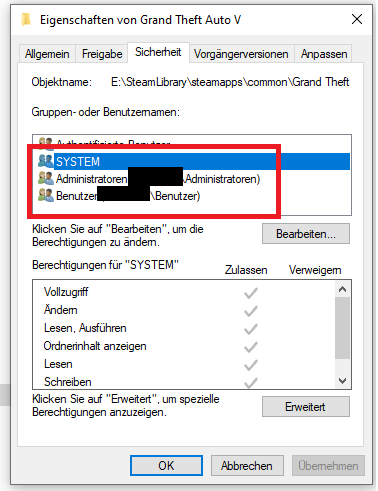
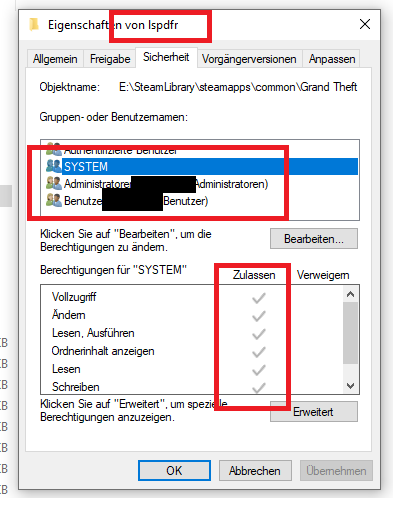
1. Add your GTA V folder to your Antivirus exceptions. If you do not know how for you Antivirus, please Google. 2. Make sure your User, Admin and SYSTEM have all permissions for 1. Your GTA V folder. 2. Your LSPDFR folder in /GTAV. Right click the the GTA V folder and then later the LSPDFR folder -> Properties -> Security. It should look as followed: <- The GTA V folder permissions. Make sure SYSTEM, Admin & your user have them all checked. And for the GTAV/LSPDFR folder:
-
. 🙂 Here you go
-
BetterEMS should still work. A simple reinstall will help.
-
Did you cuff / arrest the suspect you shot at?
-
Seems like it was the BankRobbery Callout that crashed your game. Remove in /Plugins/LSPDFR: (Wilderness Callouts & RedCallouts excluded) - AttemptedCrimeCallouts; - BOLO_Callouts; - FirstCallouts; - MoreRobberies; - PeterUCallouts; - RegularCallouts; - RichsPoliceEnhancements; - terrcall; - Typical Callouts; - WoutersCalloutsV;
-
It's the wrong file. You need to send your RagePluginHook.log. It's a text file, usually located two files below your RagePluginHook.exe.
-
You need to move the folder via Steam, not just copy it over in Explorer. The GTA V folder is set in your registry key, which you will need to change, then. But, since you are using the Steam version, Steam will revert it, unless you do it VIA Steam itself. So, if you haven't yet, please move the folder via Steam to where ever you want it to be. (Right click GTA V in Steam -> Properties -> Local Files -> Move Game folder) You need to have a second Steam library set up in order for this to work. Only then can you run RagePluginHook from the original folder.
-
1. You are missing DarkmyreAPI for his plugins. (LSPDFR Comes Alive) I linked it in "DarkmyreAPI" fr you. 2. You have a bunch of outdated LSPD:FR plugins installed. Remove the following in /Plugins/LSPDFR: - AgencyCallouts - Arrest Manager - Assorted Callouts - Code Red Callouts - Federal Callouts - red Callouts - PeterU callouts And since you don't have PoliceSmartRadio, you should also remove Traffic Policer. Albo's plugins are outdated by now. Then, please do this: Change the plugin timeout threshold from 10000 to 60000 in the RagePluginHook.ini file and change Main.PreloadAllModel in GTAV/LSPDFR -> LSPDFR.ini to false. And, since you are using CoastalCallouts + LML, please make sure you installed those: Gameconfig; choose 1x Traffic 1x Peds or 1.5x: https://www.gta5-mods.com/misc/gta-5-gameconfig-300-cars Heap Limit Adjuster: https://www.gta5-mods.com/tools/heap-limit-adjuster-600-mb-of-heap Packfile Limit Adjuster: https://www.gta5-mods.com/tools/packfile-limit-adjuster
-
Can you send a screenshot? Also, you should use LSPD:FR manual, not the setup.
-
Update LSPD:FR with the manual version. Then, rename mods to _mods.
-
If you installed EUP, make sure you also install the EUP LSPD:FR configs. 🙂
-
Are you using Bejo's plugins to arrest people? Because it only counts the vanilla LSPD:FR arrests & such.
-
It's missing LSPDFR+. It still requires Albo's plugins, so it's better to remove PeterU callouts. Not reinstall it. 🙂
-
1. Update LSPD:FR. 2. Open commandline.txt in your GTA main folder, delete everything in it, then save & close. 3. Set your permissions for GTA V &LSPDFR. If you do not know how, go to the official RPH FAQ and look for "threw an exception". Do what it says.
-
That log is months old. Please send the RagePluginHook.log from your GTA V folder, not /Logs.
-
And you're loading it up after you are successfully loaded in?
-
Does it also crash with just GTA V?
-
RPH and enbseries can't hook at the same time. In order to fix it; or play ENB / your visual mod with RagePluginHook do the following: 1. Launch GTA without RPH. 2. Load into Singleplayer. 3. Once fully loaded, tab out. 4. Launch RagePluginHook.


