


A Stranger
Members
-
Joined
-
Last visited
Everything posted by A Stranger
-
Did you rename or move your GTA V folder by any chance? If so, it has to be run from the original name & location. If you didn't, try the following: 1. Disable GeForce Experience Overlay. 2. Disable Windows Game Bar if necessary. 3. Remove Rivatuner if existent. 4. Check for your permissions. Your user has to own the GTA V folder.
-
It's a text file in your GTA V main folder. "RagePluginHook.log."
-
Wrong file. Please send your RagePluginHook.log, found in your GTA V main folder.
-
Send your RagePluginHook.log.
-
You have 0.47 installed.
-
Try renaming your mods folder to _mods.
-
Which is probably what the issue is. Revert your changes & see if it works.
-
Seems to be Grammar Police.
-
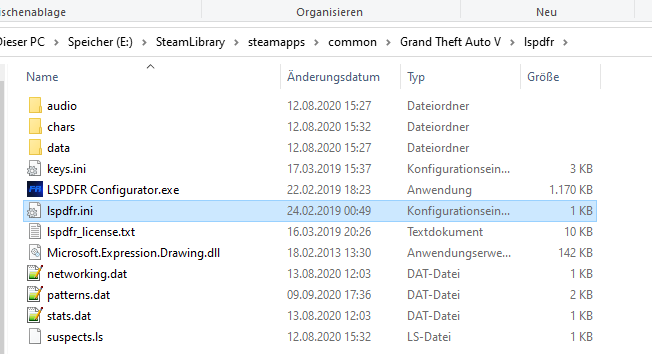
Öffne die RagePluginHook.ini in deinem GTA V Ordner und setzte PluginTimeoutThreshold=10000 auf PluginTimeoutThreshold=60000 Dann gehe nach GTAV/LSPDFR: Öffne die lspdfr.ini und setzte: Main.PreloadAllModels = true auf Main.PreloadAllModels = false
-
You are using Patchday23ng. Use 22ng, like I said.
-
Can you send a screenshot of your Patchday22ng's vehicles.rpf? Including the path?
-
Did you install them into Patchday22ng's vehicles.rpf in your mods folder?
-
-
Yeah, that is perfectly fine. 🙂 Make sure the same thing goes for the /LSPDFR folder.
-
Did you set your folder ownership to your User? Or was it already set?
-
Avast ist nicht wirklich gut. Ich würde empfehlen es zu löschen & Windows Defender + Malwarebytes zu benutzen. 🙂
-
It's not. The original installation location is X:\Program Files\Epic Games\GTAV
-
Remove Traffic Control; Arrest Manager. You should get rid of all of Albo's plugins.
-
That does not look vanilla. Did you move your folder?
-
Rename your mods folder to _mods.
-
Das heißt einfach nur, dass du es bereits installiert hast. Alles gut. Was ist dein Antivirus?
-
RagePluginHook startet nicht mal richtig. Installiere alle diese Links: https://www.microsoft.com/en-us/download/details.aspx?id=48130 http://www.microsoft.com/en-us/download/details.aspx?id=13523 https://www.microsoft.com/en-us/download/details.aspx?id=52685 Wenn alle installiert sind / bereits installiert haben, dann füge deinen GTA V Ordner zu deinen Antivirus Ausnahmen hinzu. Dan nochmal RagePluginHook installieren. (Alle Dateien)
-
First of all, wrong file. 😉 Make sure you have the following links installed after you installed car packs and add-on cars: Gameconfig; choose 1x Traffic 1x Peds or 1.5x: https://www.gta5-mods.com/misc/gta-5-gameconfig-300-cars Heap Limit Adjuster: https://www.gta5-mods.com/tools/heap-limit-adjuster-600-mb-of-heap Packfile Limit Adjuster: https://www.gta5-mods.com/tools/packfile-limit-adjuster
-
This error is caused by failed or wrong permissions. It usually stems from your Antivirus; f.ex Norton, McAfee, AVG etc., but can also be caused by Microsoft Windows Defender. In order to fix this issue, please follow the steps below: The easiest fix would include adding your Grand Theft Auto V folder to your Antivirus exceptions. If you are unsure on how to do so, please Google your Antiviruses exceptions settings. Sometimes your Antivirus is not the problem but your actual user permissions are. In this case, you need to adjust folder ownership & permissions for each other manually. There are multiple ways to do so; First of, right click your Grand Theft Auto V folder → Properties → Security. In there you will see your user, SYSTEM and the Administrator group. For this issue, you will have to change primarily those three permissions. It will look something like the screenshot shown above. Click on SYSTEM, Administrators & your User and make sure they each have ALL checkmarks, as shown above. Once edited, click “Apply”. Now press the “Advanced” button right below the checkmarks list. This list will be presented to you: First of all, look at the very top of the new window. The user name here is blacked out. Please validate that it is YOUR USER at that spot or your laptop’s name. If it is something else, change the Owner via Administrator rights. Press OK, then launch RagePluginHook. Load LSPD:First Response. You’re now good to go. First of all, look at the very top of the new window. The user name here is blacked out. Please validate that it is YOUR USER at that spot or your laptop’s name. If it is something else, change the Owner via Administrator rights. Press OK, then launch RagePluginHook. Load LSPD:First Response. You’re now good to go.
-



